941
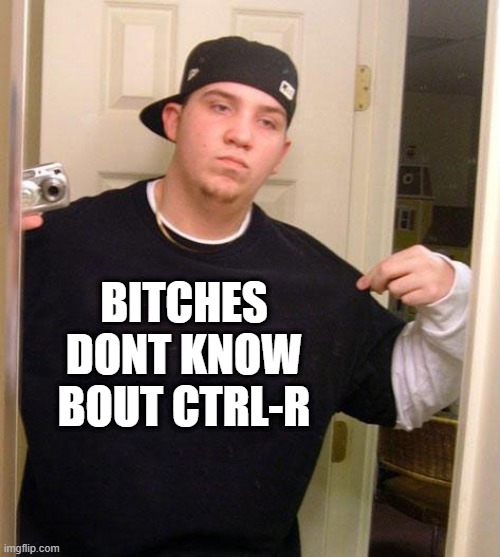
after every cd (thelemmy.club)
top 50 comments
sorted by: hot top new old
[-] wildbus8979@sh.itjust.works 79 points 4 months ago
[-] RollForInitiative@feddit.org 42 points 4 months ago

Yep, thats a good one. Another one, ALT + . inputs the last argument from your last command, pressing it multiple times cycles thorough your past arguments.

[-] wildbus8979@sh.itjust.works 18 points 4 months ago

Nice, 30 years and I didn't know this one. I always use the $! for the last argument.

[-] toynbee@lemmy.world 8 points 4 months ago

I've never heard of $! but we use Macs at work. Alt+. doesn't work so I've been using $_.

[-] softwarist@programming.dev 6 points 4 months ago

โŒฅ+. does the trick for me on MacOS.

[-] toynbee@lemmy.world 2 points 4 months ago

Sorry, I should have been more clear ... When ssh'd into a remote Unix machine from a Mac, it doesn't me. I don't think I've tried locally.

[-] Inkstainthebat@pawb.social 2 points 4 months ago

Wow, that's a new Unicode symbol

[-] softwarist@programming.dev 2 points 4 months ago

You might have fun perusing the Miscellaneous Technical block (I sure did).

load more comments (1 replies)
[-] toynbee@lemmy.world 1 points 4 months ago

Just as a matter of interest, I just tried this and it simply printed โ‰ค on the console. I'm using Terminal and Tahoe 26.2.

[-] softwarist@programming.dev 2 points 4 months ago

I think for Terminal.app you have to enable "Use Option as Meta key"

[-] toynbee@lemmy.world 2 points 4 months ago* (last edited 4 months ago)

I'll try to remember to check it out in the morning, thank you.

edit: This worked. This is amazing. Thank you so much.

[-] ttyybb@lemmy.world 11 points 4 months ago

I don't even want to think about how much effort this has saved me.

[-] ScientifficDoggo@lemmy.zip 9 points 4 months ago

Yeesh, I just learned something new. Thanks!

[-] Syndication@lemmy.today 4 points 4 months ago

I was just about to ask how the hell anyone remembers or knows all these commands, thanks for the info! I am trying to learn Linux and get used to using the Terminal more often.

[-] wildbus8979@sh.itjust.works 3 points 4 months ago

You can also just grep through your .bash_history

load more comments (3 replies)
[-] pinball_wizard@lemmy.zip 34 points 4 months ago

This thread is full of great solutions that I know I will ignore...

[-] bdonvr 26 points 4 months ago

Ctrl-R

Try it. Please, I beg you.

[-] Anafabula@discuss.tchncs.de 16 points 4 months ago

I also recommend Atuin, the better shell history that works with most shells and can replace both up arrow and ctrl-r

[-] Wildmimic@anarchist.nexus 2 points 4 months ago

Thanks for that, thats much more comfortable!

[-] ada@piefed.blahaj.zone 15 points 4 months ago

In addition to ctrl-r, there is also fish! Fish does something similar to Ctrl-R, but in an easier to use way. Start typing a command, and then press the up arrow. It will cycle through your history, but only the history that includes the text you've started typing.

[-] Undearius@lemmy.ca 11 points 4 months ago

This can be enabled in bash by putting these two lines in ~/.inputrc

"\e[A": history-search-backward
"\e[B": history-search-forward
[-] Wildmimic@anarchist.nexus 2 points 4 months ago

My Nobara installation has those commands mapped to pageup/down by default, so it's probably a default in other distros too if anyone wants to try it out without editing first

[-] pedz@lemmy.ca 13 points 4 months ago

To be even more efficient while being lazy, try oh-my-bash. You can start typing the beginning of a command and use arrow up to cycle through only those, instead of the whole history. So if you had a very long mount command and don't want to type it again, type mount and up arrow until it can be found. Not very useful for ls -al but very appreciated on longer commands.

[-] chellomere@lemmy.world 8 points 4 months ago

I personally use fzf to do basically the same thing, I just have to press ctrl-r before I start to type, and it does fuzzy matching to your history and shows more than one alternative at a time

[-] AI_toothbrush@lemmy.zip 11 points 4 months ago

Very useful tip: i have ls aliased to eza which is ls with eyecandy, I have la aliased to eza -a and I have cd aliased to cd && eza which makes navigating folders very easy. I also aliased .. to cd .. for convenience. I know a lot of people are purists about the terminal but i think this is a good ballance between convenience and simplicity. Doesnt do a lot of the cursed stuff ricers like to do.

[-] Anafabula@discuss.tchncs.de 11 points 4 months ago

cd is a zoxide alias for me. If I need to navigate by folder content, I have yazi on y

[-] AI_toothbrush@lemmy.zip 3 points 4 months ago

Yazi is nice but when im navigating shorter directory structures i prefer cd. Question of personal preference as all of this is.

[-] DaforLynx@lemmy.zip 3 points 4 months ago

Love convenient aliases. Would aliasing .. cause "../previous/file" to become " cd ../previous/file" and ruin some commands? I guess not. I also use eza :D

[-] Prunebutt@slrpnk.net 3 points 4 months ago

Only if it's a global alias, I think (those are useful for stuff like alias -g DN=/dev/null)

[-] Wildmimic@anarchist.nexus 2 points 4 months ago

ooooh that's nice! i love this threads, my shell gets soo much nicer! thank you all, you are great!

load more comments (3 replies)
[-] ramenshaman@lemmy.world 10 points 4 months ago* (last edited 4 months ago)

$ sudo apt install sl

Try sl instead of ls, you'll thank me later

[-] lmmarsano@lemmynsfw.com 10 points 4 months ago* (last edited 4 months ago)

Reposted yet again.
meme: bitches dont know bout ctrl-r
As usual, the documentation covers these answers plus much more.

[-] jikt@sh.itjust.works 9 points 4 months ago

history | grep 'ls -la' | sed 's/^[[:space:]]*[0-9]\+[[:space:]]*//' | sh

[-] irelephant@lemmy.dbzer0.com 9 points 4 months ago

cd - will bring you to the last directory you were in.

[-] Electricd@lemmybefree.net 2 points 4 months ago
[-] Gyroplast@pawb.social 7 points 4 months ago

I like the retro text adventure charm of running a verbose ls -la after every cd. It's like entering a new room and reading its description for possible exits and items!

[-] Aneb@lemmy.world 4 points 4 months ago

I aliased cd | ls -la to cd so it lists the folder contents eveytime

[-] tracelr402@piefed.blahaj.zone 2 points 4 months ago

this is the sort of cozy thought I love to encounter on the internet

[-] FauxLiving@lemmy.world 7 points 4 months ago

ls, ctrl+R

Significantly less up arrows

[-] TheTechnician27@lemmy.world 5 points 4 months ago

I just alias ls -lah to lsl.

[-] ratel@mander.xyz 5 points 4 months ago

Yeah lk = ls -larth for me because lk is right next to each other.

[-] gandalf_der_12te@discuss.tchncs.de 5 points 4 months ago* (last edited 4 months ago)

ls -alh try that. -h means human-readable file sizes

[-] Zink@programming.dev 4 points 4 months ago

I leave ls alone and instead do

alias l='ls -latrF'

I do sometimes just want to use the plain version, especially if I'm in a small terminal window for some reason. But I think my brain likes scanning 1D lists more than 2D grids, no matter whether I'm in a terminal or using a graphical file manager.

load more comments (1 replies)
[-] mudkip@lemdro.id 3 points 4 months ago

Pro tip, just do:

alias ls="ls -lah"

[-] HoloPengin@lemmy.world 2 points 4 months ago* (last edited 4 months ago)

Alternatively, use a different alias so it doesn't override the original. "la" and just "l" are pretty common

[-] mlg@lemmy.world 2 points 4 months ago* (last edited 4 months ago)

People talking about history without mentioning the laziest answer is to use an alias, which bash usually has ll = la -la or my personal preference is ll = ls -lAh (list + Everything except . and .. + human readable file size)

[-] nil@piefed.ca 1 points 4 months ago

is yazi allowed?

load more comments
view more: next โ€บ
this post was submitted on 25 Jan 2026
941 points (98.8% liked)

linuxmemes

31614 readers
480 users here now

Hint: :q!


Sister communities:


Community rules (click to expand)

1. Follow the site-wide rules

2. Be civil
  • Understand the difference between a joke and an insult.
  • Do not harrass or attack users for any reason. This includes using blanket terms, like "every user of thing".
  • Don't get baited into back-and-forth insults. We are not animals.
  • Leave remarks of "peasantry" to the PCMR community. If you dislike an OS/service/application, attack the thing you dislike, not the individuals who use it. Some people may not have a choice.
  • Bigotry will not be tolerated.
  • 3. Post Linux-related content
  • Including Unix and BSD.
  • Non-Linux content is acceptable as long as it makes a reference to Linux. For example, the poorly made mockery of sudo in Windows.
  • No porn, no politics, no trolling or ragebaiting.
  • Don't come looking for advice, this is not the right community.
  • 4. No recent reposts
  • Everybody uses Arch btw, can't quit Vim, <loves/tolerates/hates> systemd, and wants to interject for a moment. You can stop now.
  • 5. ๐Ÿ‡ฌ๐Ÿ‡ง Language/ัะทั‹ะบ/Sprache
  • This is primarily an English-speaking community. ๐Ÿ‡ฌ๐Ÿ‡ง๐Ÿ‡ฆ๐Ÿ‡บ๐Ÿ‡บ๐Ÿ‡ธ
  • Comments written in other languages are allowed.
  • The substance of a post should be comprehensible for people who only speak English.
  • Titles and post bodies written in other languages will be allowed, but only as long as the above rule is observed.
  • 6. (NEW!) Regarding public figuresWe all have our opinions, and certain public figures can be divisive. Keep in mind that this is a community for memes and light-hearted fun, not for airing grievances or leveling accusations.
  • Keep discussions polite and free of disparagement.
  • We are never in possession of all of the facts. Defamatory comments will not be tolerated.
  • Discussions that get too heated will be locked and offending comments removed.
  • ย 

    Please report posts and comments that break these rules!


    Important: never execute code or follow advice that you don't understand or can't verify, especially here. The word of the day is credibility. This is a meme community -- even the most helpful comments might just be shitposts that can damage your system. Be aware, be smart, don't remove France.

    founded 3 years ago
    MODERATORS