1
4

.fe-warning { display: none; }

2
13

You can use my_post and my_comment classes to target CSS at your content. For example, here is how to hide the vote score on your own content:

.my_post .score {  
display: none;  
}  

.my_comment .score {  
display: none;  
}  
3
10

This one is pretty simple:

.post_teaser_image_preview a { max-height: unset !important };

4
1

Soon people will be able to upload an animated gif for their profile picture. This could get annoying so I put a special css class on all profiles with an animated gif:

.render_username a .gif {  
  display: none!important;  
}  
5
2
PieFed Custom Themes? (piefed.social)

Has anyone made custom themes for PieFed? Is it even possible in the first place?

6
1
Hide bottom nav bar (piefed.social)
submitted 4 months ago* (last edited 4 months ago) by rimu@piefed.social to c/piefed_css@piefed.social

This is new in v1.2 and might not be something everyone wants. You can hide it with this:

.mobilenav { display: none; }  
7
1
submitted 4 months ago* (last edited 4 months ago) by suff@piefed.social to c/piefed_css@piefed.social

edit: Make button float in feeds, too.
edit2: Fix inconsistency

#side_pane div:nth-child(1) div div div:nth-child(2) a.btn-primary,  
#side_pane div:nth-child(1) div div div:nth-child(1) a.btn-primary {  
  position: fixed;  
  top: 17vh;  
  left: 77vw;  
  max-width: 60pt;  
  overflow: hidden;  
  z-index: 999;  
  box-shadow: 5pt 5pt 30pt black;  
}  
8
1
submitted 6 months ago* (last edited 6 months ago) by rimu@piefed.social to c/piefed_css@piefed.social

NSFW communities are often a mixture of redgifs videos (which play automatically) and <video> elements linking to mp4s which don't. This script evens the playing field so mp4 videos autoplay as well. Hover your mouse over the video and it'll unmute.

document.addEventListener("DOMContentLoaded", () => {  
  const videos = document.querySelectorAll("video");  

  const observer = new IntersectionObserver((entries) => {  
    entries.forEach(entry => {  
      if (entry.isIntersecting) {  
        entry.target.play().catch(err => {  
          console.warn("Autoplay blocked:", err);  
        });  
      } else {  
        entry.target.pause();  
      }  
    });  
  }, { threshold: 0.5 });  

  videos.forEach(video => {  
    video.muted = true; // ensure muted initially  
    observer.observe(video);  

    video.addEventListener("mouseenter", () => {  
      video.muted = false; // unmute on hover  
    });  

    video.addEventListener("mouseleave", () => {  
      video.muted = true; // re-mute when not hovered  
    });  
  });  
});  

Put it into the 'Additional JS' field in /admin/misc.

9
1

This is JS which only admins can use:

if(localStorage.getItem('theme') == null) {  
   localStorage.setItem('theme', 'dark');  
   document.documentElement.setAttribute('data-bs-theme', 'dark')  
}  

Put it into the 'Additional JS' field in /admin/misc.

10
3
Lemmy/old Reddit styles (media.piefed.social)

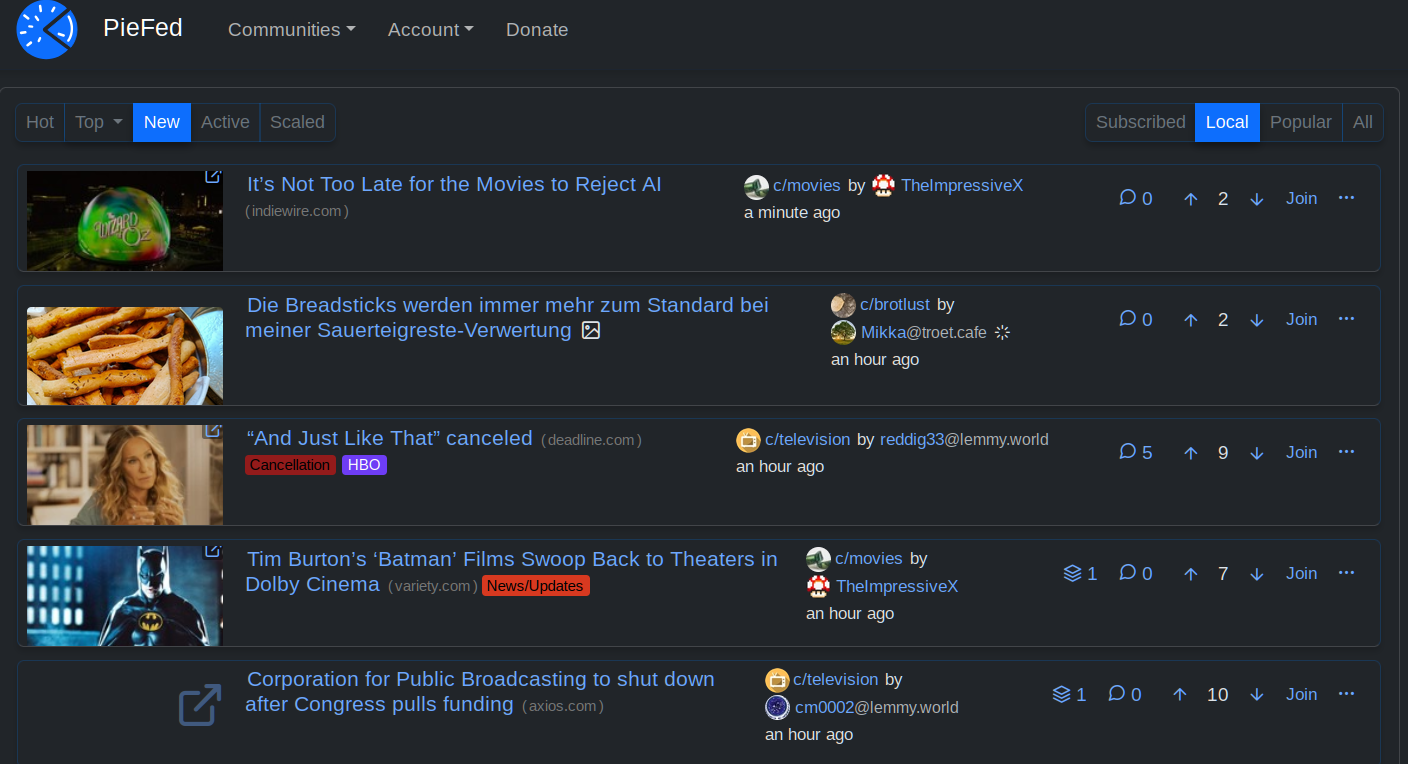
I really like Piefed's pace of development, featureset, and the responsiveness of the dev team, but I find the main UI a little lacking. Thanks to custom CSS I was able to tweak in the following:

  • Use more screen real estate on larger viewports
  • Fix height of posts, regardless of whether there's an image/icon or not
  • Fix size of link images and thumbnails to always be the same
  • Anchor post options buttons to right and fix their order so you can quickly do a visual scan of replies and votes

I'm continually impressed by just how "flex" flexbox really is!

/* Use more width in larger viewports */  
.container-lg, .container-xl, .container-xxl {  
  max-width: 90% !important;  
}  

.col.post_teaser_body {  
  display: flex !important;  
  gap: 1rem !important;  
  align-items: flex-start !important;  
}  

/* Image in left column */  
.post_teaser_image_preview, .col_thumbnail {  
  order: -1 !important;  
  flex-shrink: 0 !important;  
  width: 160px !important;  
  height: 80px !important;  
  overflow: hidden !important;  
}  

/* New styles to anchor post_utilities_bar to the right */  
.post_utilities_bar {  
  display: flex !important;  
  flex-shrink: 0 !important;  
  justify-content: flex-end !important;  
  gap: 0 !important;  
  margin-left: auto !important;  
}  

/* Reorder the child elements */  
.cross_post_button { order: 1 !important; }  
.post_replies_link { order: 2 !important; }  
.voting_buttons_new { order: 3 !important; }  
.post_options_link { order: 4 !important; margin-left: auto !important; }  

/* Create a "virtual" right column using flex direction */  
.post_teaser_body > :not(.post_teaser_image_preview) {  
  flex: 1 !important;  
  min-width: 0 !important;  
  display: flex !important;  
  flex-direction: column !important;  
  gap: 0.3rem !important;  
  width: 100% !important;  
}  

/* Ensure the options dropdown stays properly aligned */  
.post_options_link.pull-right {  
  margin-left: 0 !important;  
}  
11
1

This is consistent with what Lemmy does:

.community_instance {  
    display: inline;  
}  
12
1
Hide reputation icons (piefed.social)
.fe-warning {  
    display: none;  
}  
13
1

A few snippets in case you want to prevent yourself from accidentally voting on things or change your behavior with regard to being swayed by existing public opinion.

You can mix-and-match a few of these if you want to e.g. not allow any voting on posts but allow upvoting on comments or something:

/* Remove upvote and downvote buttons everywhere */  
.downvote_button, .upvote_button {  
  display: none !important;  
}  
/* Remove upvote and downvote buttons from comments */  
.comment_actions .downvote_button, .comment_actions .upvote_button {  
  display: none !important;  
}  
/* Remove upvote and downvote buttons from posts */  
.post_utilities_bar .downvote_button, .post_utilities_bar .upvote_button {  
  display: none !important;  
}  
/* Remove downvote buttons everywhere */  
.downvote_button {  
  display: none !important;  
}  
/* Remove downvote buttons from comments */  
.comment_actions .downvote_button {  
  display: none !important;  
}  
/* Remove downvote buttons from posts */  
.post_utilities_bar .downvote_button {  
  display: none !important;  
}  

And in another category, removing score counts:

/* Remove score displays everywhere */  
.score {  
  display: none !important;  
}  
/* Remove score displays from posts */  
.post_utilities_bar .score {  
  display: none !important;  
}  
/* Remove score displays from comments */  
.comment_actions .score {  
  display: none !important;  
}  
14
1
submitted 7 months ago by sag@piefed.social to c/piefed_css@piefed.social
:root {  
	--bs-border-radius: 0;  
}  

.main_pane {  
	border-radius: 0;  
}  

.card {  
	border: solid 1px #ddd;  
	border-radius: 0;  
}  

.card-header {  
	border-radius: 0;  
}  

.post_list .post_teaser .thumbnail img, .post_teaser_image_preview img {  
	border-radius: 0;  
}  

.main_pane {  
	border-radius: 0;  
}  

.card {  
	border: solid 1px #ddd;  
	border-radius: 0;  
}  

.card-header {  
	border-radius: 0;  
}  

.post_list .post_teaser .thumbnail img, .post_teaser_image_preview img {  
	border-radius: 0;  
}  

15
1

The bars where a little too bright, thus the vote percentages weren't well readable. I changed the background of the bars to a darker grey with this line of css:

.post_poll ul li .vote_bar .vote_score { background-color: #333 }  
16
1
.navbar-brand img { animation: none }  
17
1

This stylesheet uses CSS grids to force a consistent look between link posts and image posts when using the compact layout option. There's probably a better way to accomplish this, but this is quick & dirty & it works.

It probably doesn't play nice with different page layouts triggered at smaller breakpoints.

.col.post_teaser_body {  
  display: grid;  
  grid-template-columns: auto 170px;  
}  

.col.post_teaser_body h3 {  
  grid-column: 1;  
  grid-row: 1;  
}  

.col.post_teaser_body .author {  
  grid-column: 1;  
  grid-row: 2;  
}  

.col.post_teaser_body .post_teaser_image_preview {  
  align-self: end;  
  margin-left: auto;  
  grid-column: 2;  
  grid-row: 1/3;  
  height: 90px;  
  width: 170px;  
  overflow: hidden;  
}  

.col.post_teaser_body .post_teaser_image_preview .post_link {  
  width: 100%;  
}  

.col.post_teaser_body .post_teaser_image_preview .post_link img {  
  object-fit: cover;  
  width: 100%;  
}  

.col.post_teaser_body .col_thumbnail.thumbnail {  
  grid-column: 2;  
  grid-row: 1/3;  
}  

.col.post_teaser_body .post_utilities_bar {  
  grid-row: 3;  
  grid-column: 1/3;  
}  
18
1

In your settings at https://piefed.social/user/settings there is a field 'Additional CSS' where you can put snippets of CSS code.

It is best to only use CSS you understand from sources you trust so this community should be the place.

19
1
Hide scores (piefed.social)
.score {  
display: none;  
}  

PieFed CSS

1065 readers
1 users here now

Share CSS snippets that make your PieFed experience a wee bit different.

In your settings at https://your-instance.com/user/settings there is a field 'Additional CSS' where you can put snippets of CSS code.

founded 8 months ago
MODERATORS