top 50 comments

sorted by: hot top controversial new old
[–] 146 points 9 months ago (2 children)

Stop trying to use your computer and get back to consuming damn it. Why are users so difficult!

  • source
  • hideshow 2 child comments
  • [–] 103 points 9 months ago* (last edited 9 months ago) (6 children)

    I remember how the startmenu didnt suck on windows 7 and just worked. Good times. That was also the last time where you could find most of the options in one place.

    Like in 2015 i was weirded out how a multibillion dollar company wasnt able to just make a new app for settings with feature parity to the old thing for their major new OS release. 10 years later: lmao.

  • source
  • hideshow 6 child comments
  • [–] 30 points 9 months ago (4 children)

    Even the windows 10 startmenu didn't suck if you took the time to customize it - The Metro tiles were nice, with grouping and folders making everything pretty neat and reducing the need for the standard program list to a minimum; I made mine 3 columns wide, which made pretty much every app i regularly needed available on the fly, using horizontal space that's much more available than vertical one.

  • source
  • parent
  • hideshow 4 child comments
  • load more comments (1 reply)
  • load more comments (1 reply)
    [–] 83 points 9 months ago (8 children)

    They can do whatever they want, it'll be without me.

  • source
  • hideshow 8 child comments
  • [–] 42 points 9 months ago (7 children)

    I'm not saying that my Linux installation was super easy to set up, but once set up, I've had fewer problems than Windows.

  • source
  • parent
  • hideshow 7 child comments
  • load more comments (4 replies)
  • [–] 70 points 9 months ago (27 children)

    Unrelated to that exact image but I'm gonna rant about other windows shit because I feel like it.

    Windows decided my page file needed to be 80 GB. I do not want it to be 90 GB. I go to the start menu and search up "page file" to see if there's a settings menu. First result is a random file in an application's directory that can't be opened/displayed by any program on my PC, then a list of other unrelated files.

    So I open Control Panel, hoping to find it where I did before, and I click on System. What do you know, that menu no longer exists, and redirects to Windows Settings. Where do I go from here? Maybe the giant Installed RAM section because the page file is just a (overly simplified) method of extending your memory to your disk? No, of course not, that menu's not actually a menu, it's just a stat counter.

    Instead, I have to go to Device Specifications, then the section titled Related links, then click Advanced system settings. Oh whaddaya know? Now I'm in the settings menu that used to be behind the original System option in Control Panel!

    Now I'm in the Advanced tab of that menu. But where do I go from here? That's right, Performance Options, and then another Advanced tab!!!

    Then I have to click the Change button, where Windows has... conveniently enabled System managed size so it could choose to set my page file to 80 GB.

    I edit, it, hit Ok, have to hit Apply in the other menu too, have to close out the no-longer-needed Settings and Control Panel windows that only served as a maze to get me here in the first place, and THEN I can restart my computer to reduce the size of the page file, even though it is currently not in use by any program, and all data is in RAM, and the file could reasonably be shrunk by the system at any time.

    After the restart, this process begins all over again, because this is my third attempt, and Windows automatically reverts back to managing the size itself, and sets it to 80 GB. I have 5 GB of storage space left on my disk.

  • source
  • hideshow 27 child comments
  • [–] 13 points 9 months ago (14 children)

    I empathize with this slightly non-ideal situation.

    But can you imagine how insane it would be if you were told to do something like copy/paste swapoff /swap && truncate -s 8G /swap && swapon /swap into a terminal? TEXT? Like a caveman? The horror! The heresy! How can anyone be expected to do something so complicated! This is entirely unreasonable UX and the reason why Linux is straight up unusable.

    Btw here's 15 bazillion commands in a .ps to perhaps disable some of the ads in your start menu until the next time your computer reboots.

  • source
  • parent
  • hideshow 14 child comments
  • load more comments (14 replies)
  • load more comments (5 replies)
    [+] 51 points 9 months ago (27 children)
  • [–] 48 points 9 months ago (6 children)

    The Windows start menu is completely useless now. I know they pushed using the search to find apps, but I never used it that way except as a last resort.

    I've been on Mint for just over a year, now. I'll never go back.

  • source
  • hideshow 6 child comments
  • [–] 25 points 9 months ago (5 children)

    By find apps, do you mean the ones I installed already or ones in their marketplace or whatever?

    Because I've never been able to have it find my own god damn programs that I installed locally and fully given up on ever using the start menu.

  • source
  • parent
  • hideshow 5 child comments
  • load more comments (4 replies)
  • [–] 45 points 9 months ago* (8 children)

    I know this is the wrong audience, but you can type cmd into explorer's address bar and it will launch a terminal in that directory (I think this works with any command in your path)

  • source
  • hideshow 8 child comments
  • load more comments (6 replies)
    [+] 39 points 9 months ago (7 children)
    load more comments (7 replies)
    [–] 33 points 9 months ago*

    I typed "add or remove programs" which is verbatim the name of the shortcut, clicked enter, and it searched Bing for the phrase.

    Windows search bar is useless.

  • source
  • [–] 28 points 9 months ago (6 children)

    Certainly it looks like your trying to post a meme on Lemmy 👍🔥 Do you need help with that? Here's my top memes brought to you by Raid Of Warfare get the new frog togs skin only $4.99.

    Would you like to open this in edge? 💪🤔

  • source
  • hideshow 6 child comments
  • load more comments (6 replies)
    [–] 27 points 9 months ago (2 children)

    I'm hearing a lotta bitchin' about Windows and not enough uninstalling.

  • source
  • hideshow 2 child comments
  • load more comments (2 replies)
    [–] 20 points 9 months ago

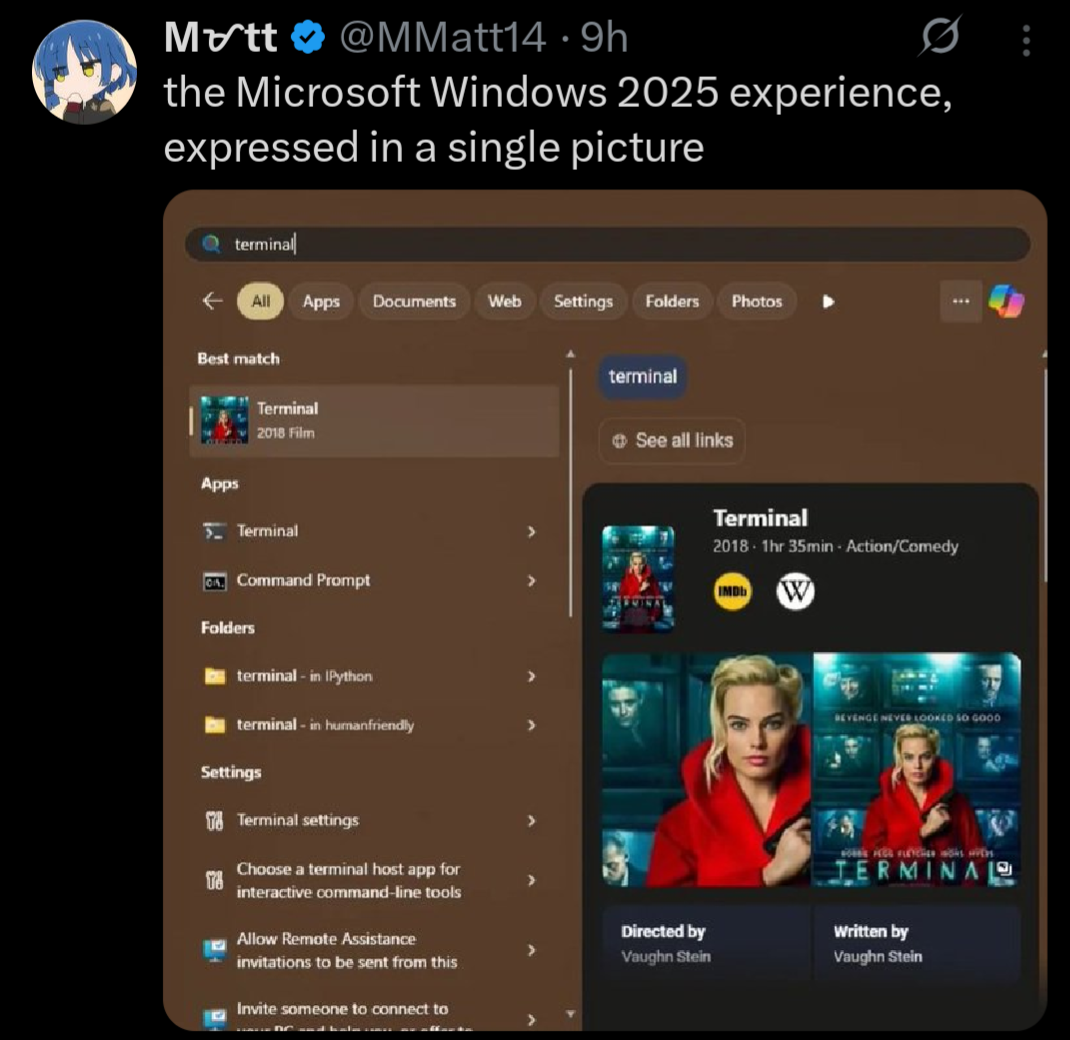
    Obligatory "If they choose the 'Netflix Quick Picks' route, at least they should recommend 'The Terminal' starring Tom Hanks!"

  • source
  • [–] 17 points 9 months ago (9 children)

    as a linux user (so, genetically superior in every way) i do not have this issue. hahaha....ah.

    .... sudo app install ....... a friend?

  • source
  • hideshow 9 child comments
  • load more comments (9 replies)
    [–] 15 points 9 months ago (38 children)

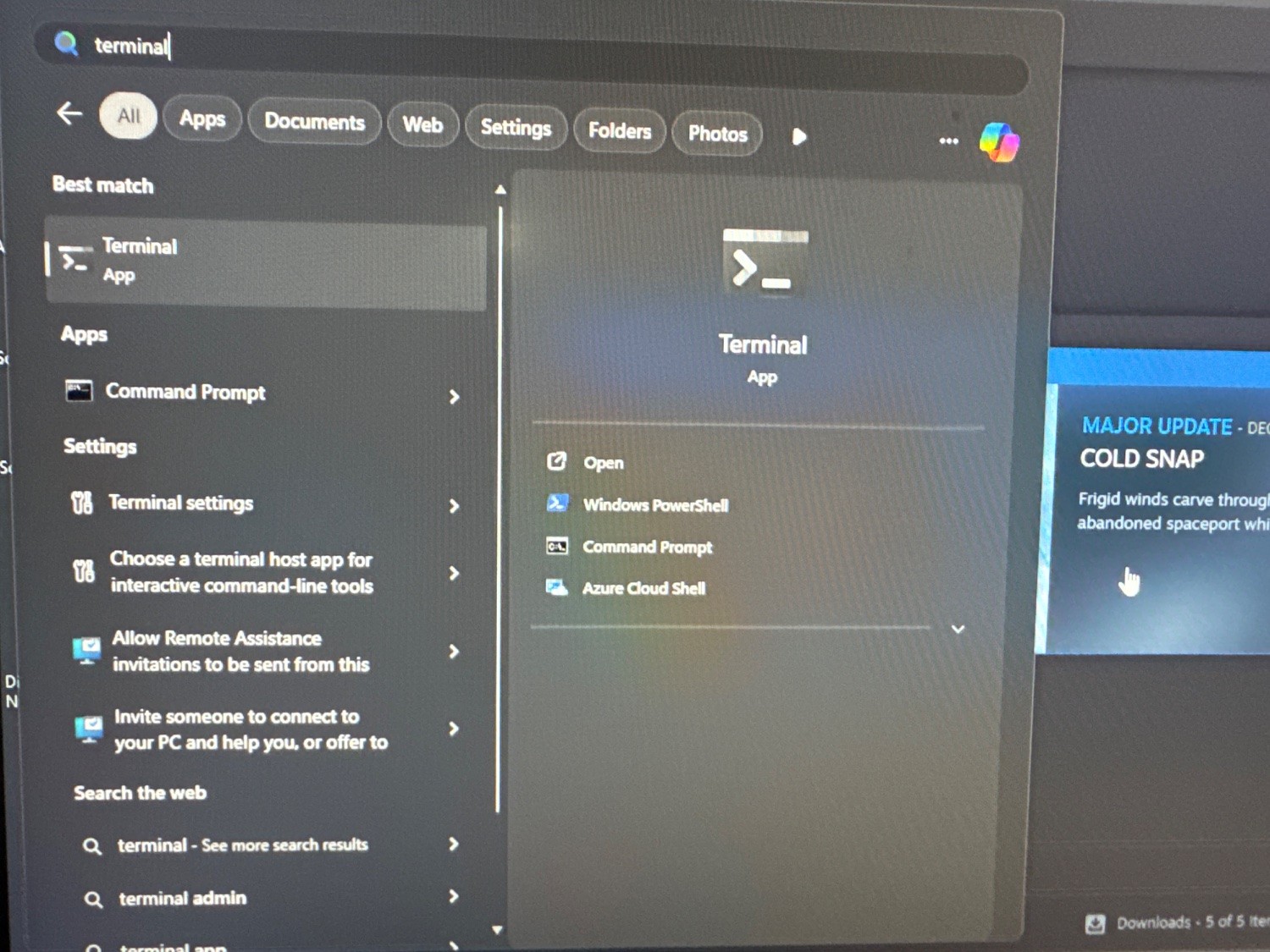
    I just tried this and the terminal app is the first thing to show up.

  • source
  • hideshow 38 child comments
  • load more comments (38 replies)
    [–] 15 points 9 months ago (8 children)

    Thankfully, there are easy to access and use tools to completely rid yourself of the bullshit, ads, and telemetry within Windows.

  • source
  • hideshow 8 child comments
  • [–] 16 points 9 months ago* (last edited 9 months ago) (1 child)

    Mine too:

    FYI, you don't have to use any third party tools and I didn't, either. Step 1 is to run the Enterprise LTSC IoT version of Windows (either 10 or 11). The consumer versions of Windows are extra bullshit, as we all know by now.

    Remove the Windows Store via Powershell (you probably have to run as an administrator):

    Get-AppxPackage -allusers *WindowsStore* | Remove-Appxpackage

    That removes the store suggestions. It also removes the store entirely, as well as the ability to install store apps. Obviously don't do this if you are one of the 0.1% of users who actually use the Windows Store for some twisted reason.

    Then in gpedit.msc / Group Policy Editor:

    Local Computer Policy \ Computer Configuration \ Administrative Templates \ Windows Components \ Search

    • Allow Cloud Search → Disabled
    • Allow Cortana → Disalbed
    • Allow Search Highlights → Disabled
    • Do Not Allow Web Search → Enabled (gets rid of the internet search)
    • Don't search the web or display web results in search → Enabled (probably overridden by the above, I set it anyway)

    Local Computer Policy \ User Configuration \ Administrative Templates \ Start Menu And Taskbar

    • Remove Personalized Website Recommendations From The Start Menu → Enabled
    • Do Not Search Internet → Enabled

    There are settings for other nags and irritations in here that you may also want to configure to your tastes as well.

    Also:

    Local Computer Policy \ User Configuration \ Administrative Templates \ Windows Components \ Windows Copilot

    • Turn off Windows Copilot → Enabled
  • source
  • parent
  • hideshow 1 child comment
  • load more comments (1 reply)
  • [–] 13 points 9 months ago (3 children)

    Might as well link a few:

    However, do note the massive caveat of these tools is that they are proprietary, closed-source tools that must be run with administrative access to your PC, and I have yet to find a satisfactory open-source alternative.

    If it works, it works, but I do question the security implications of allowing these tools that level of unfettered access to your system. If possible, I highly recommend giving Linux Mint a try, rather than relying on sketchy tools to debloat a sketchy OS.

  • source
  • parent
  • hideshow 3 child comments
  • load more comments (3 replies)
  • load more comments (2 replies)
    [–] 14 points 9 months ago (16 children)
  • [–] 13 points 9 months ago (4 children)

    All the problems these people bitch about with Windows never happen to me. Maybe it's because I started with a plain vanilla ISO, no preloaded crap. 🤷🏻‍♂️

    Best part? When I mention that I'm not having these problems I get downvoted.

  • source
  • parent
  • hideshow 4 child comments
  • [–] 17 points 9 months ago

    I've definitely had this happen to me on Windows, more than once. I can't remember what I searched exactly, but I typed it in and hit enter, assuming I'd get the installed app with whatever name I typed, but instead it opened the browser with some online search results. Very annoying.

    I'm sure it can be turned off, and it probably isn't as common as it's portrayed online, but it does happen, and honestly... It should never happen. The start menu is not the place for generic Internet searching. Period.

  • source
  • parent
  • load more comments (3 replies)
  • load more comments (5 replies)
    [–] 14 points 9 months ago (3 children)
    load more comments (3 replies)
    [–] 13 points 9 months ago*

    That’s a pretty good result. I often can’t even find Windows features via search anymore. Or stuff like their App Store gets opened and just… hangs, on a brand new install.

  • source
  • [–] 12 points 9 months ago (3 children)

    Love how this is what the world's talented and well paid humans are making.

  • source
  • hideshow 3 child comments
  • load more comments (3 replies)
    [–] 12 points 9 months ago (14 children)

    Maybe it’s my Win 11 Pro or the fact that I took 2 minutes to go to Settings and click a few toggles, but I don’t have any of this. 🤷‍♂️

  • source
  • hideshow 14 child comments
  • [–] 20 points 9 months ago (10 children)

    A lot of these annoyances can be disabled somewhere in the Settings, but the problem is that there are so many of them tucked away all over the place. Windows 10 (I haven't used 11) was better than Windows 8 in terms of how unified the settings were, but I remember a few instances where I had to go rummaging through the skeletons in Windows' closet in order to change some stuff (e.g. having to go through the old-style control panel rather than the Settings).

    Furthermore, Windows has the annoying habit of changing settings after updates, and it's an unnecessary inconvenience to have to go traipsing through the settings again and again to revert unwelcome changes. Even if it's only the minority of settings that get changed, and if those changes aren't too frequent, it's still draining on one's executive function to make your PC actually behave how you want it to. People get burnt out, and then this contributes to them struggling to find the time and brain to go through changing things.

    Mostly though, I am just irked that it's necessary to go into the settings to turn this stuff off. I am a very techy person, and thus I enjoy tinkering (or perhaps "I enjoy tinkering, and thus I am a very techy person), and stuff like this annoys me so much because I know that I'm in the minority when it comes to willingness to wrestle my tech into the shape I want it. Most people won't go to that effort, even if it'll only take 2 minutes — the key thing here is that many of them don't know it'll only take a couple of minutes, and I don't blame them for that.

    Good software needs to have sensible default settings. If that were the case, then I think we'd see more non-techy people figuring out what particular settings align with their preferences. As it stands though, configuring Windows to work in a sensible manner is a Task, and the activation energy required for that means that many won't do it.

  • source
  • parent
  • hideshow 10 child comments
  • load more comments (10 replies)
  • load more comments (3 replies)
    load more comments
    view more: next ›