submitted 2 years ago* (last edited 2 years ago) by to c/technology@lemmy.world
 

I just moved into a student dorm for a semester abroad, and beforehand I emailed them asking whether they had ethernet ports to plug my router into (I use it to connect all my devices, and for WiVRn VR streaming). They confirmed that I could, but now that I'm here the wifi login portal is asking me to accept these terms from the ISP, which forbid plugging in a router. There's another clause that forbids "Disruptive Devices" entirely, defined as:

“Disruptive Device” means any device that prevents or interferes with our provision of the 4Wireless to other customers (such as a wireless access point such as wireless routers) or any other device used by you in breach of the Acceptable Use Policy;

So what are my options? I don't think I can use this service without accepting the terms, but also I was told by the student dorm support that I could bring a router, which contradicts this.

EDIT: some additional context:

  • dorm provider is a company separate from my uni (they have an agreement but that's it)
  • ISP (ask4) is totally separate from dorm provider, and have installed a mesh network that requires an account. On account creation, there are many upsells including one for connecting more than one device. The "free" plan only allows me to sign in on a single device, and I can upgrade to two devices for 15 pounds.
  • ethernet requires login too
  • VR streaming requires a high performance wifi 6 network, which is why I bought this router (Archer C6 from tp-link)
top 50 comments

sorted by: hot top controversial new old
[–] 221 points 2 years ago* (1 child)

That seems pretty standard stuff. My dorm had the same policy, because they operated their own mesh network and didn't want students sending out their own radio signals that would have absolutely made their wireless network not work well.

Is there some reason you need your own router?

ETA: The student dorm people probably meant a network switch. Regular, non-techy people don't usually know the difference between a router and a switch.

  • source
  • hideshow 2 child comments
  • [–] [S] 89 points 2 years ago (3 children)

    Yeah, the interference argument is fair, but I think this is also the ISP (totally separate third party) trying to protect the paid plans they sell for connecting more than one device...

  • source
  • parent
  • hideshow 5 child comments
  • load more comments (1 reply)
  • [–] 146 points 2 years ago (9 children)

    psst

    Hey, kid, don't tell anyone I told you about this

    *Lifts coat

    iodine
    https://code.kryo.se/iodine
    Description: tool for tunneling IPv4 data through a DNS server
    This is a piece of software that lets you tunnel IPv4 data through a DNS
    server. This can be usable in different situations where internet access is
    firewalled, but DNS queries are allowed.

  • source
  • hideshow 11 child comments
  • [–] 32 points 2 years ago* (1 child)

    You got the goods! I used an HTTP tunnel when I was in college.

  • source
  • parent
  • hideshow 2 child comments
  • load more comments (7 replies)
    [–] 109 points 2 years ago (13 children)

    The reason they don't want you using your own WiFi access point is probably because dorms are prone to over congestion if everyone sets up their own WiFi network.

    If you wanted to fuck with them-and you don't mind spending money-then you could set up your WiFi and get internet via mobile carrier or starlink, so that you never actually have to agree to their terms. Then when/if someone comes around to bitch at you you can watch them slowly come to the conclusion that they've got nothing on you.

    Otherwise your options are to follow the rules to the letter and live without vr streaming, or accept that you might get in trouble. Some WiFi routers can be configured to not advertise their network; annoying because you'll have to manually enter the network information on every device, but it might keep you from getting caught.

    As for connecting multiple devices without paying; there's probably some creative ways to tunnel all your traffic through a single device to get around that. Could still get you in trouble if you're caught.

    If you're doing anything that could get you in trouble with the school make sure you save the email in which they told you using your own router is allowed.

  • source
  • hideshow 14 child comments
  • load more comments (12 replies)
    [–] 79 points 2 years ago (2 children)

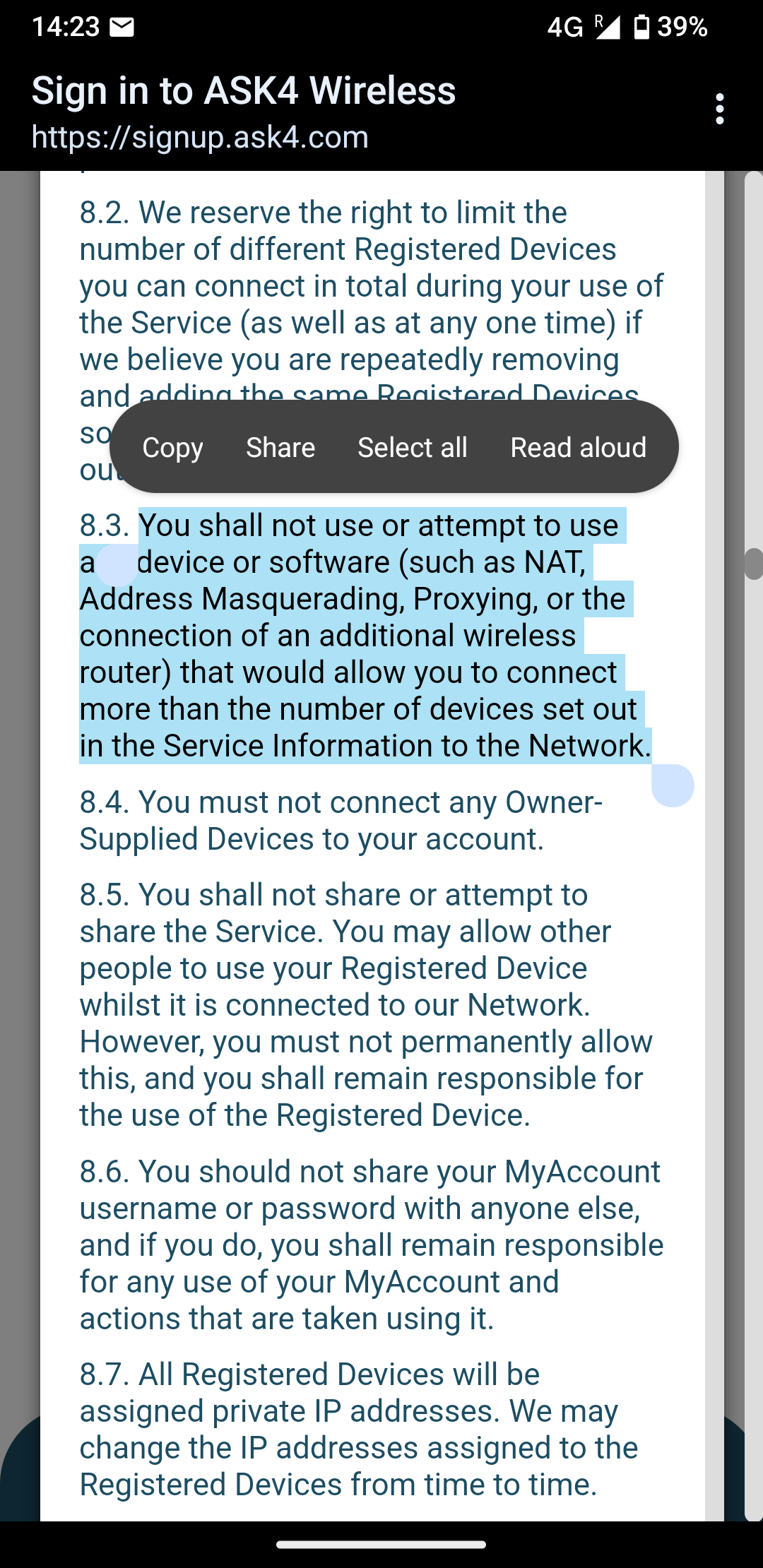
    You shall not use or attempt to use a device or software (such as NAT, Address Masquerading, Proxying, or the connection of an additional wireless router) that would allow you to connect more than the number of devices set out in the Service Information to the Network.

    One of the ways they detect this is by checking the TTL of the packets coming from the "one" device is less than expected. If your router is using OpenWrt, you can configure an iptables rule to reset the TTL of outgoing packets to the default.

  • source
  • hideshow 2 child comments
  • load more comments (2 replies)
    [–] 74 points 2 years ago* (3 children)

    So most dorms don't want you using your own routers because a bunch of student routers causes A LOT of inference.

    You should probably reach out not to the dorm folks but the university networking folks as they're the ones that will ultimately make the decision on whether or not to turn things off/disconnect you.

    A cheap networking switch would probably be okay by them to get some more wired connections in your dorm room (routers aren't really a great way to do that).

    https://www.amazon.com/Linksys-Business-LGS105-Unmanaged-Enclosure/dp/B00FV12VSW/ref=mp_s_a_1_1_sspa?crid=3PUXDK6TFLZIT&dib=eyJ2IjoiMSJ9.zm2b2eGNCSReGFJuUskv6-s3cUVDK12lfqOmf729Jjx1nw8mI07xRjx4RZCcnWDhplIUW-7IOfSn6R7TMu0yVy_k9hGXtOs0SNS7RO8sN4RI5aa_8-iwSOXz6biaUH5pE27eM8eYyBzJl9tkYxX4erfrbMwkWwhSrqIKQGOSqx1DQ1z5ZiDGCyQ_u0k8IhaN1Ra-Zpsr07cg-ZjJnDz6lA.iHHYMOhPc6OW0LmOOPkf8taxFxWnD5Sbwy_NxZwTQbU&dib_tag=se&keywords=network+switch&qid=1725717407&sprefix=network+%2Caps%2C186&sr=8-1-spons&sp_csd=d2lkZ2V0TmFtZT1zcF9waG9uZV9zZWFyY2hfYXRm&psc=1

    As a secondary concern, using a router will cause a double NAT for all your connected devices (universities don't operate in the way ISPs do). That could cause some weird networking shenanigans, particularly for anything peer-to-peer like online games.

  • source
  • hideshow 3 child comments
  • load more comments (3 replies)
    [–] 53 points 2 years ago (5 children)

    Mine didn't either when I lived in a dorm. I got around the network block.

    1. Plug Xbox 360 into ethernet wall port
    2. Log into uni network, get internet
    3. Plug router directly into pc.
    4. Assign router same ip as Xbox
    5. Spoof router mac address to match xbox
    6. Unplug from pc
    7. Quickly swap cable in wall from Xbox cable to router cable, Indiana Jones style
    8. Internet for 1 month. Repeat monthly.
  • source
  • hideshow 6 child comments
  • load more comments (4 replies)
    [–] 51 points 2 years ago (1 child)

    This isn’t rare and not altogether a bad idea.

    My university had a problem of students bringing their own WiFi routers before the dorms had WiFi. Students would set them up incorrectly and cause a series of problems with colliding DHCP servers and interference and it would cause outages for nearby wired students.

    A lot of IT departments locked the network down for these reasons.

  • source
  • hideshow 2 child comments
  • [–] 25 points 2 years ago (1 child)

    Students would set them up incorrectly and cause a series of problems with colliding DHCP servers

    That's an IT problem, not a user problem. The downstream ports should have been isolated at both the link and packet layers. Configuring a router to share an unrestricted LAN between a dorm full of untrusted users is a disaster waiting to happen.

  • source
  • parent
  • hideshow 1 child comment
  • load more comments (1 reply)
  • [–] 51 points 2 years ago (3 children)

    I work in university IT so I have some experience here. Some schools are better than others but in general providing IT services for students is like trying to wrangle a herd of starving feral cats who are all in heat.

    First of all I have never seen 802.1x implemented (Ethernet authentication) in the wild that wasn’t almost immediately removed. It’s a shitty protocol that’s terrible to debug. I totally get why they restrict APs … my god if every student had one it would be a pain. It would be like standing in a crowded room with everyone shouting and you’re trying to pick out one conversation 20 ft away.

    My guess is you’re basically in a situation like my son was at ECU. It’s likely not really a university dorm but closely affiliated hence the reason of a third party. Or the central university IT is abysmal and can’t be bothered. Either way the only reason to use 802.1X is because they think it’s more secure, when in fact it’s way more trouble than it’s worth. You can do the same thing by controlling downstream routing or MAC filtering. The ECU “dorm” did that and it wasn’t much better honestly. You had to go into a website to add your MAC address to get access to the WiFi. Firstly how do you do that when your computer can’t talk to anything. Chicken and egg problem. Secondly for the ones who figured out how to do that using your phone, good luck getting a history major to figure what even what a MAC address was.

    My suggestion is don’t bother. If they’ve implemented 802.1x they’re a micromanaged IT and will catch you eventually. I’d also guess they have completely overtaxed their egress traffic and your speeds are abysmal.

    On a related note, when you graduate never ever rent from an apt complex that generously process WiFi or Ethernet. It will almost always suck, they will have no one to provide adequate tech support, and they are just using it as another revenue stream.

    Sorry I don’t have better advice but if they control the network there isn’t really much you can do.

  • source
  • hideshow 3 child comments
  • load more comments (3 replies)
    [–] 48 points 2 years ago (8 children)

    Users are often dumb. Imagine 100 people who think they know what they're doing trying to set up a bunch of custom networking.

    That's your dorm.

    Most dorms either outright prohibit using personal hardware like that or require the schools IT department to install it themselves and set it up.

    Run a network of your own someday and you'll understand. It's hard enough to get your own network working perfectly without a bunch of wildcards popping up everywhere.

  • source
  • hideshow 8 child comments
  • load more comments (8 replies)
    [–] 47 points 2 years ago (1 child)

    Shit, ask4? I think they were the isp when I was at uni about a decade ago. I'm sorry to hear they're still kicking.

    If it's still the same as back then, all the dorms are essentially on the same lan and they're using Mac filtering at the gateway. Since this was before Https became ubiquitous this meant you could sniff other people's http requests.

    What you do (what we did) was sign up with one device and setup a proxy on it. I think we used squid-cache. But anything that will masquerade the traffic as coming from that one device should do the trick.

  • source
  • hideshow 2 child comments
  • [–] 43 points 2 years ago*

    pretend you didn't read it and press the button

  • source
  • [–] 42 points 2 years ago (1 child)

    As someone who has administered networks and written policies like this the concern here is that you will run an open network that may be used for piracy, hacking, DDOS or to send bomb threats. Tracing down this type of behavior is required by law and allowing students to run open networks makes this near impossible.

  • source
  • hideshow 2 child comments
  • [–] 16 points 2 years ago

    Not only that, but managing wifi channel congestion in a dorm is a pita.

    It's tough enough when you fully control the airspace, to have nice clean coverage and overlapping cells.

    But then add dozens or hundreds of individually managed APs in a tiny space...with DFS and/or 160MHz channel widths?

    Ops best bet is to get their own 5g home internet and plug in.

    You'll be hard pressed to get a router to talk to a captive portal sign in...but if OP wants to get creative, this can easily be fixed with a dumb switch and a Linux PC with two NICs. You could use windows for this, but why would you?

  • source
  • parent
  • [–] 38 points 2 years ago (10 children)

    Assuming they have their own wifi, they just don't want you using wifi off of your own router. A wired connection should be fine.

  • source
  • hideshow 10 child comments
  • load more comments (10 replies)
    [–] 36 points 2 years ago* (last edited 2 years ago) (1 child)

    If you are really worried about getting caught not following the exact rules as written, you could always pay for multi device connections... then they won't care.

    But it's definitely possible to set up your VR router in a way that is not gonna bother anything. Most people in this thread don't know that your VR router doesn't need internet access. If the VR stream is all it is doing, it can be isolated from the internet, and the isp won't know or care it exists.

    The other thing about rules, that they don't tell us autistic people, is that following rules is actually kind of optional. Certainly more optional than it feels like to us. Think about it in terms of what the people were thinking when they wrote the rules, and who will be enforcing the rules and what they will care about. And what the enforcement of the rules would look like. (In this case, the most likely initial outcome of them enforcing these rules would be either an e-mail or paper letter telling you they noticed you are breaking a rule, possibly with details to help you stop breaking it, but likely not). Try to sus out the "spirit" of the rules rather than the letter of the rules. That is how all the other humans use rules and why to us it always feels like everyone is breaking all the rules and getting away with it.

    If you follow every rule to the letter... you really can't do anything. At all. Like, literally, even we are breaking rules we don't yet know about every single day.

  • source
  • hideshow 1 child comment
  • load more comments (1 reply)
    [–] 32 points 2 years ago (3 children)

    Not a lawyer but if you have an email that says you can, I'd argue it's override the ToS assuming the person giving permission actually legally can.

    Anyway I bet what they avoid is reselling access so I believe as long as you don't pay for yourself then resell to others you'll be OK.

  • source
  • hideshow 3 child comments
  • load more comments (3 replies)
    [–] 27 points 2 years ago (2 children)

    Looks like that tos is just for the wifi network, if you've got an ethernet port then that won't be using the wifi.

  • source
  • hideshow 2 child comments
  • load more comments (2 replies)
    [–] 26 points 2 years ago (5 children)

    As someone whose job it is to deploy and manage wifi at a small university-adjacent student accommodation, these are similar to my rules. There are enough students that know enough to cause a problem, but not enough to know the pitfalls. It's best to just blanket cut this off for everyone's best experience.

  • source
  • hideshow 5 child comments
  • load more comments (5 replies)
    [–] 24 points 2 years ago (1 child)

    Using your own WiFi router also bypasses the wireless security settings to access the school network.

    Some resources are only available while on the network (printers, access to library, academic papers, other student hardware). Now imagine a random person in a coffee shop next door had u limited access to these resources via an unmanaged access point.

  • source
  • hideshow 1 child comment
  • load more comments (1 reply)
    [–] 18 points 2 years ago* (last edited 2 years ago)

    Are these restrictions set out by the ISP or the dorm?

    If you don't do business with the ISP, then you don't have to agree to and follow their terms.

    So as long as the dorms doesn't have rules against setting up your own WiFi, then you should be well within your rights to purchase an Internet connection from another provider, but since you are likely not allowed to get your own line installed, you are probably restricted to ISPs that provide a service over the cellular network.

    Of course using a cellular connection will give you worse latencies for online games, but at least you can have your own WiFi with low latency for your VR.

    If you want to be nice, you could then run as much of your Internet network over ethernet as possible, so you congest the air waves as little as possible, possibly only running the VR headset over WiFi, and maybe even only enabling the WiFi radio when you want to play VR. If all your WiFi devices support 5GHz, you might also completely disable your 2.4GHz WiFi, to leave the most congested frequencies alone.

    To lower the chance of someone complaining about your WiFi, you should configure it as a "hidden network", such that it doesn't broadcast an SSID, and therefore doesn't show up when people are looking for WiFi networks to connect to.

  • source
  • [–] 17 points 2 years ago

    Connect your PC to the network then run internal networking as you like through a 2nd interface?

  • source
  • [–] 16 points 2 years ago* (6 children)

    I would set up your router, turn off ssid broadcast and forget about it. It's doubtful they have the equipment to find an access point that doesn't actively announce itself to the world .

    Edit: it means you will have to manually add your wifi network to your devices by typing in the ssid on them but other than that there shouldn't be any issues

  • source
  • hideshow 6 child comments
  • load more comments (6 replies)
    [–] 15 points 2 years ago (6 children)

    They don't want you plugging in your own gear to their network, fine.

    Get one of the "5G Home Internet" services from T-Mobile or Verizon, plug your router into that.

    https://www.t-mobile.com/home-internet

    https://www.verizon.com/home/internet/5g/

    Not on their network, they have absolutely no say over it.

  • source
  • hideshow 6 child comments
  • load more comments (6 replies)
    [–] 12 points 2 years ago (2 children)

    Name and shame that crappy backwards university.

  • source
  • hideshow 3 child comments
  • load more comments (1 reply)
    [–] 12 points 2 years ago (31 children)

    Not all that surprising. I don’t know of any network manager who’d happily allow rogue routers on their network, particularly if you still have it configured as a DHCP device and not a pass through device, which most college students do not consider and will very much disrupt campus network performance.

  • source
  • hideshow 31 child comments
  • load more comments (31 replies)
    [–] 12 points 2 years ago

    Honestly this sounds like a bit of a pickle. If I were in your situation I would just use one of the cellular carriers 5g internets. I personally use a T-Mobile 5g internet hotspot with a fresh tomato flashed nether 6700 plugged into it. Then I basically do all of my networking from that. Latency is a fair bit higher (usually about 30-50ms) but upload is significantly better than spectrum.

  • source
  • load more comments
    view more: next ›