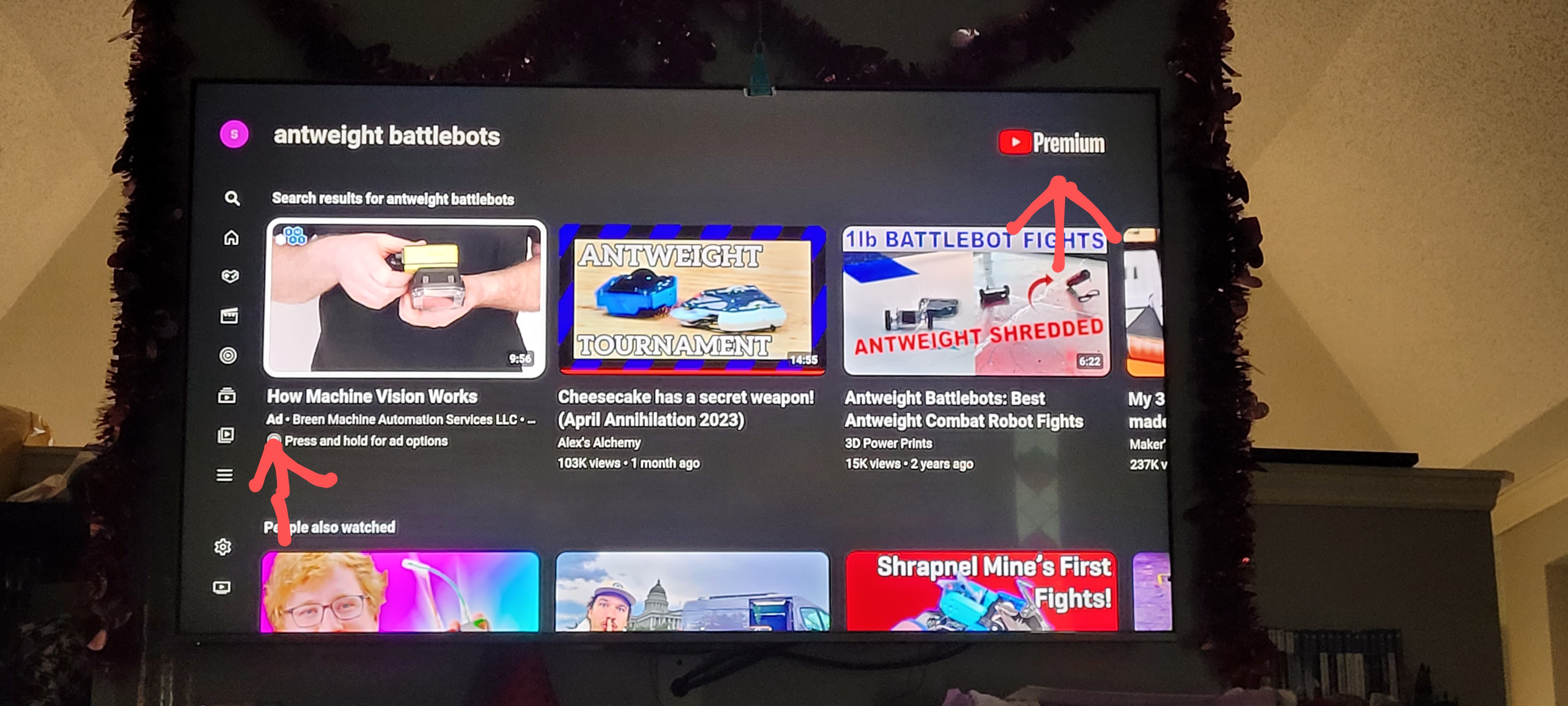
โฒ 394 โผ Excuse you, YouTube ๐ก (sh.itjust.works) submitted 3 years ago by moose_cannon@sh.itjust.works to c/mildlyinfuriating@lemmy.world 102 comments fedilink hide all child comments
[โ] synapse1278@lemmy.world 14 points 3 years ago (1 child) For Android TV you have Smart Tube Next permalink fedilink source parent hideshow 2 child comments replies: [โ] theblueredditrefugee@lemmy.dbzer0.com 3 points 3 years ago (2 children) Do you happen to know of a replacement for Youtube Vanced? It stopped getting supported due to cease and desist, and now it only works like half the time... (idk why youtube doesn't create a version check and make it not work all the time, but w/e lmao I'll take what I can get) permalink fedilink source parent hideshow 4 child comments replies: [โ] cranky_dweeb@lemmy.world 6 points 3 years ago Newpipe and libretube permalink fedilink source parent [โ] aleks01100001@lemmy.world 6 points 3 years ago (2 children) there is a replacement called revanced, here is their github page. You will have to compile the youtube app yourself, their revanced manager will help you with that. And you have to download the latest supported version that is 18.19.35 from apk mirror. If you need any more help feel free to ask me :) permalink fedilink source parent hideshow 4 child comments replies: [โ] intoverflow@feddit.de 2 points 3 years ago Tutorial Revanced. Download the latest Revanced Manager App from here & install: https://github.com/revanced/revanced-manager/releases/tag/v1.3.5 After that uninstall every update of your installed YouTube. (Use Google for that) Start Revanced Manager - Patcher - Select application - YouTube. Now look at the "Suggested:" app version. Remember the version number, go to apkmirror.com, search for YouTube and the right version number. Download and install. Restart Revanced Manager, Patcher, select, YouTube. Suggested and current should be the same version numbers now. Go to selected patches, click on default (if you don't know what you are doing), click done. Click on patch, wait a bit. While it's repacking go to your Youtube and disable it, before the install prompt comes (if you do it too early, there might be an error. Retry). When the install promp comes, you click install (and you might need to allow it in the settings). Voila, you have Revanced installed. permalink fedilink source parent [โ] GatoB@lemmy.world 1 point 3 years ago (1 child) I think you should just share the oficial apk because those steps are only for tech savy people. Way easier, download and install: https://github.com/j-hc/revanced-magisk-module/releases/download/20220868/youtube-revanced-v18.16.37-all.apk permalink fedilink source parent hideshow 2 child comments replies: [โ] aleks01100001@lemmy.world 3 points 3 years ago its not the supported way of doing it, and revanced doesnt release apks and therefore the apk you provided its not safe to use, even if there is nothing malicious in this apk you are never sure of that, so its better to just make the app with the manager yourself and btw its not that hard to do permalink fedilink source parent
[โ] theblueredditrefugee@lemmy.dbzer0.com 3 points 3 years ago (2 children) Do you happen to know of a replacement for Youtube Vanced? It stopped getting supported due to cease and desist, and now it only works like half the time... (idk why youtube doesn't create a version check and make it not work all the time, but w/e lmao I'll take what I can get) permalink fedilink source parent hideshow 4 child comments replies: [โ] cranky_dweeb@lemmy.world 6 points 3 years ago Newpipe and libretube permalink fedilink source parent [โ] aleks01100001@lemmy.world 6 points 3 years ago (2 children) there is a replacement called revanced, here is their github page. You will have to compile the youtube app yourself, their revanced manager will help you with that. And you have to download the latest supported version that is 18.19.35 from apk mirror. If you need any more help feel free to ask me :) permalink fedilink source parent hideshow 4 child comments replies: [โ] intoverflow@feddit.de 2 points 3 years ago Tutorial Revanced. Download the latest Revanced Manager App from here & install: https://github.com/revanced/revanced-manager/releases/tag/v1.3.5 After that uninstall every update of your installed YouTube. (Use Google for that) Start Revanced Manager - Patcher - Select application - YouTube. Now look at the "Suggested:" app version. Remember the version number, go to apkmirror.com, search for YouTube and the right version number. Download and install. Restart Revanced Manager, Patcher, select, YouTube. Suggested and current should be the same version numbers now. Go to selected patches, click on default (if you don't know what you are doing), click done. Click on patch, wait a bit. While it's repacking go to your Youtube and disable it, before the install prompt comes (if you do it too early, there might be an error. Retry). When the install promp comes, you click install (and you might need to allow it in the settings). Voila, you have Revanced installed. permalink fedilink source parent [โ] GatoB@lemmy.world 1 point 3 years ago (1 child) I think you should just share the oficial apk because those steps are only for tech savy people. Way easier, download and install: https://github.com/j-hc/revanced-magisk-module/releases/download/20220868/youtube-revanced-v18.16.37-all.apk permalink fedilink source parent hideshow 2 child comments replies: [โ] aleks01100001@lemmy.world 3 points 3 years ago its not the supported way of doing it, and revanced doesnt release apks and therefore the apk you provided its not safe to use, even if there is nothing malicious in this apk you are never sure of that, so its better to just make the app with the manager yourself and btw its not that hard to do permalink fedilink source parent
[โ] cranky_dweeb@lemmy.world 6 points 3 years ago Newpipe and libretube permalink fedilink source parent
[โ] aleks01100001@lemmy.world 6 points 3 years ago (2 children) there is a replacement called revanced, here is their github page. You will have to compile the youtube app yourself, their revanced manager will help you with that. And you have to download the latest supported version that is 18.19.35 from apk mirror. If you need any more help feel free to ask me :) permalink fedilink source parent hideshow 4 child comments replies: [โ] intoverflow@feddit.de 2 points 3 years ago Tutorial Revanced. Download the latest Revanced Manager App from here & install: https://github.com/revanced/revanced-manager/releases/tag/v1.3.5 After that uninstall every update of your installed YouTube. (Use Google for that) Start Revanced Manager - Patcher - Select application - YouTube. Now look at the "Suggested:" app version. Remember the version number, go to apkmirror.com, search for YouTube and the right version number. Download and install. Restart Revanced Manager, Patcher, select, YouTube. Suggested and current should be the same version numbers now. Go to selected patches, click on default (if you don't know what you are doing), click done. Click on patch, wait a bit. While it's repacking go to your Youtube and disable it, before the install prompt comes (if you do it too early, there might be an error. Retry). When the install promp comes, you click install (and you might need to allow it in the settings). Voila, you have Revanced installed. permalink fedilink source parent [โ] GatoB@lemmy.world 1 point 3 years ago (1 child) I think you should just share the oficial apk because those steps are only for tech savy people. Way easier, download and install: https://github.com/j-hc/revanced-magisk-module/releases/download/20220868/youtube-revanced-v18.16.37-all.apk permalink fedilink source parent hideshow 2 child comments replies: [โ] aleks01100001@lemmy.world 3 points 3 years ago its not the supported way of doing it, and revanced doesnt release apks and therefore the apk you provided its not safe to use, even if there is nothing malicious in this apk you are never sure of that, so its better to just make the app with the manager yourself and btw its not that hard to do permalink fedilink source parent
[โ] intoverflow@feddit.de 2 points 3 years ago Tutorial Revanced. Download the latest Revanced Manager App from here & install: https://github.com/revanced/revanced-manager/releases/tag/v1.3.5 After that uninstall every update of your installed YouTube. (Use Google for that) Start Revanced Manager - Patcher - Select application - YouTube. Now look at the "Suggested:" app version. Remember the version number, go to apkmirror.com, search for YouTube and the right version number. Download and install. Restart Revanced Manager, Patcher, select, YouTube. Suggested and current should be the same version numbers now. Go to selected patches, click on default (if you don't know what you are doing), click done. Click on patch, wait a bit. While it's repacking go to your Youtube and disable it, before the install prompt comes (if you do it too early, there might be an error. Retry). When the install promp comes, you click install (and you might need to allow it in the settings). Voila, you have Revanced installed. permalink fedilink source parent
[โ] GatoB@lemmy.world 1 point 3 years ago (1 child) I think you should just share the oficial apk because those steps are only for tech savy people. Way easier, download and install: https://github.com/j-hc/revanced-magisk-module/releases/download/20220868/youtube-revanced-v18.16.37-all.apk permalink fedilink source parent hideshow 2 child comments replies: [โ] aleks01100001@lemmy.world 3 points 3 years ago its not the supported way of doing it, and revanced doesnt release apks and therefore the apk you provided its not safe to use, even if there is nothing malicious in this apk you are never sure of that, so its better to just make the app with the manager yourself and btw its not that hard to do permalink fedilink source parent
[โ] aleks01100001@lemmy.world 3 points 3 years ago its not the supported way of doing it, and revanced doesnt release apks and therefore the apk you provided its not safe to use, even if there is nothing malicious in this apk you are never sure of that, so its better to just make the app with the manager yourself and btw its not that hard to do permalink fedilink source parent