1
21
GPU-Accelerated Autorouter Handles Monstrous PCB Designs
(hackaday.com)
After about 6 months, my project is finally complete. It's the first significant circuit that I've designed myself, rather than just implementing someone else's design:
https://codeberg.org/interrupt_tv/steadyhand
Steady Hand is a digital circuit for programming EEPROMs by hand. It's inspired by this video by Ben Eater, where he creates a circuit for programming an EEPROM using DIP switches and jumper wires. Steady Hand is much more ergonomic than his design, though it is somewhat more complex.
While Ben Eater provides the "how" inspiration, the "why" inspiration comes from Jeremiah Orians' stage0 project, and the general concept of bootstrapping: creating a computer software environment from nothing. When building a homebrew computer, one would typically use a significantly more complex modern computer to write the homebrew computer's software to an EEPROM. I created Steady Hand as a first step towards resolving this problem.
After I'd wired everything up, I was a little afraid something would melt when I plugged it in. While the schematic is separated into smaller modules, the breadboard layout ended up being pretty monolithic. I didn't do any testing as I was assembling it, so it seemed likely there would be a mistake somewhere. No magic smoke escaped though, and it mostly worked on the first try. There were a few bugs:
The address display was connected backwards, with the most significant digit on the right instead of the left. Easy enough to fix, but the relevant wires were no longer the right lengths to neatly reach their connection points. This trend continued as I had to do further circuit surgeries, leaving things messier than I'd like.
The auto-skip function would cycle endlessly if the byte value to skip matched what was in the write registers. The write registers' output lines are connected to the EEPROM's I/O lines in order to be able to write to it. The comparator is also connected to these so that it can compare the EEPROM's output to the skip value. When it's time for the multiplexed display to show one of the write nibbles, the EEPROM's output is disabled and the write registers' output enabled. This meant that the comparator would now be comparing with the write value instead of the value read from the EEPROM, and would give the signal to skip to the next address.
Disabling the comparator when it's getting invalid input would have required some additional logic, and at the time I didn't have any extra gates available. I solved this by using one of the display digit enable lines as the auto-skip function's clock signal, instead of having it hooked directly to the clock. This ensured that the rising edge would only occur when the comparator had a valid input.
After writing a byte or when auto-skipping past a large number of addresses, the EEPROM would occasionally output FF instead of the byte that was actually stored at that address. It wouldn't do this with any kind of consistency, but the FF would persist until the address was changed. I thought this was a power issue, but no combination of decoupling capacitors or pull-up resistors would make it go away. After wrestling with it for a long time, I eventually concluded that the AT28C256 just doesn't like being always enabled. Once I added proper logic to control both the output enable and chip enable lines, the problem went away.
Since I needed at least one more logic IC to solve that last bug, I decided to add a 74HC7266 quad XNOR IC. This allowed me to add a search function alongside the auto-skip function, by just using an XNOR gate to invert the comparator's output.
I used dupont cables to group related signal lines together, but I'm not sure how I feel about them now. I thought that they'd result in a cleaner layout than if I'd used several additional layers of solid core wire, but I still ended up with a rat's nest. That was likely inevitable with how densely packed the components are. If I were to redo everything, I'd probably spread them out onto more boards, group them into individual modules, and allow for more redundancy in the glue logic.
Still, I'm happy with how the project turned out overall, and that I can now move onto the next one.

My main project has been paused while I waited for a shipment of components. Who knew I would need an XNOR gate IC?
In the meantime I switched back to working through Ben Eater's videos on the 6502. I'm up to the ones on implementing the PS/2 keyboard interface. Before getting too far into it, I decided it was finally time to clean up the layout of the computer's components. Ben's layout, while compact, is also pretty messy. The address and data buses wind all over the place, making them difficult to understand and access for diagnostics or expansion. Also when I first built it I hadn't bothered to take any power rails off of the boards before connecting them together, so my power rails were doubled up:

Inspired by some layouts that I'd seen on r/beneater, I went with a layout that has all the bus lines running vertically through the center of each board. Components are placed on the sides and connect to the bus lines instead of directly to each other. There are 27 bus lines:
There's just enough room on the left side for the DIP40 ICs. The DIP28s go on the right, with a few columns to spare. Since the data bus starts at column 21, it aligns nicely with the numeric labels on the breadboard. The 1st data line is at column 21, 2nd line is at 22, 3rd at 23, and so on. I put the reset and clock lines in between the data and address busses in order to maintain this pattern for the address lines: 1st at 31, up to 16th at 46. I guess I could have gotten 0-based indexing instead of 1-based if I had put the DIP40s on the right side, but the 6502 really wants to be on the left side due to its pin layout.
I also did some creative wiring in order to fit the reset button below the oscillator so that it wouldn't take up any extra real estate:

The center pins of the button share a column with the GND pin of the oscillator. The left pins are in the unusable space between the oscillator and the NAND IC. The right pins are in an otherwise unused column that runs underneath the oscillator. Since the reset button doesn't take up any extra space, there's room for an additional DIP14 next to the oscillator, and another two DIP14s or DIP16s to the right of the bus on that board.

I barely know anything about electricity. With that said:
I bought this decoration containing a bunch of what looks like LEDs (henceforth "lamp") at a thrift store

It needs 4.5 volts to function, according to the writing on a little etiquette. I wanted to ditch the AAA battery power supply and power it with a DC adapter, so I stripped the DC adapters end and cut off the lamp's cord that goes to the battery case/on off button in order to connect them like so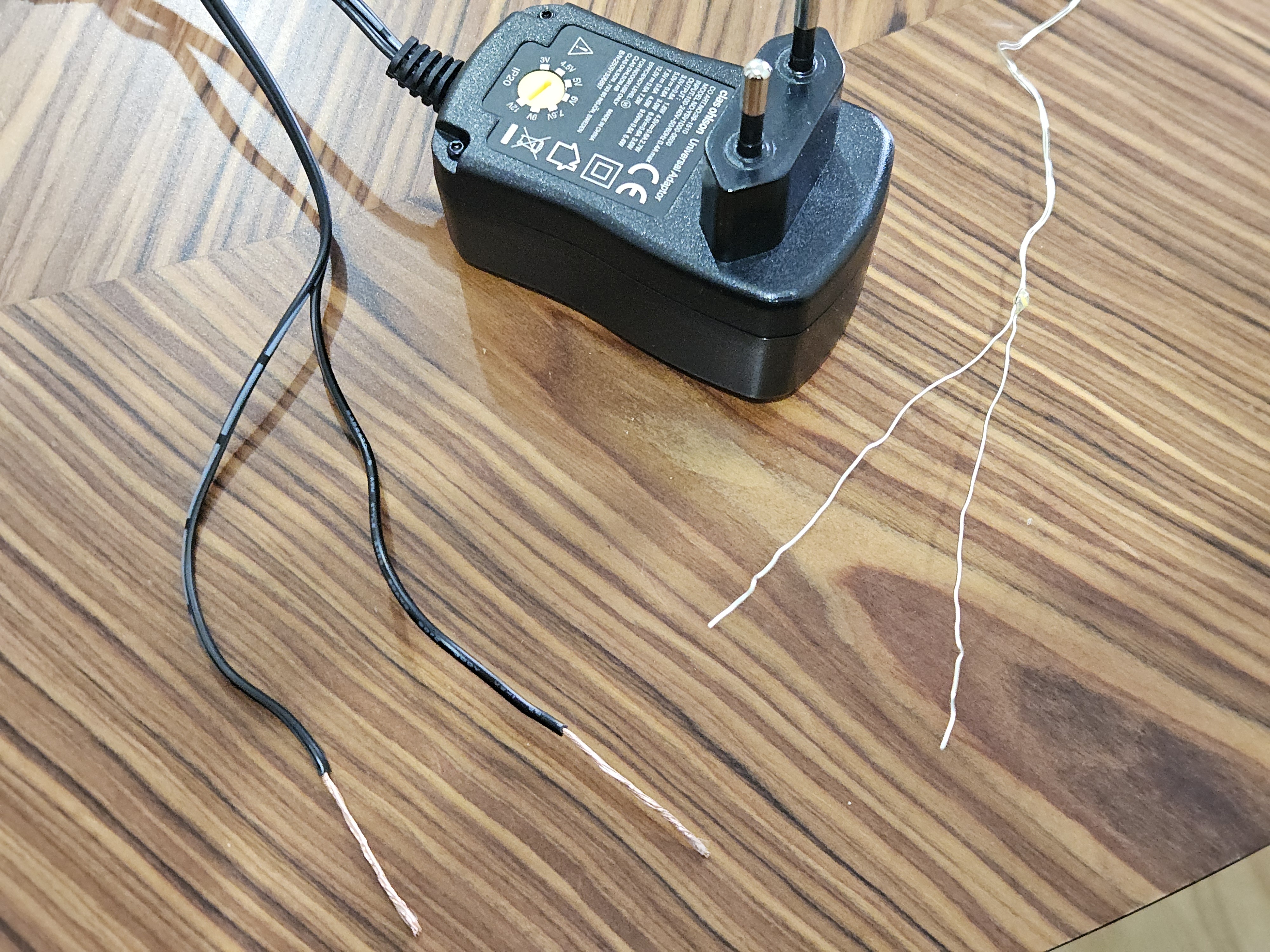
I even tried to attach the stripped DC wires to the original battery box, thinking that maybe there some circuitry magic going on in the little PCB.
The LEDs do not light up.
Questions:
In any case, I'll just rip out the LEDs and put in my own LEDs with wiring that's encased in some insulator, I guess.
Edit: I needed to remove the insulating coating from the LED wiring ends. I did it by burning it off. Thank you all!
Do you need 16 bytes of ROM that you can program with a soldering iron? Well, you're in luck!
I'm working on a larger project that I'll hopefully be sharing here soon, and needed something to display hexadecimal digits on a 7-segment LED display. The non-obsolete ICs that I found could only do binary coded decimal, but I need to be able to display A-F as well. An EEPROM truth table can be used for this, but I also wanted to avoid any programmable ICs. I decided to take an old-school approach and create a diode ROM board.


I've been working on Ben Eater's breadboard 6502 computer project for a little while. The pins on the EEPROM sometimes get bent when I pry it out of the breadboard to reprogram it. I was afraid that they'd break eventually, so I looked into getting a Zero Insertion Force (ZIF) socket to put on the board, which should be gentler on the EEPROM's pins. Ran into a few problems though:
I eventually decided to solve that last one myself, and I figured I'd share the design in case anyone else might find it useful:

I built two circuits as similarly as possible 1) quad ua741 and dual NE5532. FFT on my Rigol scope showing peaks at 1k and 15k as set/expected (2 channels from Seesil generator are mixed with 1k signal at 80% of 15k signal amplitude) with this I believe I created a tool to do AM with my cheap Seesil generator and can also mix two audio signals.
That said, I have no clue what I am doing. I based my testing procedure off an Elenco radio kit.
So I guess I actually have two questions or areas where I am trying to understand better:
What makes one op-amp better than another? I am talking about the IC itself, I believe. Why is NE5532 better than ua741, I see and hear the difference, now why?
What should I be testing and/or what data should I be collecting to better understand and characterized?
Thank you for your time and consideration. I am 100% self-taught savage from the wilderness and stumbled into your camp, but we are not so different, I promise, just had to walk down different road in life. Thanks again.

Hobbyist/DIY guy in a garage. I use Linux. I have briefly tested Eagle and a couple circuit design apps but didn't like anything about any of them, did not spend sufficient time with them either, though. Eagle is going away? Any recommended apps for designing pcb and/or services? I am also open to more artisinal methods. What direction should I point my momentum? Not afraid to try things out but also not wanting to waste time. I have been breadboarding for a minute, learned to solder, benn making some pcb gadgets and think I am ready. Thank you. (Pic is audio mixer with two NE5532 and LM386)

Projects, pictures, industry discussions and news about electronic engineering & component-level electronic circuits.
1: Be nice.
2: Be on-topic (eg: Electronic, not electrical).
3: No commercial stuff, buying, selling or valuations.
4: No circuit design or repair, tools or component questions.
5: No excessively promoting your own sites, social media, videos etc.
Ask questions in https://discuss.tchncs.de/c/askelectronics

