If you have "Help" instead of "Ins", replace it with Overgod-tier. Keep pressing it, it will come.
OC, feel free to share.
EDIT; Home is now G-od tier. I didn't know it would go to the beginning of a line, I always used macros "lol".
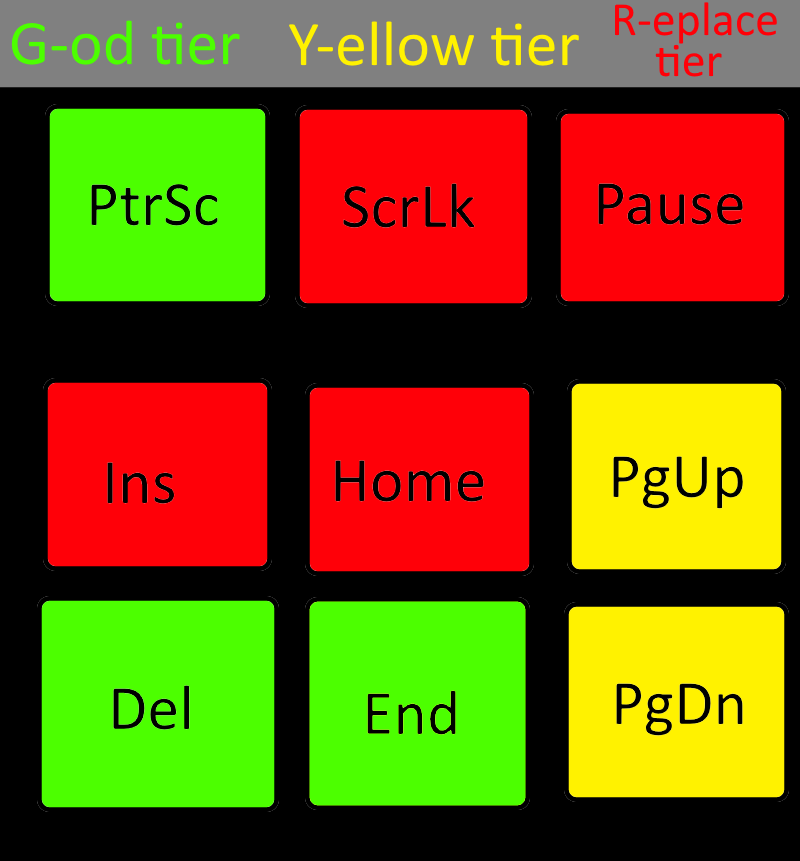
If you have "Help" instead of "Ins", replace it with Overgod-tier. Keep pressing it, it will come.
OC, feel free to share.
EDIT; Home is now G-od tier. I didn't know it would go to the beginning of a line, I always used macros "lol".
Home is God-tier, just as useful as End when editing stuff.
You don't use Home? Home and End are my two most used keys on this list. IDEs move your cursor to the beginning of the line but after the indents. It's God -tier.
Home is pretty useful actually, just like end. Ins can go fuck itself
You never use the home button? Do you also not use the terminal?
For those learning how good Home is, wait until you try CTRL + Home. Start of the file.
Also see: CTRL + End
Smells like windows if End is God Tier but Home isn't. On the command line being without either would kill my speed something fierce
They are all useful, except for maybe Pause. Ctrl+Insert and Shift+Insert ist like Ctrl-C Ctrl-V, but it works in terminals too. Home goes to the beginning of the line. Shift+Home marks the line from current position until the beginning.
I use all of these keys except scroll lock. Mainly because there aren't any software vendors that support the function anymore, and nobody has had the innovation to use it for anything new.
I use insert regularly, delete all the time. Home and end, pretty much daily.... Print screen sometimes (though I usually use a screen snippet tool instead), and pause is used in some keyboard shortcuts in Windows that are very helpful.
Idk why we're picking on insert and pause when F12 is right there. Seriously, does anyone use any F keys beyond F5? If you do, is your scope then limited to F1/F2/F5? Maybe add alt+F4?
All the F keys do stuff. But in my experience, 90+ % of the time nobody knows what those things are. One of my personal favorites is F2 which is generally used as a shortcut to "rename". It's very helpful. Honorable mention to F5 for all the reasons you would expect.
Meanwhile, there's people like OP throwing shade at our good friend "home".... What are you saying OP? Are you to good for your home?
Space Engineers players are fuming
"pause/break" I can understand if you don't write compiled code I guess (if you don't know, Ctrl+break usually stops compilation, very handy when you reread your code while compiling and realized you fucked something up), but "home" is remove-tier ??? It's one of the most useful keys for editing text my dude
I use pgup/pgdn every day. Especially with terminal multiplexers, as I am unaware of how to view the scrollback buffer of long outputs faster than a quick couple of pgup's.
You can take my ins from my cold dead hands!
what, no SysRq?
boo!
I'll take home over pgup/down any day.
Also Menu key is pretty obscure, I consider it a yellow, since it's useful when you don't have a mouse, but there are other shortcuts that can do it (shift+f10)
Pause is useless but only because escape steals all it's usecases in apps.The only tool I know that uses it prominently is Windbg
Ins is so much more deserving of an indicator light than scroll lock - I almost never want Ins engaged in it's normal meaning... I'd rather just delete word and retype the whole thing.
Pressing ScrLk twice and then the number of the port switches to this port on the KVM switch in the office. Very specific use case, but still.
Pause ... I have no idea. If I remember correctly you can, well, pause terminal output with it, but I never tried.
The rest of the keys I use regularly.
On a serious note, the PC keyboard seriously needs a revamp. Scroll Lock? What does that even do nowadays?
on debian based system PrntScr actually prints stuff you're looking at in a terminal, if a printer is configured. learned that the hard way, accidentally printing hundreds of pages of html source
Insert is extremely useful in any editing situation. Right after Find and Replace.
If you don't need it just use it as keybind for something else.
I love to bind push to talk on my beloved ScrLk as it is not interfering with any other shortcut!
My work laptop has pg up and pg down as a secondary on the up and down arrows. It's such a threat to be able to move up and down a page with just pressing fn and the arrow keys
Where's the 'PtrSc' key? On Peter's keyboard presumably.
Most tier lists use a tabular format, often horizontal. This one looks like a table organized vertically. Except it's neither and instead uses color, but isn't R/G colorblindness the most common form? Anyway, I'm saying that I found it confusing.
Then again, you posted infinitely more to Lemmy today than I did (at zero:-P), so there is no need at all to listen to my whining if you aren't interested in such feedback on presentation style:-D.
I never used to use Home and End until I put them on a layer right next to my home row. Now I can't live without them. Position really makes a difference!
top 50 comments