I have been looking for a 2D reflective water shader for some time and was delighted to see that this tutorial was posted on YouTube to create just that:

https://www.youtube.com/watch?v=wPr5PvSgxFo

I've had a go at implementing it and have got the reflective water rendering. It's very "Kingdom: Two Crowns" like when spread across the full width of the scene.

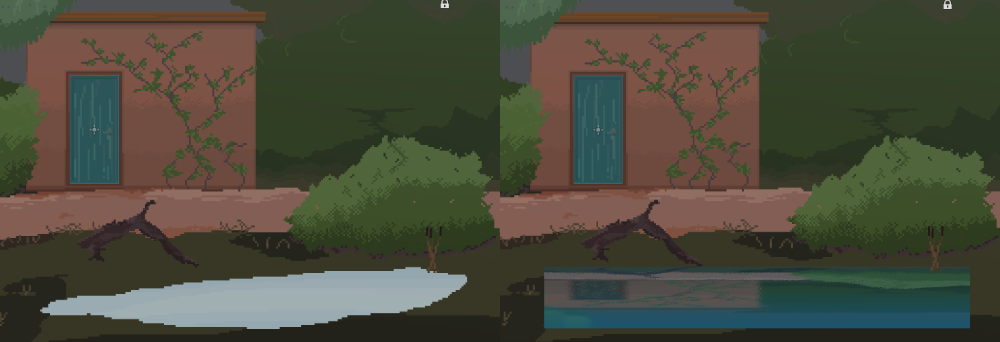
However, as you can see from the image above, I've drawn a pond (as a separate Sprite2D) and I've applied the water shader to the pond. It's done that, but draws the water as a rectangle.

Is there a way to apply this shader to the Sprite2D, but conform to the actual sprite (only the light blue), rather than as a rectangle?
you are viewing a single comment's thread
view the rest of the comments
[–] [S] 5 points 2 years ago

This worked perfectly - thank you!!

For anyone else looking here later, the final shader code (confirmed working Godot 4.2) is:

shader_type canvas_item;

uniform sampler2D screen_texture : hint_screen_texture;
uniform vec4 water_color : source_color;
uniform sampler2D wave_noise : repeat_enable;

void fragment() {
	vec2 water_wave = (texture(wave_noise, UV * TIME * 0.02).rg - 0.5) * 0.02;
	vec2 uv = vec2(SCREEN_UV.x , SCREEN_UV.y - UV.y) + water_wave;
	vec4 color = texture(screen_texture, uv);
	float mix_value = 1.0 - UV.y;

	float avg_color = (color.r + color.g + color.b) / 3.0;
	avg_color = pow(avg_color, 1.4);
	mix_value += avg_color;

	mix_value = clamp(mix_value, 0.0, 0.7);
	COLOR = vec4(mix(water_color, color, mix_value).rgb, texture(TEXTURE, UV).a);
}

Credits to Single-mindedRyan for creating this shader in the first place.

  • source
  • parent