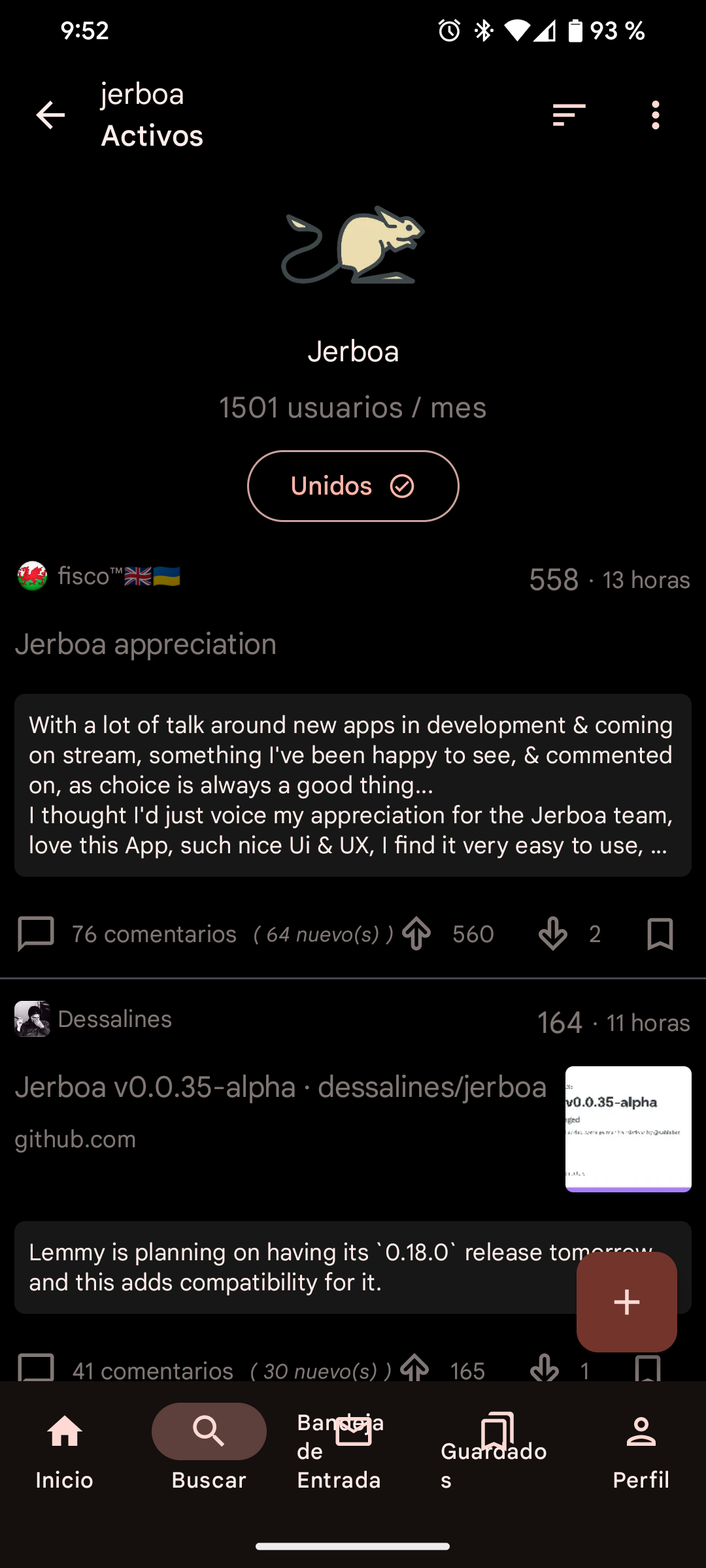
The Spanish words overlap the bottom menus as you can see in the screenshot.
top 12 comments

sorted by: hot top controversial new old
[–] 13 points 3 years ago (5 children)

Only if you are on Android 13. There is an open issue for it https://github.com/dessalines/jerboa/issues/755

  • source
  • hideshow 5 child comments
  • [–] [S] 7 points 3 years ago (3 children)

    Thank you, gladly I'm in A13 and I could handle it from the settings!

  • source
  • parent
  • hideshow 3 child comments
  • [–] 4 points 3 years ago (2 children)

    Did it work for you? I'm on Android 13 too but I can't select Jerboa since it doesn't show up. I also used the search function but no success.

  • source
  • parent
  • hideshow 2 child comments
  • [–] [S] 2 points 3 years ago (1 child)

    Yes it worked, I checked it in the system settings app (or just hold Jerboa icon and go to information section).

  • source
  • parent
  • hideshow 1 child comment
  • [–] 6 points 3 years ago (1 child)

    +1 Please give us the choice of the language in app, my phone won't be updated to android 13 and I want to let it in french but I like IT related stuff to be in English... Otherwise I may perhaps fork and rebuild jerboa stripping out the translation files...

  • source
  • hideshow 1 child comment
  • [–] 2 points 3 years ago* (last edited 3 years ago)

    Well I did a sort of poc I recompiled jerboa (in debug mode so I can keep official installed) after removing app/src/main/res/values-fr directory and I have this jerboa in English which I prefer, additionally there are layout issues with french version because the words do not correctly fit the allocated space on the screen, it looks far better in English. So if it's possible to give a setting to change language for us poor old android users...

  • source
  • parent
  • [–] 2 points 3 years ago* (3 children)

    Are you LATAM Spanish? Because European Spanish still shows the app in English, except for time, like this comment was "27 minutos ago" jaja

  • source
  • hideshow 3 child comments
  • [–] [S] 2 points 3 years ago (2 children)

    Yes, LATAM Spanish, weird haha.

  • source
  • parent
  • hideshow 2 child comments
  • [–] 2 points 3 years ago* (1 child)

    So I updated to the latest Jerboa version which had ES localization, it looks fine for me (barely lol). So it must depend on screen and/or text size

  • source
  • parent
  • hideshow 1 child comment
  • [–] 1 point 3 years ago

    This is part of the issue... I put in a localization file for Japanese, tested it thoroughly and even made a couple changes so that it fit the UI properly, but then when I was done, I tried it on a different phone that wasn't as wide, it caused the text to wrap around.

  • source
  • parent
  • load more comments
    view more: next ›