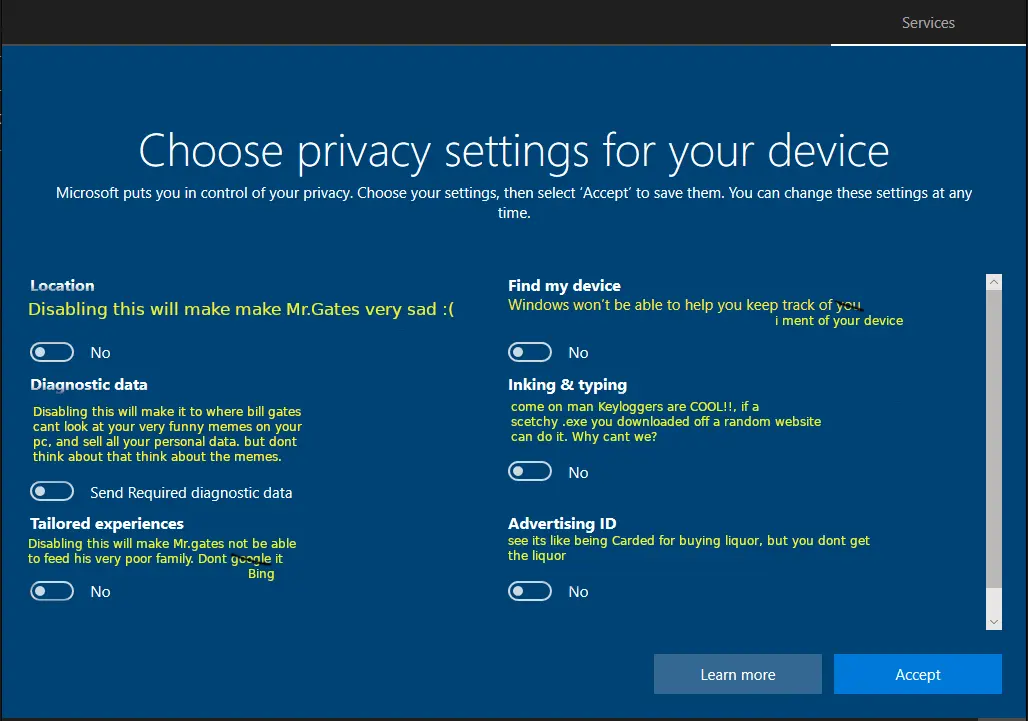
β² 752 βΌ installing windows in a nutshell (sh.itjust.works) submitted 3 years ago by Steamymoomilk@sh.itjust.works to c/linuxmemes@lemmy.world 75 comments fedilink hide all child comments
[β] TheDarkBanana87@lemmy.world 4 points 3 years ago (3 children) Does it required a microsoft account now? Or can we still install it without connected to the internet permalink fedilink source hideshow 6 child comments replies: [β] pineapplelover@lemm.ee 10 points 3 years ago (2 children) Yeah but I turn on airplane mode and it doesn't need an account anymore. Lpt for those of you out there. Actually, better tip, use Linux. permalink fedilink source parent hideshow 4 child comments replies: [β] TheDarkBanana87@lemmy.world 2 points 3 years ago True, but i still need to keep a copy of windows for my average Joe friends. Not gonna preach the hard way thought, i want them to slowly convert to Linux hahaha. Especially more and more games arw supported in Linux, either native or via proton Me myself, already using Linux for the past 3 Years :D permalink fedilink source parent [β] purplemonkeymad@lemmy.world 2 points 3 years ago (1 child) That stopped working for home editions of windows. On pro you can say you are joining a local domain, but on home you have to use a workaround, such as the bypass command or a locked out account. permalink fedilink source parent hideshow 2 child comments replies: [β] TheDarkBanana87@lemmy.world 1 point 3 years ago Thats sad, soo the only way is either using the Pro Version, or the LTSC version? permalink fedilink source parent [β] Gamey@lemmy.world 6 points 3 years ago (1 child) I think it's still technically possible with some workaround but they indeed kind of killed offline accounts with Windows 11 permalink fedilink source parent hideshow 2 child comments replies: [β] stalfoss@lemm.ee 4 points 3 years ago (3 children) Itβs not hard at all, when making an account one of the options is to make it offline/local only. Sure itβs a small link below the big buttons but itβs there and not hidden. permalink fedilink source parent hideshow 6 child comments replies: [β] diemechanist@programming.dev 4 points 3 years ago* I reinstalled Win11 last month and I think they removed that feature. now you have to Shift+F10 and type the bypass command in CMD. permalink fedilink source parent [β] Gamey@lemmy.world 2 points 3 years ago That's how it worked in Windows 10 and possibly early versions of 11 but as far as I know (not a Windiws user so take it with a grain of salt) that's no longer the case and they even patched some of the workaroundssoo you have to find a current one permalink fedilink source parent [β] Navigate@partizle.com 2 points 3 years ago (1 child) It used to be that way, but last time I tried the only way is to disconnect from the internet otherwise it will force it. permalink fedilink source parent hideshow 2 child comments replies: [β] stalfoss@lemm.ee 2 points 3 years ago I just made an offline account 3 days ago on a windows 11 machine so I dunno what to say man permalink fedilink source parent [β] eruchitanda@lemmy.world 5 points 3 years ago* (last edited 3 years ago) (2 children) Yeah, but you can create local account. With the installing media running: β’ Shift+F10 (opens cmd) > OOBE\BYPASSNRO β’ Continue until getting to creating account β¦β¦ Account > 123@123.com/test@test.com/a@b.com/1@1.ru/fuckoff@microsoft.com/a@outlook.com/d@d.d/na@na.com β¦β¦ Password > *enter any random password* β’ [β¦] > How would you like to set up this device > Set up for work or school With an existing system: β’ CMD > net user /add <username> * E: Wording. permalink fedilink source parent hideshow 4 child comments replies: [β] eruchitanda@lemmy.world 1 point 3 years ago I heard that you can insert any invalid email address. permalink fedilink source parent [β] TheDarkBanana87@lemmy.world 1 point 3 years ago* Nice info, gonna try it later. Thank you Edit: Is it working only for windows 10? Or can the same applied to win11? permalink fedilink source parent
[β] pineapplelover@lemm.ee 10 points 3 years ago (2 children) Yeah but I turn on airplane mode and it doesn't need an account anymore. Lpt for those of you out there. Actually, better tip, use Linux. permalink fedilink source parent hideshow 4 child comments replies: [β] TheDarkBanana87@lemmy.world 2 points 3 years ago True, but i still need to keep a copy of windows for my average Joe friends. Not gonna preach the hard way thought, i want them to slowly convert to Linux hahaha. Especially more and more games arw supported in Linux, either native or via proton Me myself, already using Linux for the past 3 Years :D permalink fedilink source parent [β] purplemonkeymad@lemmy.world 2 points 3 years ago (1 child) That stopped working for home editions of windows. On pro you can say you are joining a local domain, but on home you have to use a workaround, such as the bypass command or a locked out account. permalink fedilink source parent hideshow 2 child comments replies: [β] TheDarkBanana87@lemmy.world 1 point 3 years ago Thats sad, soo the only way is either using the Pro Version, or the LTSC version? permalink fedilink source parent
[β] TheDarkBanana87@lemmy.world 2 points 3 years ago True, but i still need to keep a copy of windows for my average Joe friends. Not gonna preach the hard way thought, i want them to slowly convert to Linux hahaha. Especially more and more games arw supported in Linux, either native or via proton Me myself, already using Linux for the past 3 Years :D permalink fedilink source parent
[β] purplemonkeymad@lemmy.world 2 points 3 years ago (1 child) That stopped working for home editions of windows. On pro you can say you are joining a local domain, but on home you have to use a workaround, such as the bypass command or a locked out account. permalink fedilink source parent hideshow 2 child comments replies: [β] TheDarkBanana87@lemmy.world 1 point 3 years ago Thats sad, soo the only way is either using the Pro Version, or the LTSC version? permalink fedilink source parent
[β] TheDarkBanana87@lemmy.world 1 point 3 years ago Thats sad, soo the only way is either using the Pro Version, or the LTSC version? permalink fedilink source parent
[β] Gamey@lemmy.world 6 points 3 years ago (1 child) I think it's still technically possible with some workaround but they indeed kind of killed offline accounts with Windows 11 permalink fedilink source parent hideshow 2 child comments replies: [β] stalfoss@lemm.ee 4 points 3 years ago (3 children) Itβs not hard at all, when making an account one of the options is to make it offline/local only. Sure itβs a small link below the big buttons but itβs there and not hidden. permalink fedilink source parent hideshow 6 child comments replies: [β] diemechanist@programming.dev 4 points 3 years ago* I reinstalled Win11 last month and I think they removed that feature. now you have to Shift+F10 and type the bypass command in CMD. permalink fedilink source parent [β] Gamey@lemmy.world 2 points 3 years ago That's how it worked in Windows 10 and possibly early versions of 11 but as far as I know (not a Windiws user so take it with a grain of salt) that's no longer the case and they even patched some of the workaroundssoo you have to find a current one permalink fedilink source parent [β] Navigate@partizle.com 2 points 3 years ago (1 child) It used to be that way, but last time I tried the only way is to disconnect from the internet otherwise it will force it. permalink fedilink source parent hideshow 2 child comments replies: [β] stalfoss@lemm.ee 2 points 3 years ago I just made an offline account 3 days ago on a windows 11 machine so I dunno what to say man permalink fedilink source parent
[β] stalfoss@lemm.ee 4 points 3 years ago (3 children) Itβs not hard at all, when making an account one of the options is to make it offline/local only. Sure itβs a small link below the big buttons but itβs there and not hidden. permalink fedilink source parent hideshow 6 child comments replies: [β] diemechanist@programming.dev 4 points 3 years ago* I reinstalled Win11 last month and I think they removed that feature. now you have to Shift+F10 and type the bypass command in CMD. permalink fedilink source parent [β] Gamey@lemmy.world 2 points 3 years ago That's how it worked in Windows 10 and possibly early versions of 11 but as far as I know (not a Windiws user so take it with a grain of salt) that's no longer the case and they even patched some of the workaroundssoo you have to find a current one permalink fedilink source parent [β] Navigate@partizle.com 2 points 3 years ago (1 child) It used to be that way, but last time I tried the only way is to disconnect from the internet otherwise it will force it. permalink fedilink source parent hideshow 2 child comments replies: [β] stalfoss@lemm.ee 2 points 3 years ago I just made an offline account 3 days ago on a windows 11 machine so I dunno what to say man permalink fedilink source parent
[β] diemechanist@programming.dev 4 points 3 years ago* I reinstalled Win11 last month and I think they removed that feature. now you have to Shift+F10 and type the bypass command in CMD. permalink fedilink source parent
[β] Gamey@lemmy.world 2 points 3 years ago That's how it worked in Windows 10 and possibly early versions of 11 but as far as I know (not a Windiws user so take it with a grain of salt) that's no longer the case and they even patched some of the workaroundssoo you have to find a current one permalink fedilink source parent
[β] Navigate@partizle.com 2 points 3 years ago (1 child) It used to be that way, but last time I tried the only way is to disconnect from the internet otherwise it will force it. permalink fedilink source parent hideshow 2 child comments replies: [β] stalfoss@lemm.ee 2 points 3 years ago I just made an offline account 3 days ago on a windows 11 machine so I dunno what to say man permalink fedilink source parent
[β] stalfoss@lemm.ee 2 points 3 years ago I just made an offline account 3 days ago on a windows 11 machine so I dunno what to say man permalink fedilink source parent
[β] eruchitanda@lemmy.world 5 points 3 years ago* (last edited 3 years ago) (2 children) Yeah, but you can create local account. With the installing media running: β’ Shift+F10 (opens cmd) > OOBE\BYPASSNRO β’ Continue until getting to creating account β¦β¦ Account > 123@123.com/test@test.com/a@b.com/1@1.ru/fuckoff@microsoft.com/a@outlook.com/d@d.d/na@na.com β¦β¦ Password > *enter any random password* β’ [β¦] > How would you like to set up this device > Set up for work or school With an existing system: β’ CMD > net user /add <username> * E: Wording. permalink fedilink source parent hideshow 4 child comments replies: [β] eruchitanda@lemmy.world 1 point 3 years ago I heard that you can insert any invalid email address. permalink fedilink source parent [β] TheDarkBanana87@lemmy.world 1 point 3 years ago* Nice info, gonna try it later. Thank you Edit: Is it working only for windows 10? Or can the same applied to win11? permalink fedilink source parent
[β] eruchitanda@lemmy.world 1 point 3 years ago I heard that you can insert any invalid email address. permalink fedilink source parent
[β] TheDarkBanana87@lemmy.world 1 point 3 years ago* Nice info, gonna try it later. Thank you Edit: Is it working only for windows 10? Or can the same applied to win11? permalink fedilink source parent