976
977


Not sure if good or not, but might be interesting for people trying to switch from Unity.

978


I'm trying to make an action where the player can pick up and throw a rigidbody3d. I want the object to act like a rigidbody when not in the player's hands, but when it is, I want to set the rigidbody position to match a marker3d which is a child of the player.

What's the best approach to something like this? Should I be using integrate forces here? I'm not sure I really understand when and when not to use it.

979


In case you're suddenly facing the task of porting an entire game over due to capitalist nonsense or something

980


@godot's timing on announcing the development fund is just *chef's kiss*. The landing page was out there without announcement for some time, I guess they simply took the opportunity as they should have :)

981


I made a blog post about my experience switching from Unity to Godot earlier this year, and some tips for Unity devs.

982
983
984
985
986
threaded add_child() ? (lemmy.blahaj.zone)


I'm struggling with adding nodes to the scene without a frame or two dropping for larger scenes. What are the chances that it will ever have some sort of threaded version, so that it just adds the node in the background while the main thread can continue displaying them graphics?

987
Godot XR Update (godotengine.org)
988


They're free to use commercially, and some of them are pretty neat if you want to show off support for the engine in your game. Preview image:

A screenshot previewing most of them

989


Hi everyone, I was hoping someone could help me with the following. I have a button that saves a screenshot PNG to the Downloads folder when you press it.

What I want is for the button to disappear after it is pressed, so the screenshot does not include the two menu buttons called "%SaveReport" and "%BackMainMenu".

The code for the save button is listed below:

`

func _on_SaveReport_pressed():

$"%SaveReport".visible = false

$"%BackMainMenu".visible = false

print("I've disabled the buttons")
print("That means the screenshot SHOULD be button free")

take_screenshot()

$"%SaveReport".visible = true
$"%BackMainMenu".visible = true

`

As you can see, it calls the take_screenshot() function which is listed above:

`

func take_screenshot(): image = get_viewport().get_texture().get_image()

if OS.get_name() == "Web" or OS.has_feature('JavaScript'):
	print("We're on the web")
	# We're on the web		

	image.clear_mipmaps()

	var buffer = image.save_png_to_buffer()
	JavaScriptBridge.download_buffer(buffer, fileName)

if OS.get_name() != "Web" or !OS.has_feature('JavaScript'):
	# We're not on the web
	print("We're not on the web")
	
	var docs = OS.get_environment("HOME") + "/Documents"
	
	var title = str(docs + "/results",global_ints.observed_person_name, global_ints.observation_minutes,".png")
	
	print(title)
	
	var _saveimage = image.save_png(title)
	
	if OS.get_name() != "OSX":
		print("We're not on MacOS")
		var _openfolder = OS.shell_open(docs)
	
	if OS.get_name() == "OSX":
		print("We're on MacOS")
		
		var _openfolder = OS.shell_open("file://" + docs)

`

The code works. The screenshot is taken and it's saved to the Downloads folder and MacOS/Windows/Linux open up the Downloads folder straight after.

For the life of me, I can't figure out why the Back & Screenshot buttons ( "%SaveReport" and "%BackMainMenu") that I turn invisible BEFORE I call take_screenshot() end up being in the screenshot. Every single time.

Anyone have any ideas?

Thank you!

990


Hi everyone,

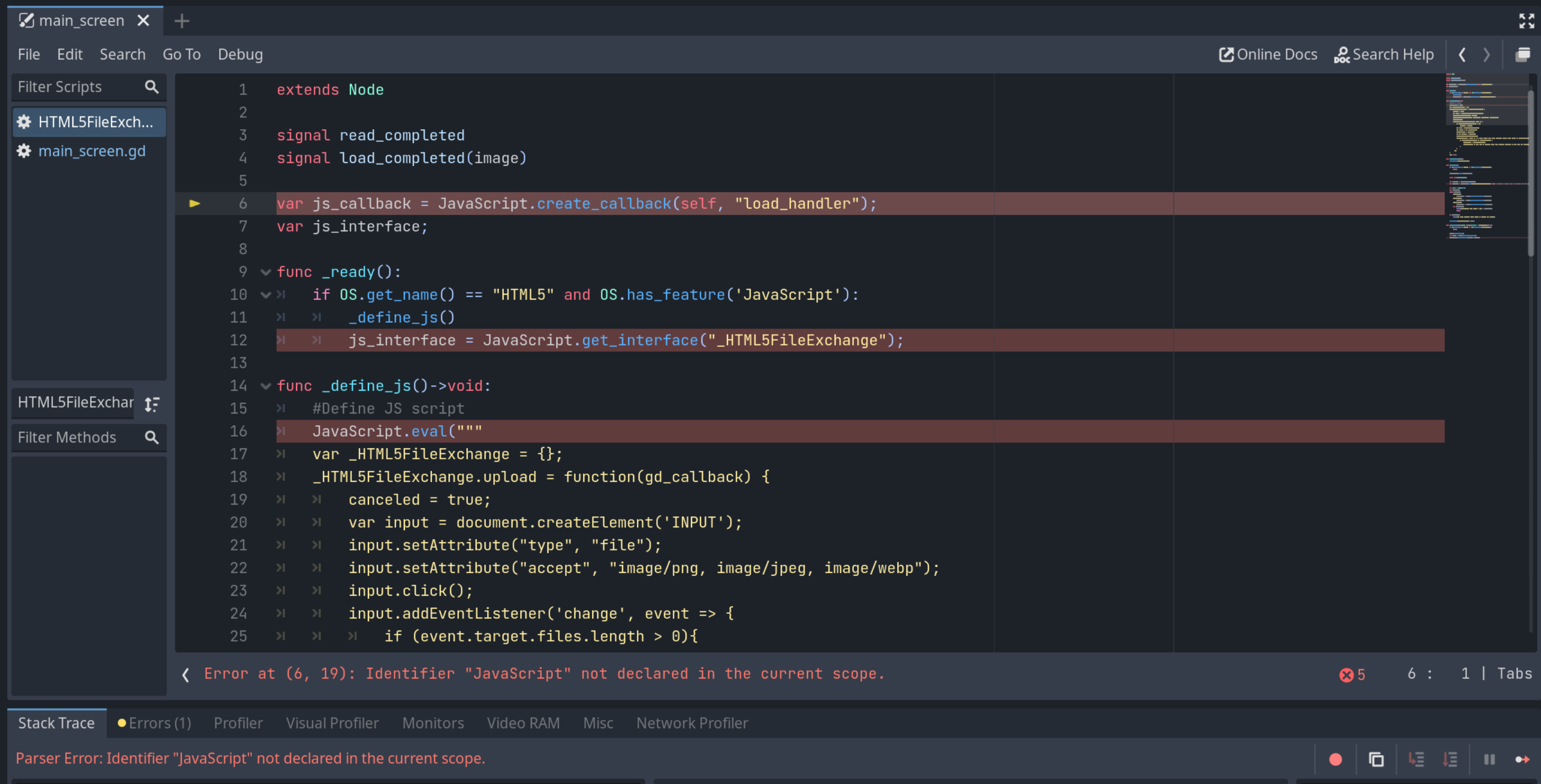
Pretty much as I described in my toot (text copied here). Is anyone aware of what I may need to fix to get this plugin to work again?

I'm hoping someone can help me with a Godot engine question. With the Q&A forum being read-only, I'm hoping Lemmy people can answer this one for me.

I'm trying to use this plugin for HTML5 downloads in Godot 4.1:

https://github.com/Pukkah/HTML5-File-Exchange-for-Godot

It's for Godot 3.4, but I've upgraded my projects and want to stay in 4.1.

Currently, it throws an error “Identifier JavaScript not defined in scope” (see screenshot).

Would anyone have an idea on what to fix here? Thanks!

991
992
993


I'm trying to make something in 2d where once the player reaches the end of the level, they're back at the beginning and it just keeps going like that. I could imagine how this could be done in terms of setting the player position, but if I have a scrolling parallax background, how would I make that match up reliably?

994
995
996
997
submitted 3 years ago by to c/godot@programming.dev
998


I've been looking into some tutorials, mainly this one - https://www.gotut.net/custom-key-bindings-in-godot-4/

My particular problem is that this and every other tutorial of key rebind only deals with 1 action = 1 keybind, while I want my actions to have 3 keybinds: 2 from the keyboard, 1 from a controller. Because of that, I can't simply empty the InputMap of a given action and add the newly pressed key.

After quite some time thinking and testing, I've managed to cobble together this code (based on the one from the link above) that works as I want: it removes the previous keybind and adds the new one, without messing any of the previous keys.

func _input(event):
	if !current_button:
		return
	if event is InputEventKey and $keypress.visible:
		var action: String
		match current_button.name:
			"rebind_jump":
				action = "game_jump"
		#Match repeat for each button/action, also "duplicated" for each of the alternative keys/buttons, as "alt_game_jump", etc
		#The following lines happen after the match defines the action 
		rebind(event,action, current_button.text)
		current_button.text = event.as_text()
		current_button = null


## The rebind function is called by sending the event, a string of the action proper and the button's current text as the "oldkey"
## rebind(event, "game_jump", $rebind_jump.text)
## After the event call, the button's text is set like this: $rebind_jump.text = event.as_text()

func rebind(event: InputEvent, action: String, oldkey:String):
	var existing : Dictionary = {}
	var key: String
	for ia in InputMap.action_get_events(action):
		#The split(" ") below happens because physical key presses are sent as "E (Phyisical)" or "Ctrl (Physical)"
		if ia.as_text().split(" ")[0] != "Joypad":
			key = ia.as_text().split(" ")[0]
		else:
			key = ia.as_text()
		existing[key] = ia
	for acts in InputMap.get_actions():
		#Removes the key from any other events 
		InputMap.action_erase_event(acts, event)
	InputMap.action_erase_event(action, existing[oldkey])
	InputMap.action_add_event(action, event)

While it works as is for keyboard rebind, I haven't tested it with a controller, as I don't have one around to test.

But my main question is: is this "ideal"? Is there a better/easier way to do this, rebind an action substituting only one key?

EDIT: Did a few tweaks on the code. One thing that I haven't figured out yet is a way to update a key that was already bound to another button. For example: if "Ctrl" is bound to jump, and I bind it to attack, it automatically unbinds from jump. If I then try to bind anything to that specific jump button, I'll get a Invalid Index error at the InputMap.action_erase_event(action, existing[oldkey])
999


I was seeing a video on common tricks FPS games use, and one of them was having the weapon render on a higher and/or separate layer to avoid having it clip with other objects in the world. How would something like this be done in Godot?

1000


Since I'm currently dealing with this problem, I'm gonna leave this info here, so anyone that comes across it knows what to do to fix it. Currently working on 4.1.1, should work on 3.x too

This is a problem that happens if you rename or delete files outside the Godot editor. Godot may warn you, or it may simply keep a cached copy and keep you completely unaware of it until you export the game and try to play it. It's always a good thing to check for these once in a while.

Related questions:

HOW TO FIX:

  • Create a dummy file, it can be a.PNG or whatever
  • Open the problematic scenes with a text editor
  • Change the path of the offending files to the dummy. They're usually at the top of the file, loaded as [ext_resource type="Texture" uid="" path=res://graphics/missing.png" id="10_0y2mn"
  • After saving, try to load the scene again. Be sure to run the Debug console version of Godot
  • If everything went well, it should open. Delete the dummy file from within the editor.

If that doesn't work, try this instead:

  • Open the problematic scenes with a text editor
  • Remove any lines that point to the offending files.
  • Run the Godot with the debug console
  • Attempt to open the scene in the editor. If it gives an error, check the debug console, the most likely error will be something like res://scenes/problemscene.tscn:3815 - Parse Error: Can't load cached ext-resource id: 10_0y2mn
  • Back in the text editor, look for that id within the scene. It'll likely be something similar to texture = ExtResource("10_0y2mn"). Delete it
  • Repeat the last 2 steps until the errors stop.
view more: ‹ prev next ›