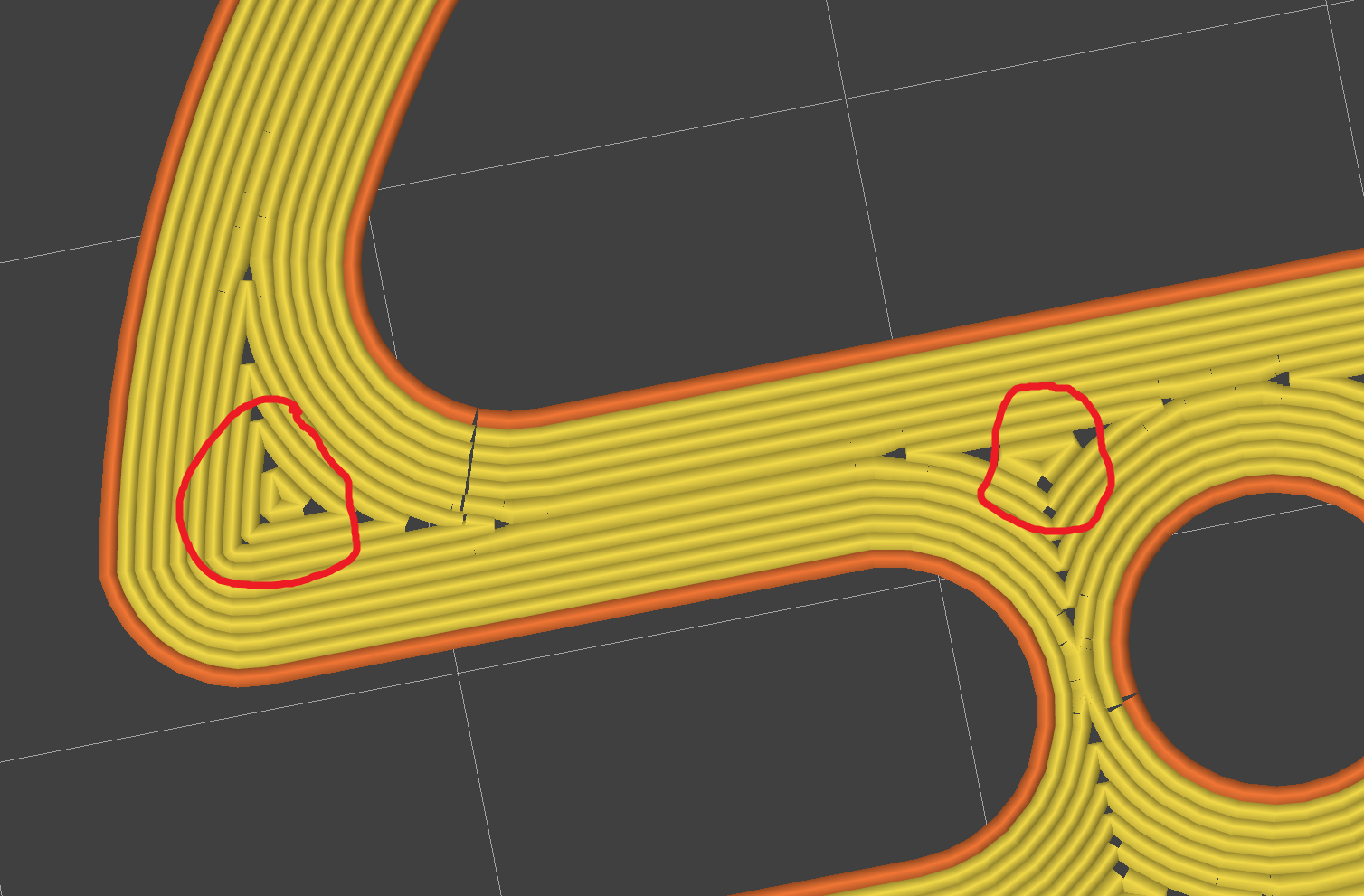
Hey y'all. I am trying to do a max perimeter style print, and want to know how to remove these smaller sections. I know I could reduce wall count until I remove them, however that isnt dynamic, and leaves larger gaps than I want in other areas. Is there a setting in PrusaSlicer im missing? I messed around with a few but they didnt give me the results I was looking for.

top 17 comments

sorted by: hot top controversial new old
[+] 11 points 3 years ago* (last edited 2 years ago) (2 children)
  • [–] 5 points 3 years ago

    Rectilinear.

    If OP wasn’t concerned about print times I’d say hillburt curves- but I like the texture it makes.

    Octagram spirals or Archimedean chords might also do it, it’s not like there’s one option for Infill…

  • source
  • parent
  • [–] 6 points 3 years ago (3 children)

    Why do you want to remove them?

  • source
  • hideshow 3 child comments
  • [–] [S] 2 points 3 years ago (2 children)

    They dramatically increase print times and increase blemishes. It's such a small surface area, that it just ends up creating blobs and shakes the printer.

  • source
  • parent
  • hideshow 2 child comments
  • [–] 2 points 3 years ago* (last edited 3 years ago) (1 child)

    If you’re finding you’re printer is shaking too much, consider adjusting the acceleration/jerk settings

    it’ll slow prints down- the maximum axcel/jerk will limit the top speed for the very short moves, longer moves remain mostly unaffected- but it will improve print quality.

  • source
  • parent
  • hideshow 1 child comment
  • [–] [S] 3 points 3 years ago

    I probably should adjust the acceleration settings. In this instance, Im just trying to optimize the print to cut down on print time. There's about 15 or so of these needlessly small sections per layer, so culling them would cut down the print time a bit.

  • source
  • parent
  • [–] 4 points 3 years ago

    The triangles are a result of the print "wall" changing thickness. Look at the corner on the left. All 10 perimeter lines go all the way round. If 10 go in and 10 come out, we need extra perimeter lines in the corner to fill the extra width. That's why there are triangles.

    I imagine you could fix this by making the walls the same thickness at all points, but without trying I can't be sure.

  • source
  • [–] 3 points 3 years ago (7 children)

    Can't you make the infill concentric? That should help.

  • source
  • hideshow 7 child comments
  • [–] 4 points 3 years ago (3 children)

    Isn't that possible only for top/bottom layer?

  • source
  • parent
  • hideshow 3 child comments
  • [–] 2 points 3 years ago* (2 children)

    Set top and bottom solid layers to 1. Set infill to concentric and then set infill percentage to 100%.

    It should get rid of most triangles.

  • source
  • parent
  • hideshow 2 child comments
  • [–] [S] 2 points 3 years ago (1 child)

    Unfortunately that has the same issue as well. These triangles are due to the 3 closest perimeter lines meeting, thus concentric ends up with the same issue.

  • source
  • parent
  • hideshow 1 child comment
  • [–] 0 points 3 years ago

    Then I am afraid you can't eliminate all triangles. If you had an extruder with variable extrusion width, then it might have worked. Why are you trying to eliminate the triangles anyway?

  • source
  • parent
  • [–] [S] 3 points 3 years ago (2 children)

    Yellow is perimeter lines, the goal is to not use infill at all, and to just use multiple perimeter passes.

  • source
  • parent
  • hideshow 2 child comments
  • [–] 2 points 3 years ago

    If this is a one off, you could try manually removing the lines of gcode for those traces. Though this would get tiresome if you wanted to do this a lot.

  • source
  • load more comments
    view more: next ›