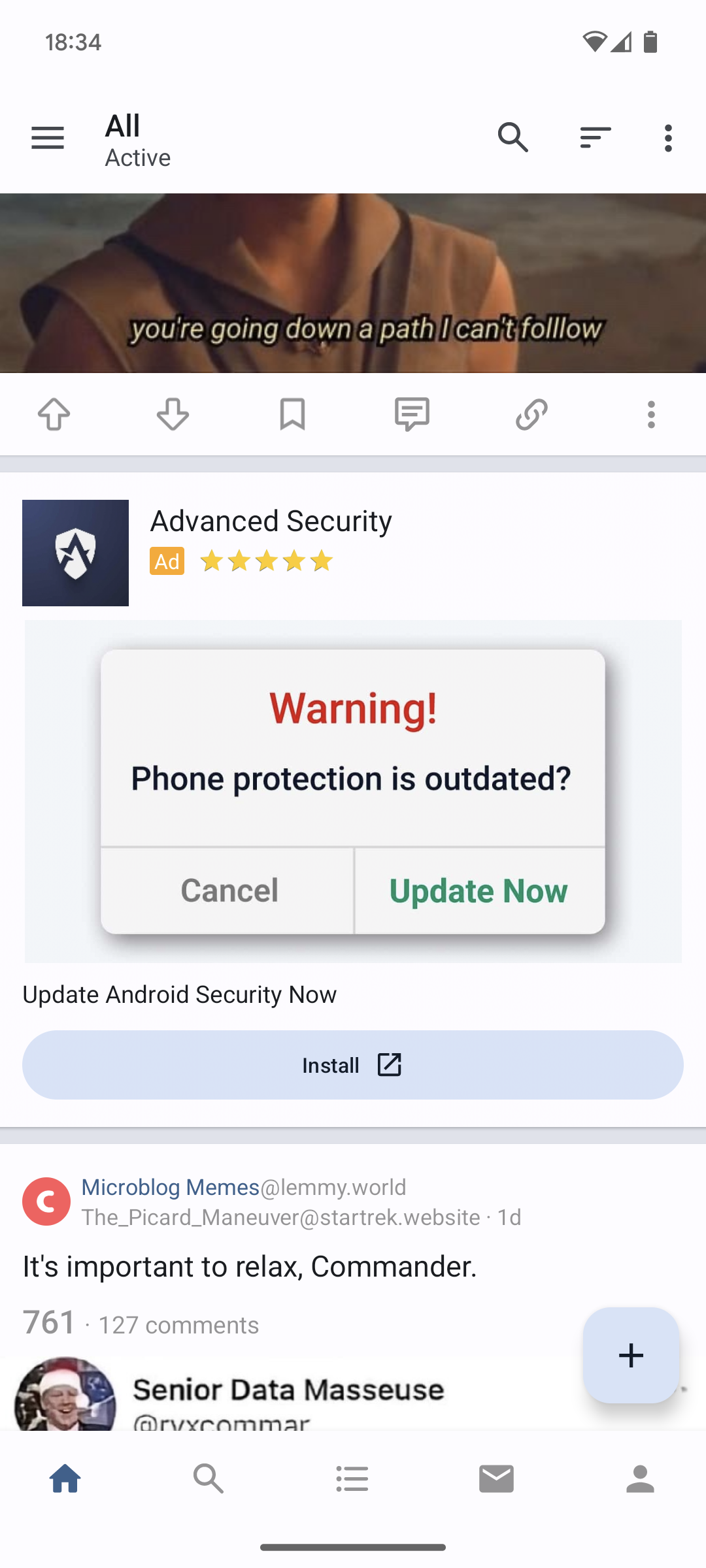
▲ 496 ▼ The Boost android client for Lemmy is displaying these dark pattern ads pretending to be system notifications. What security/privacy conscious Lemmy clients do you recommend? (lemmy.ml) submitted 2 years ago by golden_zealot@lemmy.ml to c/privacy@lemmy.ml 240 comments fedilink hide all child comments
[–] AlexisFR@jlai.lu -5 points 2 years ago (2 children) Unfortunately this break LTE internet. permalink fedilink source parent hideshow 4 child comments replies: [–] Thermal_shocked@lemmy.world 1 point 2 years ago (3 children) What phone? Never had an issue with private DNS on Android. Unfortunately IOS requires it setup on every connection, but works. https://adguard-dns.io/en/public-dns.html https://youtu.be/ovqRt_qGV7c?si=iMxKS_tMMyKJV6ie Make sure you restart the app after applying settings, should pickup new DNS and poof, 95% of ads are gone instantly. https://d3ward.github.io/toolz/adblock.html permalink fedilink source parent hideshow 6 child comments replies: [–] PipedLinkBot@feddit.rocks [B] 2 points 2 years ago Here is an alternative Piped link(s): https://piped.video/ovqRt_qGV7c?si=iMxKS_tMMyKJV6ie Piped is a privacy-respecting open-source alternative frontend to YouTube. I'm open-source; check me out at GitHub. permalink fedilink source parent [–] AlexisFR@jlai.lu 2 points 2 years ago (2 children) It's on a Fairphone 3 on Android 13. On Wi-Fi Private DNS works perfectly, but as soon as I switch to 4G the internet connection don't work anymore. As soon as I reset the private DNS to default it works as intended again. That's seems to be a carrier issue. permalink fedilink source parent hideshow 4 child comments replies: [–] scottywh@lemmy.world 1 point 2 years ago (1 child) Definitely sounds carrier related... Works fine for me on Android with TMO permalink fedilink source parent hideshow 2 child comments replies: [–] wreckedcarzz@lemmy.world 2 points 2 years ago Same, Pixel 8 Pro + GrapheneOS + NextDNS, stateside using AT&T, no problems with private DNS permalink fedilink source parent [–] Dehydrated@lemmy.world 1 point 2 years ago Your carrier probably blocks the DNS. Use a VPN, Proton VPN is trustworthy and reputable and they have a free option. permalink fedilink source parent [–] ModsAreCopsACAB@lemm.ee 0 points 2 years ago I'm using Blokada. Would you consider Adguard to be better? And if so could you explain why? I'm not sure I see the difference. permalink fedilink source parent [–] currawong@lemmy.ml 1 point 2 years ago It should not. Some phones don't play well with private DNS though, mostly entry level ones that thrives on spying. permalink fedilink source parent
[–] Thermal_shocked@lemmy.world 1 point 2 years ago (3 children) What phone? Never had an issue with private DNS on Android. Unfortunately IOS requires it setup on every connection, but works. https://adguard-dns.io/en/public-dns.html https://youtu.be/ovqRt_qGV7c?si=iMxKS_tMMyKJV6ie Make sure you restart the app after applying settings, should pickup new DNS and poof, 95% of ads are gone instantly. https://d3ward.github.io/toolz/adblock.html permalink fedilink source parent hideshow 6 child comments replies: [–] PipedLinkBot@feddit.rocks [B] 2 points 2 years ago Here is an alternative Piped link(s): https://piped.video/ovqRt_qGV7c?si=iMxKS_tMMyKJV6ie Piped is a privacy-respecting open-source alternative frontend to YouTube. I'm open-source; check me out at GitHub. permalink fedilink source parent [–] AlexisFR@jlai.lu 2 points 2 years ago (2 children) It's on a Fairphone 3 on Android 13. On Wi-Fi Private DNS works perfectly, but as soon as I switch to 4G the internet connection don't work anymore. As soon as I reset the private DNS to default it works as intended again. That's seems to be a carrier issue. permalink fedilink source parent hideshow 4 child comments replies: [–] scottywh@lemmy.world 1 point 2 years ago (1 child) Definitely sounds carrier related... Works fine for me on Android with TMO permalink fedilink source parent hideshow 2 child comments replies: [–] wreckedcarzz@lemmy.world 2 points 2 years ago Same, Pixel 8 Pro + GrapheneOS + NextDNS, stateside using AT&T, no problems with private DNS permalink fedilink source parent [–] Dehydrated@lemmy.world 1 point 2 years ago Your carrier probably blocks the DNS. Use a VPN, Proton VPN is trustworthy and reputable and they have a free option. permalink fedilink source parent [–] ModsAreCopsACAB@lemm.ee 0 points 2 years ago I'm using Blokada. Would you consider Adguard to be better? And if so could you explain why? I'm not sure I see the difference. permalink fedilink source parent
[–] PipedLinkBot@feddit.rocks [B] 2 points 2 years ago Here is an alternative Piped link(s): https://piped.video/ovqRt_qGV7c?si=iMxKS_tMMyKJV6ie Piped is a privacy-respecting open-source alternative frontend to YouTube. I'm open-source; check me out at GitHub. permalink fedilink source parent
[–] AlexisFR@jlai.lu 2 points 2 years ago (2 children) It's on a Fairphone 3 on Android 13. On Wi-Fi Private DNS works perfectly, but as soon as I switch to 4G the internet connection don't work anymore. As soon as I reset the private DNS to default it works as intended again. That's seems to be a carrier issue. permalink fedilink source parent hideshow 4 child comments replies: [–] scottywh@lemmy.world 1 point 2 years ago (1 child) Definitely sounds carrier related... Works fine for me on Android with TMO permalink fedilink source parent hideshow 2 child comments replies: [–] wreckedcarzz@lemmy.world 2 points 2 years ago Same, Pixel 8 Pro + GrapheneOS + NextDNS, stateside using AT&T, no problems with private DNS permalink fedilink source parent [–] Dehydrated@lemmy.world 1 point 2 years ago Your carrier probably blocks the DNS. Use a VPN, Proton VPN is trustworthy and reputable and they have a free option. permalink fedilink source parent
[–] scottywh@lemmy.world 1 point 2 years ago (1 child) Definitely sounds carrier related... Works fine for me on Android with TMO permalink fedilink source parent hideshow 2 child comments replies: [–] wreckedcarzz@lemmy.world 2 points 2 years ago Same, Pixel 8 Pro + GrapheneOS + NextDNS, stateside using AT&T, no problems with private DNS permalink fedilink source parent
[–] wreckedcarzz@lemmy.world 2 points 2 years ago Same, Pixel 8 Pro + GrapheneOS + NextDNS, stateside using AT&T, no problems with private DNS permalink fedilink source parent
[–] Dehydrated@lemmy.world 1 point 2 years ago Your carrier probably blocks the DNS. Use a VPN, Proton VPN is trustworthy and reputable and they have a free option. permalink fedilink source parent
[–] ModsAreCopsACAB@lemm.ee 0 points 2 years ago I'm using Blokada. Would you consider Adguard to be better? And if so could you explain why? I'm not sure I see the difference. permalink fedilink source parent
[–] currawong@lemmy.ml 1 point 2 years ago It should not. Some phones don't play well with private DNS though, mostly entry level ones that thrives on spying. permalink fedilink source parent