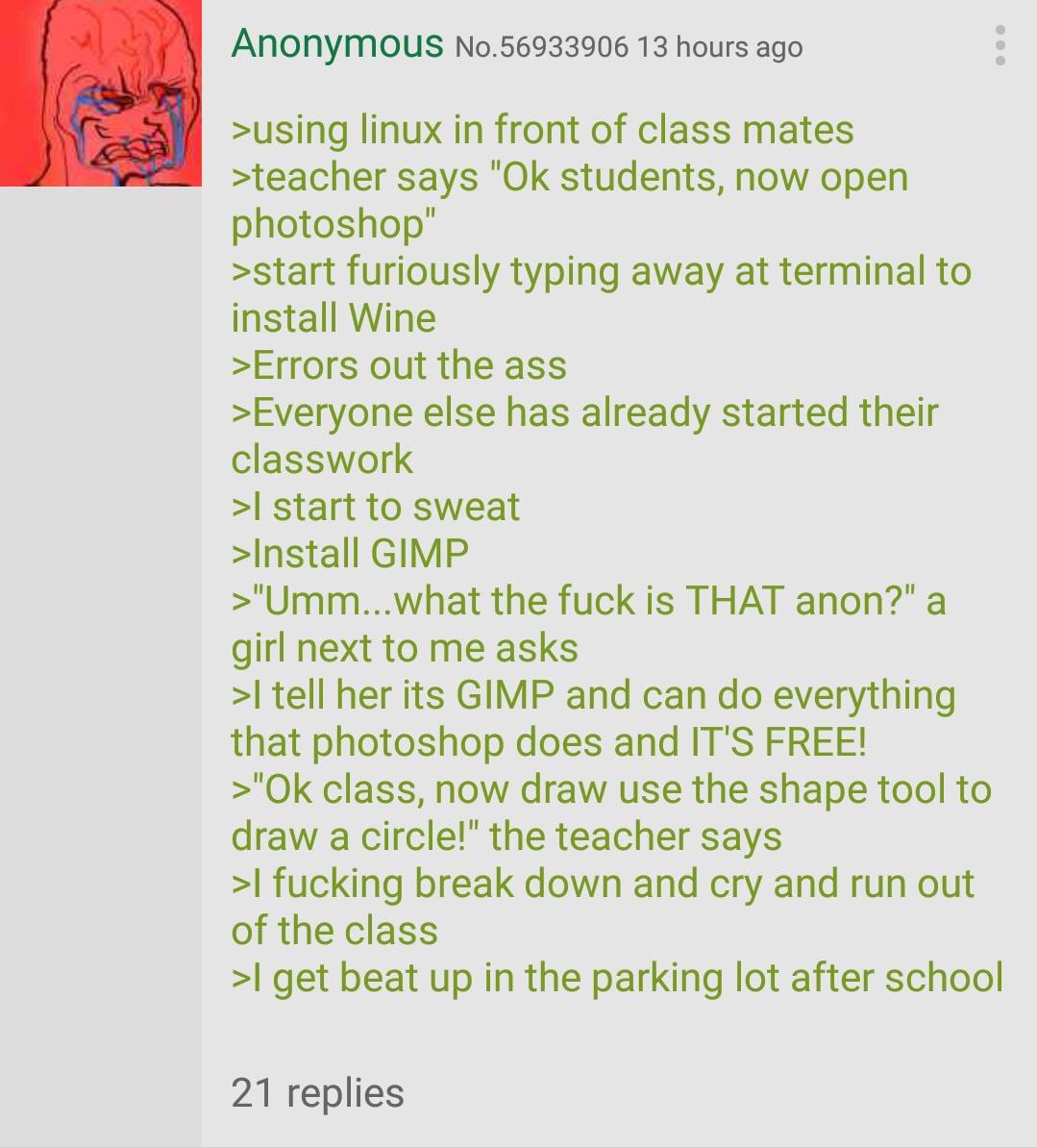
▲ 810 ▼ Anon has Photoshop class (lemmy.world) submitted 3 years ago by FrankTheHealer@lemmy.world to c/greentext@lemmy.ml 94 comments fedilink hide all child comments
[–] Armand1@lemmy.world 17 points 3 years ago* (8 children) I stopped using GIMP and started using https://www.photopea.com/. You get most Photoshop features for free (ad-supported) in a familiar interface and without having to install a large slow application. permalink fedilink source hideshow 8 child comments replies: [+] superkret@feddit.de 32 points 3 years ago* (last edited 3 years ago) (3 children) [deleted] permalink fedilink source parent hideshow 3 child comments replies: [–] Zoidsberg@lemmy.ca 5 points 3 years ago (1 child) I would rather eat my entire laptop than intentionally view an ad. permalink fedilink source parent hideshow 1 child comment replies: [–] Riven@lemmy.dbzer0.com 1 point 3 years ago Adblock homie. Not one ad on photopea permalink fedilink source parent [–] GetPsyched@lemmy.world 2 points 3 years ago I don't get this. Why not support the developers? No one ever donates so this is the next best thing permalink fedilink source parent [–] spindrift@lemmy.world 7 points 3 years ago (3 children) Photopea is amazing. Its 90% a clone of PS and is sooo much better than gimp. I used it today to remove a white background on some of our icons to get a transparent png. It was as easy as going i to the layer options, blend options, and drag the slider. It even has the option that you can hold alt and split the slider in 2 to get transparency blend as a gradient. This would be a nightmare in gimp, and photopea does it non destructively. And since its a web app you dont even have to install anything. Amazing. permalink fedilink source parent hideshow 3 child comments replies: [–] baronofclubs@lemmy.world 4 points 3 years ago (2 children) Nightmare is a bit hyperbolic I'd say. From memory, use the magic wand tool, select the white area. Selection menu, expand by 4 or 6 pixels. Colors menu, color to alpha, pick white. Done. permalink fedilink source parent hideshow 2 child comments replies: [–] spindrift@lemmy.world 0 points 3 years ago* (1 child) Sure, this can sort of get the job done with somewhat bad results. The icons in my case were complex, so a single click with magic wand wound not select all of the parts . Expand by 4 blurs the icons at the edges. This is actually pretty bad, and would result in lost detail and a washed out look. The operation in gimp is destructive, so tweaking in multiple steps is not really possible, and creates a bad workflow. No, Gimp is terrible and not up to the task at all. permalink fedilink source parent hideshow 1 child comment replies: [+] Aoxomoxoa35@lemmy.world 1 point 3 years ago [deleted] permalink fedilink source parent
[+] superkret@feddit.de 32 points 3 years ago* (last edited 3 years ago) (3 children) [deleted] permalink fedilink source parent hideshow 3 child comments replies: [–] Zoidsberg@lemmy.ca 5 points 3 years ago (1 child) I would rather eat my entire laptop than intentionally view an ad. permalink fedilink source parent hideshow 1 child comment replies: [–] Riven@lemmy.dbzer0.com 1 point 3 years ago Adblock homie. Not one ad on photopea permalink fedilink source parent [–] GetPsyched@lemmy.world 2 points 3 years ago I don't get this. Why not support the developers? No one ever donates so this is the next best thing permalink fedilink source parent
[–] Zoidsberg@lemmy.ca 5 points 3 years ago (1 child) I would rather eat my entire laptop than intentionally view an ad. permalink fedilink source parent hideshow 1 child comment replies: [–] Riven@lemmy.dbzer0.com 1 point 3 years ago Adblock homie. Not one ad on photopea permalink fedilink source parent
[–] Riven@lemmy.dbzer0.com 1 point 3 years ago Adblock homie. Not one ad on photopea permalink fedilink source parent
[–] GetPsyched@lemmy.world 2 points 3 years ago I don't get this. Why not support the developers? No one ever donates so this is the next best thing permalink fedilink source parent
[–] spindrift@lemmy.world 7 points 3 years ago (3 children) Photopea is amazing. Its 90% a clone of PS and is sooo much better than gimp. I used it today to remove a white background on some of our icons to get a transparent png. It was as easy as going i to the layer options, blend options, and drag the slider. It even has the option that you can hold alt and split the slider in 2 to get transparency blend as a gradient. This would be a nightmare in gimp, and photopea does it non destructively. And since its a web app you dont even have to install anything. Amazing. permalink fedilink source parent hideshow 3 child comments replies: [–] baronofclubs@lemmy.world 4 points 3 years ago (2 children) Nightmare is a bit hyperbolic I'd say. From memory, use the magic wand tool, select the white area. Selection menu, expand by 4 or 6 pixels. Colors menu, color to alpha, pick white. Done. permalink fedilink source parent hideshow 2 child comments replies: [–] spindrift@lemmy.world 0 points 3 years ago* (1 child) Sure, this can sort of get the job done with somewhat bad results. The icons in my case were complex, so a single click with magic wand wound not select all of the parts . Expand by 4 blurs the icons at the edges. This is actually pretty bad, and would result in lost detail and a washed out look. The operation in gimp is destructive, so tweaking in multiple steps is not really possible, and creates a bad workflow. No, Gimp is terrible and not up to the task at all. permalink fedilink source parent hideshow 1 child comment replies: [+] Aoxomoxoa35@lemmy.world 1 point 3 years ago [deleted] permalink fedilink source parent
[–] baronofclubs@lemmy.world 4 points 3 years ago (2 children) Nightmare is a bit hyperbolic I'd say. From memory, use the magic wand tool, select the white area. Selection menu, expand by 4 or 6 pixels. Colors menu, color to alpha, pick white. Done. permalink fedilink source parent hideshow 2 child comments replies: [–] spindrift@lemmy.world 0 points 3 years ago* (1 child) Sure, this can sort of get the job done with somewhat bad results. The icons in my case were complex, so a single click with magic wand wound not select all of the parts . Expand by 4 blurs the icons at the edges. This is actually pretty bad, and would result in lost detail and a washed out look. The operation in gimp is destructive, so tweaking in multiple steps is not really possible, and creates a bad workflow. No, Gimp is terrible and not up to the task at all. permalink fedilink source parent hideshow 1 child comment replies: [+] Aoxomoxoa35@lemmy.world 1 point 3 years ago [deleted] permalink fedilink source parent
[–] spindrift@lemmy.world 0 points 3 years ago* (1 child) Sure, this can sort of get the job done with somewhat bad results. The icons in my case were complex, so a single click with magic wand wound not select all of the parts . Expand by 4 blurs the icons at the edges. This is actually pretty bad, and would result in lost detail and a washed out look. The operation in gimp is destructive, so tweaking in multiple steps is not really possible, and creates a bad workflow. No, Gimp is terrible and not up to the task at all. permalink fedilink source parent hideshow 1 child comment replies: [+] Aoxomoxoa35@lemmy.world 1 point 3 years ago [deleted] permalink fedilink source parent