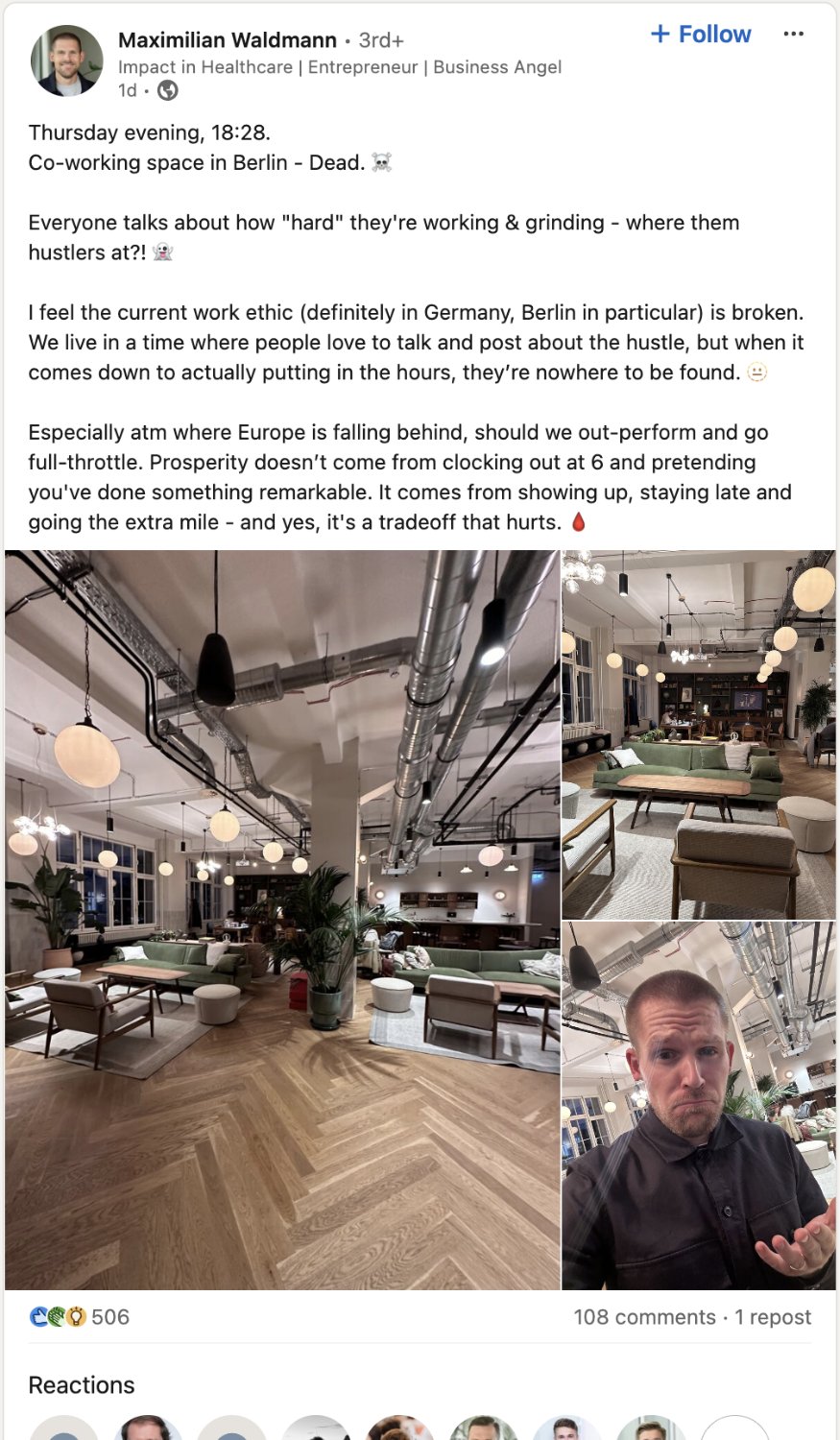
▲ 616 ▼ The office is empty at 6:30? Preposterous (sh.itjust.works) submitted 2 years ago by alphacyberranger@sh.itjust.works to c/linkedinlunatics@sh.itjust.works 140 comments fedilink hide all child comments
[–] Bougie_Birdie@lemmy.blahaj.zone 27 points 2 years ago (9 children) Pro tip - when replying to an email, schedule it to be sent at 8pm so they know you've got that sigma grindset permalink fedilink source parent hideshow 9 child comments replies: [–] P1nkman@lemmy.world 16 points 2 years ago* (8 children) Outlook will display the time "sent" as the time you hit send. Then they receive it at the scheduled time, and will be marked as the "received" time. Two different time stamps. permalink fedilink source parent hideshow 8 child comments replies: [–] Bougie_Birdie@lemmy.blahaj.zone 11 points 2 years ago (4 children) Well that's disappointing. What even is the point in scheduling a message then? Surely there's some way to spoof it, but I guess I've never really tried permalink fedilink source parent hideshow 4 child comments replies: [–] rumba@lemmy.zip 7 points 2 years ago (2 children) What even is the point Scheduling correspondence generally falls into one of a couple categories: This message contains information you don't want them to have until after an event. Raises, Layoffs, Reorgs It's 2am and you don't want to bother them at this hour. (more important for Slack) They're not in our timezone and you want it to hit the box when they're fresh to work on it. You don't want them to start a sprawling project at 4:30 on a Friday. It's the weekend and there's no reason for them to worry about it until Monday. permalink fedilink source parent hideshow 2 child comments replies: [–] prole@lemmy.blahaj.zone 5 points 2 years ago (1 child) It’s the weekend and there’s no reason for them to worry about it until Monday. Imagine checking work email on the weekend. I feel sorry for people with jobs like that. permalink fedilink source parent hideshow 1 child comment replies: [–] rumba@lemmy.zip 4 points 2 years ago I have a guy, he's amazing but he just does that. I have to be very careful to not to send him anything outside of normal work hours because he will spin up and do it and that's not what I want. permalink fedilink source parent [–] P1nkman@lemmy.world 6 points 2 years ago Trust me, I had to test it to see if I could use it, and was quite disappointed. permalink fedilink source parent [–] uranibaba@lemmy.world 7 points 2 years ago (2 children) Keep it in draft, schedule a script to click the button for you. permalink fedilink source parent hideshow 2 child comments replies: [–] P1nkman@lemmy.world 5 points 2 years ago* (1 child) True, but how could I do that on my work computer without admin access? I was barely allowed to install AutoHotKey. Also not allowed to keep the computer running 24/7. permalink fedilink source parent hideshow 1 child comment replies: [–] uranibaba@lemmy.world 3 points 2 years ago Can you run powershell 5.1? If you can do that add type definitons, PowerShell can control your mouse and click for you. If you have your mail in the browser, you can manually create javascript code to run at some point. permalink fedilink source parent
[–] P1nkman@lemmy.world 16 points 2 years ago* (8 children) Outlook will display the time "sent" as the time you hit send. Then they receive it at the scheduled time, and will be marked as the "received" time. Two different time stamps. permalink fedilink source parent hideshow 8 child comments replies: [–] Bougie_Birdie@lemmy.blahaj.zone 11 points 2 years ago (4 children) Well that's disappointing. What even is the point in scheduling a message then? Surely there's some way to spoof it, but I guess I've never really tried permalink fedilink source parent hideshow 4 child comments replies: [–] rumba@lemmy.zip 7 points 2 years ago (2 children) What even is the point Scheduling correspondence generally falls into one of a couple categories: This message contains information you don't want them to have until after an event. Raises, Layoffs, Reorgs It's 2am and you don't want to bother them at this hour. (more important for Slack) They're not in our timezone and you want it to hit the box when they're fresh to work on it. You don't want them to start a sprawling project at 4:30 on a Friday. It's the weekend and there's no reason for them to worry about it until Monday. permalink fedilink source parent hideshow 2 child comments replies: [–] prole@lemmy.blahaj.zone 5 points 2 years ago (1 child) It’s the weekend and there’s no reason for them to worry about it until Monday. Imagine checking work email on the weekend. I feel sorry for people with jobs like that. permalink fedilink source parent hideshow 1 child comment replies: [–] rumba@lemmy.zip 4 points 2 years ago I have a guy, he's amazing but he just does that. I have to be very careful to not to send him anything outside of normal work hours because he will spin up and do it and that's not what I want. permalink fedilink source parent [–] P1nkman@lemmy.world 6 points 2 years ago Trust me, I had to test it to see if I could use it, and was quite disappointed. permalink fedilink source parent [–] uranibaba@lemmy.world 7 points 2 years ago (2 children) Keep it in draft, schedule a script to click the button for you. permalink fedilink source parent hideshow 2 child comments replies: [–] P1nkman@lemmy.world 5 points 2 years ago* (1 child) True, but how could I do that on my work computer without admin access? I was barely allowed to install AutoHotKey. Also not allowed to keep the computer running 24/7. permalink fedilink source parent hideshow 1 child comment replies: [–] uranibaba@lemmy.world 3 points 2 years ago Can you run powershell 5.1? If you can do that add type definitons, PowerShell can control your mouse and click for you. If you have your mail in the browser, you can manually create javascript code to run at some point. permalink fedilink source parent
[–] Bougie_Birdie@lemmy.blahaj.zone 11 points 2 years ago (4 children) Well that's disappointing. What even is the point in scheduling a message then? Surely there's some way to spoof it, but I guess I've never really tried permalink fedilink source parent hideshow 4 child comments replies: [–] rumba@lemmy.zip 7 points 2 years ago (2 children) What even is the point Scheduling correspondence generally falls into one of a couple categories: This message contains information you don't want them to have until after an event. Raises, Layoffs, Reorgs It's 2am and you don't want to bother them at this hour. (more important for Slack) They're not in our timezone and you want it to hit the box when they're fresh to work on it. You don't want them to start a sprawling project at 4:30 on a Friday. It's the weekend and there's no reason for them to worry about it until Monday. permalink fedilink source parent hideshow 2 child comments replies: [–] prole@lemmy.blahaj.zone 5 points 2 years ago (1 child) It’s the weekend and there’s no reason for them to worry about it until Monday. Imagine checking work email on the weekend. I feel sorry for people with jobs like that. permalink fedilink source parent hideshow 1 child comment replies: [–] rumba@lemmy.zip 4 points 2 years ago I have a guy, he's amazing but he just does that. I have to be very careful to not to send him anything outside of normal work hours because he will spin up and do it and that's not what I want. permalink fedilink source parent [–] P1nkman@lemmy.world 6 points 2 years ago Trust me, I had to test it to see if I could use it, and was quite disappointed. permalink fedilink source parent
[–] rumba@lemmy.zip 7 points 2 years ago (2 children) What even is the point Scheduling correspondence generally falls into one of a couple categories: This message contains information you don't want them to have until after an event. Raises, Layoffs, Reorgs It's 2am and you don't want to bother them at this hour. (more important for Slack) They're not in our timezone and you want it to hit the box when they're fresh to work on it. You don't want them to start a sprawling project at 4:30 on a Friday. It's the weekend and there's no reason for them to worry about it until Monday. permalink fedilink source parent hideshow 2 child comments replies: [–] prole@lemmy.blahaj.zone 5 points 2 years ago (1 child) It’s the weekend and there’s no reason for them to worry about it until Monday. Imagine checking work email on the weekend. I feel sorry for people with jobs like that. permalink fedilink source parent hideshow 1 child comment replies: [–] rumba@lemmy.zip 4 points 2 years ago I have a guy, he's amazing but he just does that. I have to be very careful to not to send him anything outside of normal work hours because he will spin up and do it and that's not what I want. permalink fedilink source parent
[–] prole@lemmy.blahaj.zone 5 points 2 years ago (1 child) It’s the weekend and there’s no reason for them to worry about it until Monday. Imagine checking work email on the weekend. I feel sorry for people with jobs like that. permalink fedilink source parent hideshow 1 child comment replies: [–] rumba@lemmy.zip 4 points 2 years ago I have a guy, he's amazing but he just does that. I have to be very careful to not to send him anything outside of normal work hours because he will spin up and do it and that's not what I want. permalink fedilink source parent
[–] rumba@lemmy.zip 4 points 2 years ago I have a guy, he's amazing but he just does that. I have to be very careful to not to send him anything outside of normal work hours because he will spin up and do it and that's not what I want. permalink fedilink source parent
[–] P1nkman@lemmy.world 6 points 2 years ago Trust me, I had to test it to see if I could use it, and was quite disappointed. permalink fedilink source parent
[–] uranibaba@lemmy.world 7 points 2 years ago (2 children) Keep it in draft, schedule a script to click the button for you. permalink fedilink source parent hideshow 2 child comments replies: [–] P1nkman@lemmy.world 5 points 2 years ago* (1 child) True, but how could I do that on my work computer without admin access? I was barely allowed to install AutoHotKey. Also not allowed to keep the computer running 24/7. permalink fedilink source parent hideshow 1 child comment replies: [–] uranibaba@lemmy.world 3 points 2 years ago Can you run powershell 5.1? If you can do that add type definitons, PowerShell can control your mouse and click for you. If you have your mail in the browser, you can manually create javascript code to run at some point. permalink fedilink source parent
[–] P1nkman@lemmy.world 5 points 2 years ago* (1 child) True, but how could I do that on my work computer without admin access? I was barely allowed to install AutoHotKey. Also not allowed to keep the computer running 24/7. permalink fedilink source parent hideshow 1 child comment replies: [–] uranibaba@lemmy.world 3 points 2 years ago Can you run powershell 5.1? If you can do that add type definitons, PowerShell can control your mouse and click for you. If you have your mail in the browser, you can manually create javascript code to run at some point. permalink fedilink source parent
[–] uranibaba@lemmy.world 3 points 2 years ago Can you run powershell 5.1? If you can do that add type definitons, PowerShell can control your mouse and click for you. If you have your mail in the browser, you can manually create javascript code to run at some point. permalink fedilink source parent