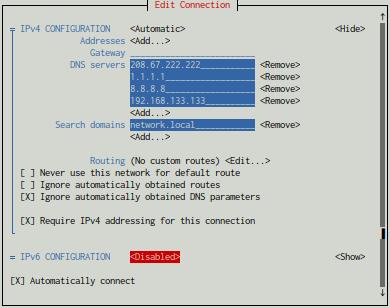
Hi everyone, so I'm having this weird issue. No matter the DNS and IP settings I use in NetworkManager, it will always generate the same resolv.conf.

resolv.conf

# Generated by NetworkManager
nameserver ::1

IPv6 is disabled by the way.
all 13 comments

sorted by: hot top controversial new old
[–] 6 points 3 years ago (1 child)

is /etc/resolv.conf a symlink?

  • source
  • hideshow 2 child comments
  • [–] 4 points 3 years ago (2 children)

    I'm not sure but this might have to do with systemd-resolved. You may want to disable it, that might fix your problem

  • source
  • hideshow 4 child comments
  • [–] [S] 2 points 3 years ago (1 child)

    Thought about that too, but I don't have resolvd nor systemd-resolv or systemd-resolve active. Nor do I have avahi running. Interesting isn't it?

  • source
  • parent
  • hideshow 2 child comments
  • [–] 2 points 3 years ago (2 children)

    Your /etc/resolv.conf is generated by your NetworkManager, which you know. Seeing the settings of NM can be confusing, and I had to try to remind myself. You can manually set these in NM or as someone else stated, systemd-resolved might be doing this as well. If you're changing this inside of NM and you're still seeing that, then something is changing it, again systemd-resolved is the most likely culprit but there are other applications that do DNS caching such as unbound, dnsmasq, etc.

    You can try seeing NM with the nmcli command such as the following:

    $ nmcli connection show Wired\ connection\ 1

    Note that "Wired\ connection\ 1" is the name of my connection, but yours might vary. If you hit TAB though a few times it should give you options.

    You'd then look for an option like ipv6.dns and if it's not set you'll see "--".

    However that "nameserver ::1" is just indicating the ipv6 loopback so on an ipv6 address your NM is saying look for something listening locally.

    If you don't like looking at nmcli you could also check nm-connection-editor command:

    $ nm-connection-editor

    And that opens a GUI for editting connections.

    There's also nmtui for NM's terminal user interface.

  • source
  • hideshow 4 child comments
  • [–] 2 points 3 years ago

    If you're getting DHCP, it could also be the DHCP server that's giving you this address. In a standard house you'll not set a specific IP address, but your router will give you one, and normally your home computers will also use your router for DNS. So potentially your router is setting this, but that'd be a misconfigured router really, because your router shouldn't be telling your computer to look at local loopback for DNS requests.

  • source
  • parent
  • [–] [S] 1 point 3 years ago

    Hi there, so,

    • all connections are configured with ignore for ipv6.
    • all connections had DNS set to "manual"/(ignore dhcp), and they are set to 208.67.222.222.
    • systemd-resolved is not installed in the system.

    Thanks!

  • source
  • parent
  • [–] [S] 2 points 3 years ago*

    I just found this file, now sure if it's related or not.

    $: cat /run/NetworkManager/resolv.conf
    # Generated by NetworkManager
    nameserver ::1
    

    and

    $: cat /run/NetworkManager/no-stub-resolv.conf
    # Generated by NetworkManager
    nameserver ::1
    

    Edit: those are generated from the /etc/resolv.conf NM generates.

  • source
  • [–] 1 point 3 years ago* (1 child)

    Move to ----> systemd-networkd 😉 . Btw check your system isn't also running something systemd-resolved that you probably will want to disable as you are using NM.

  • source
  • hideshow 2 child comments
  • [–] [S] 1 point 3 years ago

    I don't have systemd-resolved installed.

    [ 0 ] root@blaster:~#: apt remove --purge --auto-remove systemd-resolved
    Reading package lists...
    Building dependency tree...
    Reading state information...
    Package 'systemd-resolved' is not installed, so not removed
    0 upgraded, 0 newly installed, 0 to remove and 0 not upgraded.
    [ 0 ] root@blaster:~#: ps aux | grep systemd
    root         496  0.0  0.3 103956 56616 ?        Ss   10:17   0:05 /lib/systemd/systemd-journald
    root         520  0.0  0.0  27656  7352 ?        Ss   10:17   0:00 /lib/systemd/systemd-udevd
    systemd+     807  0.0  0.0  90528  7188 ?        Ssl  10:17   0:00 /lib/systemd/systemd-timesyncd
    message+     813  0.0  0.0  11956  6724 ?        Ss   10:17   0:05 /usr/bin/dbus-daemon --system --address=systemd: --nofork --nopidfile --systemd-activation --syslog-only
    root         835  0.0  0.0  50060  8000 ?        Ss   10:17   0:00 /lib/systemd/systemd-logind
    reglnx      6027  0.0  0.0  19868 11644 ?        Ss   10:19   0:01 /lib/systemd/systemd --user
    reglnx      6107  0.0  0.0  11148  6744 ?        Ss   10:19   0:01 /usr/bin/dbus-daemon --session --address=systemd: --nofork --nopidfile --systemd-activation --syslog-only
    reglnx      6514  0.0  0.1 594632 17812 ?        Ssl  10:19   0:00 /usr/libexec/gnome-session-binary --systemd-service --session=gnome
    root      639055  0.0  0.0   6332  2028 pts/1    S+   14:19   0:00 grep --color=auto systemd
    [ 0 ] root@blaster:~#: 
    
    
  • source
  • parent