I'm trying to make a 3d flight controller with a more arcade feel (think Ace Combat or Rogue Squadron). I'm somewhat new to working in 3d in Godot though and I don't really understand what methods I should be using to achieve this.

I want up and down to control pitch and left and right to be something of a hybrid roll/yaw. I'm setting direction to -transform.basis.z and multiplying that by speed, but when I use rotate_x() with the pitch, the plane itself rotates, but I only move flatly across the world plane rather than climbing up or down as I'm attempting to achieve.

What am I missing here?

all 15 comments

sorted by: hot top controversial new old
[–] 3 points 3 years ago* (last edited 3 years ago) (8 children)

(Not op, just an example)

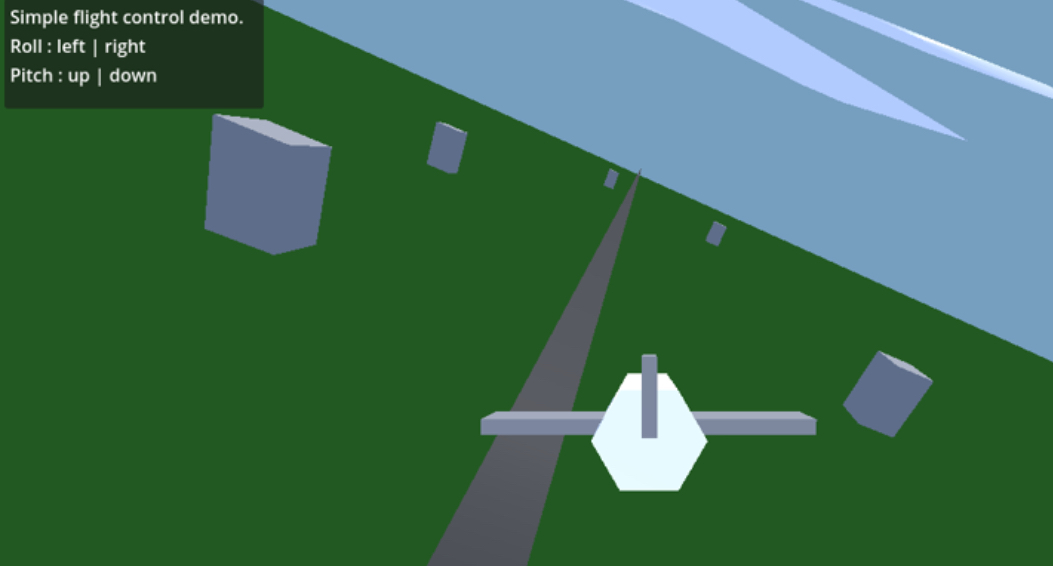
I don’t know an optimal answer here. I see various discussions online about flight control variants. However, here is a simple example I set up out of curiosity. Maybe useful? I’d like to hear about what you end up with.

Project code at: https://github.com/pipehat/godot41_flight_controller_example

————————————

plane controller script:


extends CharacterBody3D

var print_delay = 1
var next_print = 0
const SPEED_MPS = 500

func _physics_process(delta):
	var input_dir = Input.get_vector("ui_left", "ui_right", "ui_up", "ui_down")
	
	if next_print <= 0:
		print(input_dir)
		print("-z: ", -transform.basis.z)
		next_print = print_delay
	else:
		next_print -= delta
	
	var roll = -input_dir[0]
	var pitch = input_dir[1]
	
	rotate(transform.basis.z, roll * delta)
	rotate(transform.basis.x, pitch  * delta)

	velocity = -transform.basis.z * SPEED_MPS * delta
	move_and_slide()
  • source
  • hideshow 8 child comments
  • [–] 2 points 3 years ago (1 child)

    Not shown in the code here for simplicity, but in the project I added a little bit of yaw drift when banking.

    I’m sure there’s a more accurate way to simulate all this. Just messin around.

  • source
  • parent
  • hideshow 1 child comment
  • [–] [S] 1 point 3 years ago (2 children)

    I haven't gotten all the way there, but this was really helpful for taking some steps forward! Now I just need to figure out how to make the pitch controls rotate with the orientation of the plane. It wants to pull up or down relative to the world space it seems. Either that, or my maybe my rotation isn't rotating the local space at all?

    I'll keep working on this. Thanks for your help!

  • source
  • parent
  • hideshow 2 child comments
  • [–] 1 point 3 years ago (2 children)

    Where is the call to move_and_collide? There's no code here that will translate the position.

  • source
  • parent
  • hideshow 2 child comments
  • [–] 1 point 3 years ago (4 children)

    Hard to tell without seeing your code and node tree, but I reckon you are probably rotating a child (specifically the mesh instance). You should be rotating the root spatial of your player scene.

  • source
  • hideshow 4 child comments
  • [–] [S] 1 point 3 years ago (3 children)

    That's what I assumed at first too, but I am targeting the primary node which is a character3D. The mesh is a child of that and nothing is targeting it. This is the code I'm using:

    rotate_x(pitch * pitch_speed)

  • source
  • parent
  • hideshow 3 child comments
  • [–] 1 point 3 years ago* (2 children)

    Not tested but perhaps you should be using rotate_object_local - so the rotation is in the plane’s own axis, rather than that of its parent.

  • source
  • parent
  • hideshow 2 child comments
  • [–] [S] 1 point 3 years ago (1 child)

    I'm not sure I understand the difference in how these work. In the docs it makes it sound like the only difference between rotate_x() and rotate_object_local() is that rotate_x() specifies the rotation axis explicitly whereas rotate_object_local() takes it as an argument. Is that not the case? Sometimes the docs are confusing.

  • source
  • parent
  • hideshow 1 child comment
  • [–] 1 point 3 years ago* (last edited 3 years ago)

    Here's a nice tutorial vid - simpler arcade-like control than my example. Looks like this is for Godot 3.x but the concepts should translate to v4 pretty closely.

    https://www.youtube.com/watch?v=RsrwmAme_WA

  • source