Hi. I've been using powerlevel10k for a long time, but a few days ago, I decided I wanted to customize it a bit. I opened the .p10k.zsh file, and I was shocked. It's really massive, with TONS of options. I've been digging through for a few hours already, and it's absolutely amazing how much you can customize it without actually programming anything. I was wondering what other people are using. So my questions are:

  • Do you customize your shell prompt?
  • If yes, do you use some framework or pre-made theme, or do you just configure it the vanilla way in your bashrc/zshrc/...
  • How is your experiences with it so far?
  • Share screenshot of your prompts, please (Sadly, my prompt is currently half done, so I can't really share it)
you are viewing a single comment's thread
view the rest of the comments
[–] 4 points 3 years ago (2 children)

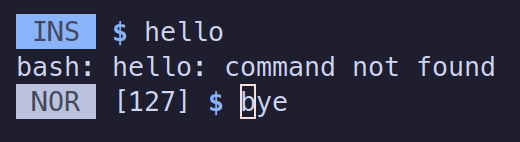
.bashrc:

# Prompt
# "Make it simple, just the dollar sign"
# "Say no more, fam"
# - if error code is not 0, then prepend [N] where N is the error code
# - if user is root, use red and #
blue='\e[34m'
red='\e[31m'
bold='\e[1m'
reset='\e[0m'
PS1='$( status=$?; [ $status -ne 0 ] && echo "[$status] ")\['"$blue""$bold"'\]$\['"$reset"'\] '

if [[ $EUID -eq 0 ]]; then
  PS1='$( status=$?; [ $status -ne 0 ] && echo "[$status] ")\['"$red""$bold"'\]#\['"$reset"'\] '
fi

.inputrc:

# vi mode, change to 'emacs' here if you prefer
set editing-mode vi

# vi INSERT prompt
set vi-ins-mode-string "\1\e[30;44m\2 INS \1\e[0m\2 "

# vi NORMAL prompt
set vi-cmd-mode-string "\1\e[30;47m\2 NOR \1\e[0m\2 "
  • source
  • hideshow 2 child comments