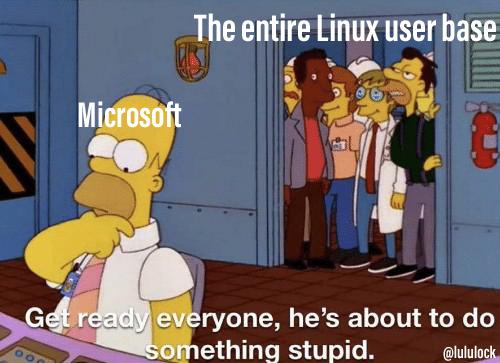
β² 1316 βΌ Windows 12 (lemmy.world) submitted 3 years ago by jroid8@lemmy.world to c/linuxmemes@lemmy.world 162 comments fedilink hide all child comments
[β] idefix@sh.itjust.works 15 points 3 years ago (9 children) I have no idea what Windows 11 contains... permalink fedilink source hideshow 18 child comments replies: [β] partial_accumen@lemmy.world 37 points 3 years ago Ads permalink fedilink source parent [β] NetherFalcon@kbin.social 25 points 3 years ago (1 child) it's basically just windows 10 but reskinned, rebranded and released as a "new operating system" permalink fedilink source parent hideshow 2 child comments replies: [β] suoko@kbin.social 6 points 3 years ago (1 child) They added android apps, they're slowly switching to Linux. It's going to be EdgeOS, maybe based on arch instead of gentoo? :-D permalink fedilink source parent hideshow 2 child comments replies: [β] Hikiru@lemmy.world 2 points 3 years ago (1 child) Nah, they wonβt. Then devs will start supporting Linux and windows will lose their one advantage over Linux: compatibility permalink fedilink source parent hideshow 2 child comments replies: [β] Perfide@reddthat.com 4 points 3 years ago Nah, they are. Satya Nadella was having an important medical procedure done when he noticed all the lab equipment still ran on xp. Not compatible with newer versions, staff said. Horrified that he was hooked up to machines that any black hat fucker could compromise in a heartbeat, he had an epiphany. Windows as it is now is a blight on the land, and the path of linux is the only way forward. High as fuck on morphine, Windows 12 was conceived: Linux based, open source, split taskbar fuck yeah, with blackjack and hookers*! By hookers, I of course mean one of those dancing stripper taskbar viruses middle-aged men love downloading. Now pre-installed! Source: I made it the fuck up permalink fedilink source parent [β] Dave@lemmy.nz 17 points 3 years ago (2 children) A start button that by default is not in the corner. permalink fedilink source parent hideshow 4 child comments replies: [β] ObviouslyNotBanana@lemmy.world 15 points 3 years ago* (last edited 3 years ago) (4 children) That's not the worst part. The worst part is how I can no longer move my taskbar to my second monitor. It is now locked to my first. permalink fedilink source parent hideshow 8 child comments replies: [β] nickhammes@lemmy.world 16 points 3 years ago (1 child) The worst part is how they make it nearly impossible to create a local user account. It's fine to have alternative account types, but that's not what I want on my own machine. permalink fedilink source parent hideshow 2 child comments replies: [β] ObviouslyNotBanana@lemmy.world 6 points 3 years ago Yeah that's irritating as well. permalink fedilink source parent [β] TopRamenBinLaden@sh.itjust.works 2 points 3 years ago* (last edited 3 years ago) (2 children) Go to settings -> personalization -> taskbar. There are many different options for the display of the taskbar on multiple monitor setups. Edit: I misunderstood and windows is dumb. You can only have the taskbar on your main display or all displays. You can make your second monitor the main display to have your taskbar appear there. permalink fedilink source parent hideshow 4 child comments replies: [β] ObviouslyNotBanana@lemmy.world 2 points 3 years ago* (last edited 3 years ago) (1 child) I guess it's been fixed since I last looked then! I'll have to go through it. It wasn't there when I installed W11, but there was a promise of adding it. I just didn't expect that to happen. My impression was that Microsoft thought it wasn't necessary and that users could just get used to it. edit: no, I can add it to all screens, but not move it to my second one. That doesn't solve the issue for me. permalink fedilink source parent hideshow 2 child comments replies: [β] TopRamenBinLaden@sh.itjust.works 2 points 3 years ago* (last edited 3 years ago) (1 child) I'm sorry I misunderstood what you were saying. After playing with it, you are right you can only put the taskbar on the main display or all displays. That is kind of dumb. The only way to do it is to make your second monitor the main display. Go to settings -> system -> display -> click monitor that you want taskbar on -> click multiple displays dropdown menu -> check make this my main display. permalink fedilink source parent hideshow 2 child comments replies: [β] ObviouslyNotBanana@lemmy.world 2 points 3 years ago Yep. That's the only way. Sadly many games have trouble handling that and start on the screen with the taskbar (which is my smaller screen in portrait orientation) with no way to move them. In windows 10 I was able to just drag the taskbar to my second monitor without a problem. permalink fedilink source parent [+] ObviouslyNotBanana@lemmy.world 1 point 3 years ago* [deleted] permalink fedilink source parent [β] monsieur_jean@kbin.social 1 point 3 years ago (1 child) System > Display > Personalization > Taskbar > Show my taskbar on all displays Back in my days people were expected to at least try before shitting on software they didn't like, eh. permalink fedilink source parent hideshow 2 child comments replies: [β] ObviouslyNotBanana@lemmy.world -1 points 3 years ago* (last edited 3 years ago) But mate, that doesn't do what I want. I want to be able to move my single taskbar to my second monitor. Not have a taskbar on every single screen. Back in my day people were expected to read a thread before commenting. permalink fedilink source parent [β] Entropywins@kbin.social 1 point 3 years ago (1 child) I can on win 11... permalink fedilink source parent hideshow 2 child comments replies: [β] ObviouslyNotBanana@lemmy.world 2 points 3 years ago* (last edited 3 years ago) They've finally added it back? Tbh I never thought they would. I'll have a look later. edit: there is no setting to move the taskbar, only to display it on multiple monitors. Those are different things. I want my first monitor to be empty, and my second to have the taskbar. W11 forces me to have my second monitor as my first, which makes games run in portrait and many of them do not have an ability to move between monitors. I want programs to treat my big monitor as the primary one, but I do not want the taskbar there. permalink fedilink source parent [β] James_Ryan@feddit.de 6 points 3 years ago (2 children) There is so much to critic about win 11 But that really is just personal preference.. permalink fedilink source parent hideshow 4 child comments replies: [β] IceMan@lemmy.one 5 points 3 years ago (1 child) Sure, which side is default (or other small nuisances) might be preference, but if you take away the option to customize (which was once there) the critic is valid IMO. permalink fedilink source parent hideshow 2 child comments replies: [β] Orygin@sh.itjust.works -1 points 3 years ago You can no longer move the start button to the right? Last time I used 11 I still could permalink fedilink source parent [β] Dave@lemmy.nz 3 points 3 years ago I don't actually use Windows 11 so this is the only thing I know to complain about. permalink fedilink source parent [β] s_s@lemmy.one 5 points 3 years ago* (1 child) Each new version of Windows is just Microsoft trying to further tighten the screws on its captive userbase. They've not brought anything of real value to customers in years. permalink fedilink source parent hideshow 2 child comments replies: [β] WhiskyTangoFoxtrot@lemmy.world 1 point 3 years ago Theyβve not brought anything of real value to customers in years. They made some half-decent BASIC interpreters for 8-bit computers. That's about it. permalink fedilink source parent [β] johnnybravo@lemm.ee 5 points 3 years ago* (last edited 3 years ago) Malware, Adware, Spyware permalink fedilink source parent [β] Blackmist@feddit.uk 4 points 3 years ago It's W10 but they moved the start bar to the middle so it looks more like a Mac. permalink fedilink source parent [β] dudewitbow@lemmy.ml 4 points 3 years ago outside of the more neutral/negative features people mentioned, some of the major additions is better windows snap management (presets for organizing windows on a screen, and adjusting window sizes), and tabbed folders. It's also meant to be used for windows subsystem for android for android app usage, but you can technically do that with windows 10 with some workarounds. permalink fedilink source parent [β] const_void@lemmy.ml 3 points 3 years ago* More ways to direct you to Bing, trash political news and celebrity gossip permalink fedilink source parent [β] Ricaz@lemmy.ml 1 point 3 years ago The only interesting feature is WSL2 with the possibility to "natively" mount Linux filesystems. permalink fedilink source parent
[β] NetherFalcon@kbin.social 25 points 3 years ago (1 child) it's basically just windows 10 but reskinned, rebranded and released as a "new operating system" permalink fedilink source parent hideshow 2 child comments replies: [β] suoko@kbin.social 6 points 3 years ago (1 child) They added android apps, they're slowly switching to Linux. It's going to be EdgeOS, maybe based on arch instead of gentoo? :-D permalink fedilink source parent hideshow 2 child comments replies: [β] Hikiru@lemmy.world 2 points 3 years ago (1 child) Nah, they wonβt. Then devs will start supporting Linux and windows will lose their one advantage over Linux: compatibility permalink fedilink source parent hideshow 2 child comments replies: [β] Perfide@reddthat.com 4 points 3 years ago Nah, they are. Satya Nadella was having an important medical procedure done when he noticed all the lab equipment still ran on xp. Not compatible with newer versions, staff said. Horrified that he was hooked up to machines that any black hat fucker could compromise in a heartbeat, he had an epiphany. Windows as it is now is a blight on the land, and the path of linux is the only way forward. High as fuck on morphine, Windows 12 was conceived: Linux based, open source, split taskbar fuck yeah, with blackjack and hookers*! By hookers, I of course mean one of those dancing stripper taskbar viruses middle-aged men love downloading. Now pre-installed! Source: I made it the fuck up permalink fedilink source parent
[β] suoko@kbin.social 6 points 3 years ago (1 child) They added android apps, they're slowly switching to Linux. It's going to be EdgeOS, maybe based on arch instead of gentoo? :-D permalink fedilink source parent hideshow 2 child comments replies: [β] Hikiru@lemmy.world 2 points 3 years ago (1 child) Nah, they wonβt. Then devs will start supporting Linux and windows will lose their one advantage over Linux: compatibility permalink fedilink source parent hideshow 2 child comments replies: [β] Perfide@reddthat.com 4 points 3 years ago Nah, they are. Satya Nadella was having an important medical procedure done when he noticed all the lab equipment still ran on xp. Not compatible with newer versions, staff said. Horrified that he was hooked up to machines that any black hat fucker could compromise in a heartbeat, he had an epiphany. Windows as it is now is a blight on the land, and the path of linux is the only way forward. High as fuck on morphine, Windows 12 was conceived: Linux based, open source, split taskbar fuck yeah, with blackjack and hookers*! By hookers, I of course mean one of those dancing stripper taskbar viruses middle-aged men love downloading. Now pre-installed! Source: I made it the fuck up permalink fedilink source parent
[β] Hikiru@lemmy.world 2 points 3 years ago (1 child) Nah, they wonβt. Then devs will start supporting Linux and windows will lose their one advantage over Linux: compatibility permalink fedilink source parent hideshow 2 child comments replies: [β] Perfide@reddthat.com 4 points 3 years ago Nah, they are. Satya Nadella was having an important medical procedure done when he noticed all the lab equipment still ran on xp. Not compatible with newer versions, staff said. Horrified that he was hooked up to machines that any black hat fucker could compromise in a heartbeat, he had an epiphany. Windows as it is now is a blight on the land, and the path of linux is the only way forward. High as fuck on morphine, Windows 12 was conceived: Linux based, open source, split taskbar fuck yeah, with blackjack and hookers*! By hookers, I of course mean one of those dancing stripper taskbar viruses middle-aged men love downloading. Now pre-installed! Source: I made it the fuck up permalink fedilink source parent
[β] Perfide@reddthat.com 4 points 3 years ago Nah, they are. Satya Nadella was having an important medical procedure done when he noticed all the lab equipment still ran on xp. Not compatible with newer versions, staff said. Horrified that he was hooked up to machines that any black hat fucker could compromise in a heartbeat, he had an epiphany. Windows as it is now is a blight on the land, and the path of linux is the only way forward. High as fuck on morphine, Windows 12 was conceived: Linux based, open source, split taskbar fuck yeah, with blackjack and hookers*! By hookers, I of course mean one of those dancing stripper taskbar viruses middle-aged men love downloading. Now pre-installed! Source: I made it the fuck up permalink fedilink source parent
[β] Dave@lemmy.nz 17 points 3 years ago (2 children) A start button that by default is not in the corner. permalink fedilink source parent hideshow 4 child comments replies: [β] ObviouslyNotBanana@lemmy.world 15 points 3 years ago* (last edited 3 years ago) (4 children) That's not the worst part. The worst part is how I can no longer move my taskbar to my second monitor. It is now locked to my first. permalink fedilink source parent hideshow 8 child comments replies: [β] nickhammes@lemmy.world 16 points 3 years ago (1 child) The worst part is how they make it nearly impossible to create a local user account. It's fine to have alternative account types, but that's not what I want on my own machine. permalink fedilink source parent hideshow 2 child comments replies: [β] ObviouslyNotBanana@lemmy.world 6 points 3 years ago Yeah that's irritating as well. permalink fedilink source parent [β] TopRamenBinLaden@sh.itjust.works 2 points 3 years ago* (last edited 3 years ago) (2 children) Go to settings -> personalization -> taskbar. There are many different options for the display of the taskbar on multiple monitor setups. Edit: I misunderstood and windows is dumb. You can only have the taskbar on your main display or all displays. You can make your second monitor the main display to have your taskbar appear there. permalink fedilink source parent hideshow 4 child comments replies: [β] ObviouslyNotBanana@lemmy.world 2 points 3 years ago* (last edited 3 years ago) (1 child) I guess it's been fixed since I last looked then! I'll have to go through it. It wasn't there when I installed W11, but there was a promise of adding it. I just didn't expect that to happen. My impression was that Microsoft thought it wasn't necessary and that users could just get used to it. edit: no, I can add it to all screens, but not move it to my second one. That doesn't solve the issue for me. permalink fedilink source parent hideshow 2 child comments replies: [β] TopRamenBinLaden@sh.itjust.works 2 points 3 years ago* (last edited 3 years ago) (1 child) I'm sorry I misunderstood what you were saying. After playing with it, you are right you can only put the taskbar on the main display or all displays. That is kind of dumb. The only way to do it is to make your second monitor the main display. Go to settings -> system -> display -> click monitor that you want taskbar on -> click multiple displays dropdown menu -> check make this my main display. permalink fedilink source parent hideshow 2 child comments replies: [β] ObviouslyNotBanana@lemmy.world 2 points 3 years ago Yep. That's the only way. Sadly many games have trouble handling that and start on the screen with the taskbar (which is my smaller screen in portrait orientation) with no way to move them. In windows 10 I was able to just drag the taskbar to my second monitor without a problem. permalink fedilink source parent [+] ObviouslyNotBanana@lemmy.world 1 point 3 years ago* [deleted] permalink fedilink source parent [β] monsieur_jean@kbin.social 1 point 3 years ago (1 child) System > Display > Personalization > Taskbar > Show my taskbar on all displays Back in my days people were expected to at least try before shitting on software they didn't like, eh. permalink fedilink source parent hideshow 2 child comments replies: [β] ObviouslyNotBanana@lemmy.world -1 points 3 years ago* (last edited 3 years ago) But mate, that doesn't do what I want. I want to be able to move my single taskbar to my second monitor. Not have a taskbar on every single screen. Back in my day people were expected to read a thread before commenting. permalink fedilink source parent [β] Entropywins@kbin.social 1 point 3 years ago (1 child) I can on win 11... permalink fedilink source parent hideshow 2 child comments replies: [β] ObviouslyNotBanana@lemmy.world 2 points 3 years ago* (last edited 3 years ago) They've finally added it back? Tbh I never thought they would. I'll have a look later. edit: there is no setting to move the taskbar, only to display it on multiple monitors. Those are different things. I want my first monitor to be empty, and my second to have the taskbar. W11 forces me to have my second monitor as my first, which makes games run in portrait and many of them do not have an ability to move between monitors. I want programs to treat my big monitor as the primary one, but I do not want the taskbar there. permalink fedilink source parent [β] James_Ryan@feddit.de 6 points 3 years ago (2 children) There is so much to critic about win 11 But that really is just personal preference.. permalink fedilink source parent hideshow 4 child comments replies: [β] IceMan@lemmy.one 5 points 3 years ago (1 child) Sure, which side is default (or other small nuisances) might be preference, but if you take away the option to customize (which was once there) the critic is valid IMO. permalink fedilink source parent hideshow 2 child comments replies: [β] Orygin@sh.itjust.works -1 points 3 years ago You can no longer move the start button to the right? Last time I used 11 I still could permalink fedilink source parent [β] Dave@lemmy.nz 3 points 3 years ago I don't actually use Windows 11 so this is the only thing I know to complain about. permalink fedilink source parent
[β] ObviouslyNotBanana@lemmy.world 15 points 3 years ago* (last edited 3 years ago) (4 children) That's not the worst part. The worst part is how I can no longer move my taskbar to my second monitor. It is now locked to my first. permalink fedilink source parent hideshow 8 child comments replies: [β] nickhammes@lemmy.world 16 points 3 years ago (1 child) The worst part is how they make it nearly impossible to create a local user account. It's fine to have alternative account types, but that's not what I want on my own machine. permalink fedilink source parent hideshow 2 child comments replies: [β] ObviouslyNotBanana@lemmy.world 6 points 3 years ago Yeah that's irritating as well. permalink fedilink source parent [β] TopRamenBinLaden@sh.itjust.works 2 points 3 years ago* (last edited 3 years ago) (2 children) Go to settings -> personalization -> taskbar. There are many different options for the display of the taskbar on multiple monitor setups. Edit: I misunderstood and windows is dumb. You can only have the taskbar on your main display or all displays. You can make your second monitor the main display to have your taskbar appear there. permalink fedilink source parent hideshow 4 child comments replies: [β] ObviouslyNotBanana@lemmy.world 2 points 3 years ago* (last edited 3 years ago) (1 child) I guess it's been fixed since I last looked then! I'll have to go through it. It wasn't there when I installed W11, but there was a promise of adding it. I just didn't expect that to happen. My impression was that Microsoft thought it wasn't necessary and that users could just get used to it. edit: no, I can add it to all screens, but not move it to my second one. That doesn't solve the issue for me. permalink fedilink source parent hideshow 2 child comments replies: [β] TopRamenBinLaden@sh.itjust.works 2 points 3 years ago* (last edited 3 years ago) (1 child) I'm sorry I misunderstood what you were saying. After playing with it, you are right you can only put the taskbar on the main display or all displays. That is kind of dumb. The only way to do it is to make your second monitor the main display. Go to settings -> system -> display -> click monitor that you want taskbar on -> click multiple displays dropdown menu -> check make this my main display. permalink fedilink source parent hideshow 2 child comments replies: [β] ObviouslyNotBanana@lemmy.world 2 points 3 years ago Yep. That's the only way. Sadly many games have trouble handling that and start on the screen with the taskbar (which is my smaller screen in portrait orientation) with no way to move them. In windows 10 I was able to just drag the taskbar to my second monitor without a problem. permalink fedilink source parent [+] ObviouslyNotBanana@lemmy.world 1 point 3 years ago* [deleted] permalink fedilink source parent [β] monsieur_jean@kbin.social 1 point 3 years ago (1 child) System > Display > Personalization > Taskbar > Show my taskbar on all displays Back in my days people were expected to at least try before shitting on software they didn't like, eh. permalink fedilink source parent hideshow 2 child comments replies: [β] ObviouslyNotBanana@lemmy.world -1 points 3 years ago* (last edited 3 years ago) But mate, that doesn't do what I want. I want to be able to move my single taskbar to my second monitor. Not have a taskbar on every single screen. Back in my day people were expected to read a thread before commenting. permalink fedilink source parent [β] Entropywins@kbin.social 1 point 3 years ago (1 child) I can on win 11... permalink fedilink source parent hideshow 2 child comments replies: [β] ObviouslyNotBanana@lemmy.world 2 points 3 years ago* (last edited 3 years ago) They've finally added it back? Tbh I never thought they would. I'll have a look later. edit: there is no setting to move the taskbar, only to display it on multiple monitors. Those are different things. I want my first monitor to be empty, and my second to have the taskbar. W11 forces me to have my second monitor as my first, which makes games run in portrait and many of them do not have an ability to move between monitors. I want programs to treat my big monitor as the primary one, but I do not want the taskbar there. permalink fedilink source parent
[β] nickhammes@lemmy.world 16 points 3 years ago (1 child) The worst part is how they make it nearly impossible to create a local user account. It's fine to have alternative account types, but that's not what I want on my own machine. permalink fedilink source parent hideshow 2 child comments replies: [β] ObviouslyNotBanana@lemmy.world 6 points 3 years ago Yeah that's irritating as well. permalink fedilink source parent
[β] ObviouslyNotBanana@lemmy.world 6 points 3 years ago Yeah that's irritating as well. permalink fedilink source parent
[β] TopRamenBinLaden@sh.itjust.works 2 points 3 years ago* (last edited 3 years ago) (2 children) Go to settings -> personalization -> taskbar. There are many different options for the display of the taskbar on multiple monitor setups. Edit: I misunderstood and windows is dumb. You can only have the taskbar on your main display or all displays. You can make your second monitor the main display to have your taskbar appear there. permalink fedilink source parent hideshow 4 child comments replies: [β] ObviouslyNotBanana@lemmy.world 2 points 3 years ago* (last edited 3 years ago) (1 child) I guess it's been fixed since I last looked then! I'll have to go through it. It wasn't there when I installed W11, but there was a promise of adding it. I just didn't expect that to happen. My impression was that Microsoft thought it wasn't necessary and that users could just get used to it. edit: no, I can add it to all screens, but not move it to my second one. That doesn't solve the issue for me. permalink fedilink source parent hideshow 2 child comments replies: [β] TopRamenBinLaden@sh.itjust.works 2 points 3 years ago* (last edited 3 years ago) (1 child) I'm sorry I misunderstood what you were saying. After playing with it, you are right you can only put the taskbar on the main display or all displays. That is kind of dumb. The only way to do it is to make your second monitor the main display. Go to settings -> system -> display -> click monitor that you want taskbar on -> click multiple displays dropdown menu -> check make this my main display. permalink fedilink source parent hideshow 2 child comments replies: [β] ObviouslyNotBanana@lemmy.world 2 points 3 years ago Yep. That's the only way. Sadly many games have trouble handling that and start on the screen with the taskbar (which is my smaller screen in portrait orientation) with no way to move them. In windows 10 I was able to just drag the taskbar to my second monitor without a problem. permalink fedilink source parent [+] ObviouslyNotBanana@lemmy.world 1 point 3 years ago* [deleted] permalink fedilink source parent
[β] ObviouslyNotBanana@lemmy.world 2 points 3 years ago* (last edited 3 years ago) (1 child) I guess it's been fixed since I last looked then! I'll have to go through it. It wasn't there when I installed W11, but there was a promise of adding it. I just didn't expect that to happen. My impression was that Microsoft thought it wasn't necessary and that users could just get used to it. edit: no, I can add it to all screens, but not move it to my second one. That doesn't solve the issue for me. permalink fedilink source parent hideshow 2 child comments replies: [β] TopRamenBinLaden@sh.itjust.works 2 points 3 years ago* (last edited 3 years ago) (1 child) I'm sorry I misunderstood what you were saying. After playing with it, you are right you can only put the taskbar on the main display or all displays. That is kind of dumb. The only way to do it is to make your second monitor the main display. Go to settings -> system -> display -> click monitor that you want taskbar on -> click multiple displays dropdown menu -> check make this my main display. permalink fedilink source parent hideshow 2 child comments replies: [β] ObviouslyNotBanana@lemmy.world 2 points 3 years ago Yep. That's the only way. Sadly many games have trouble handling that and start on the screen with the taskbar (which is my smaller screen in portrait orientation) with no way to move them. In windows 10 I was able to just drag the taskbar to my second monitor without a problem. permalink fedilink source parent
[β] TopRamenBinLaden@sh.itjust.works 2 points 3 years ago* (last edited 3 years ago) (1 child) I'm sorry I misunderstood what you were saying. After playing with it, you are right you can only put the taskbar on the main display or all displays. That is kind of dumb. The only way to do it is to make your second monitor the main display. Go to settings -> system -> display -> click monitor that you want taskbar on -> click multiple displays dropdown menu -> check make this my main display. permalink fedilink source parent hideshow 2 child comments replies: [β] ObviouslyNotBanana@lemmy.world 2 points 3 years ago Yep. That's the only way. Sadly many games have trouble handling that and start on the screen with the taskbar (which is my smaller screen in portrait orientation) with no way to move them. In windows 10 I was able to just drag the taskbar to my second monitor without a problem. permalink fedilink source parent
[β] ObviouslyNotBanana@lemmy.world 2 points 3 years ago Yep. That's the only way. Sadly many games have trouble handling that and start on the screen with the taskbar (which is my smaller screen in portrait orientation) with no way to move them. In windows 10 I was able to just drag the taskbar to my second monitor without a problem. permalink fedilink source parent
[β] monsieur_jean@kbin.social 1 point 3 years ago (1 child) System > Display > Personalization > Taskbar > Show my taskbar on all displays Back in my days people were expected to at least try before shitting on software they didn't like, eh. permalink fedilink source parent hideshow 2 child comments replies: [β] ObviouslyNotBanana@lemmy.world -1 points 3 years ago* (last edited 3 years ago) But mate, that doesn't do what I want. I want to be able to move my single taskbar to my second monitor. Not have a taskbar on every single screen. Back in my day people were expected to read a thread before commenting. permalink fedilink source parent
[β] ObviouslyNotBanana@lemmy.world -1 points 3 years ago* (last edited 3 years ago) But mate, that doesn't do what I want. I want to be able to move my single taskbar to my second monitor. Not have a taskbar on every single screen. Back in my day people were expected to read a thread before commenting. permalink fedilink source parent
[β] Entropywins@kbin.social 1 point 3 years ago (1 child) I can on win 11... permalink fedilink source parent hideshow 2 child comments replies: [β] ObviouslyNotBanana@lemmy.world 2 points 3 years ago* (last edited 3 years ago) They've finally added it back? Tbh I never thought they would. I'll have a look later. edit: there is no setting to move the taskbar, only to display it on multiple monitors. Those are different things. I want my first monitor to be empty, and my second to have the taskbar. W11 forces me to have my second monitor as my first, which makes games run in portrait and many of them do not have an ability to move between monitors. I want programs to treat my big monitor as the primary one, but I do not want the taskbar there. permalink fedilink source parent
[β] ObviouslyNotBanana@lemmy.world 2 points 3 years ago* (last edited 3 years ago) They've finally added it back? Tbh I never thought they would. I'll have a look later. edit: there is no setting to move the taskbar, only to display it on multiple monitors. Those are different things. I want my first monitor to be empty, and my second to have the taskbar. W11 forces me to have my second monitor as my first, which makes games run in portrait and many of them do not have an ability to move between monitors. I want programs to treat my big monitor as the primary one, but I do not want the taskbar there. permalink fedilink source parent
[β] James_Ryan@feddit.de 6 points 3 years ago (2 children) There is so much to critic about win 11 But that really is just personal preference.. permalink fedilink source parent hideshow 4 child comments replies: [β] IceMan@lemmy.one 5 points 3 years ago (1 child) Sure, which side is default (or other small nuisances) might be preference, but if you take away the option to customize (which was once there) the critic is valid IMO. permalink fedilink source parent hideshow 2 child comments replies: [β] Orygin@sh.itjust.works -1 points 3 years ago You can no longer move the start button to the right? Last time I used 11 I still could permalink fedilink source parent [β] Dave@lemmy.nz 3 points 3 years ago I don't actually use Windows 11 so this is the only thing I know to complain about. permalink fedilink source parent
[β] IceMan@lemmy.one 5 points 3 years ago (1 child) Sure, which side is default (or other small nuisances) might be preference, but if you take away the option to customize (which was once there) the critic is valid IMO. permalink fedilink source parent hideshow 2 child comments replies: [β] Orygin@sh.itjust.works -1 points 3 years ago You can no longer move the start button to the right? Last time I used 11 I still could permalink fedilink source parent
[β] Orygin@sh.itjust.works -1 points 3 years ago You can no longer move the start button to the right? Last time I used 11 I still could permalink fedilink source parent
[β] Dave@lemmy.nz 3 points 3 years ago I don't actually use Windows 11 so this is the only thing I know to complain about. permalink fedilink source parent
[β] s_s@lemmy.one 5 points 3 years ago* (1 child) Each new version of Windows is just Microsoft trying to further tighten the screws on its captive userbase. They've not brought anything of real value to customers in years. permalink fedilink source parent hideshow 2 child comments replies: [β] WhiskyTangoFoxtrot@lemmy.world 1 point 3 years ago Theyβve not brought anything of real value to customers in years. They made some half-decent BASIC interpreters for 8-bit computers. That's about it. permalink fedilink source parent
[β] WhiskyTangoFoxtrot@lemmy.world 1 point 3 years ago Theyβve not brought anything of real value to customers in years. They made some half-decent BASIC interpreters for 8-bit computers. That's about it. permalink fedilink source parent
[β] johnnybravo@lemm.ee 5 points 3 years ago* (last edited 3 years ago) Malware, Adware, Spyware permalink fedilink source parent
[β] Blackmist@feddit.uk 4 points 3 years ago It's W10 but they moved the start bar to the middle so it looks more like a Mac. permalink fedilink source parent
[β] dudewitbow@lemmy.ml 4 points 3 years ago outside of the more neutral/negative features people mentioned, some of the major additions is better windows snap management (presets for organizing windows on a screen, and adjusting window sizes), and tabbed folders. It's also meant to be used for windows subsystem for android for android app usage, but you can technically do that with windows 10 with some workarounds. permalink fedilink source parent
[β] const_void@lemmy.ml 3 points 3 years ago* More ways to direct you to Bing, trash political news and celebrity gossip permalink fedilink source parent
[β] Ricaz@lemmy.ml 1 point 3 years ago The only interesting feature is WSL2 with the possibility to "natively" mount Linux filesystems. permalink fedilink source parent