351
Godot Shader Pack (filiprachunek.gumroad.com)


Many people asked for it, so I created and released a new product: 80 shaders from my collection, ready to use in any project. Plus bonuses. 😎

352


I won't be able to make it, sadly, but maybe someone here is interested and hadn't heard of it yet.

353
354


Hi everybody. You might remember that the fire effect created using particles in Godot 4 was one of the first tutorials I published on this channel. Since then, more than a year has passed, the Godot Engine has evolved a lot, and many things have changed in the editor as well, so the original video is no longer very usable with the latest version of Godot (currently 4.4). That's why I decided to create a new, up-to-date, and improved tutorial, which we're about to dive into.

355
356


Junkyard Space Agency is an upcoming co-op space agency simulator that the developer said is like a "scrappier, multiplayer version" of Kerbal Space Program. It's being made with Godot Engine

357


Hey everybody! Let's go back to two dimensions, and take a look at how to create the effect you're currently seeing in the background of this video. It's basically something like a kaleidoscope, for which we need a source image and parameters like the number of segments, or the rotation speed. So let's go ahead and program this shader.

358
Godot Showcase - Somar (godotengine.org)
submitted 1 year ago by to c/godot@programming.dev
359
 
 
360
361


Hey everyone! This time, we'll be playing with fire. It's not the first time I've created a fire shader, but back then, I used a noise texture and a curve as a parameter, which significantly simplified the whole process. Now, we'll try it without such tools and generate a candle flame, which, as always, will have plenty of parameters for further adjustments. So let's get to it.

362


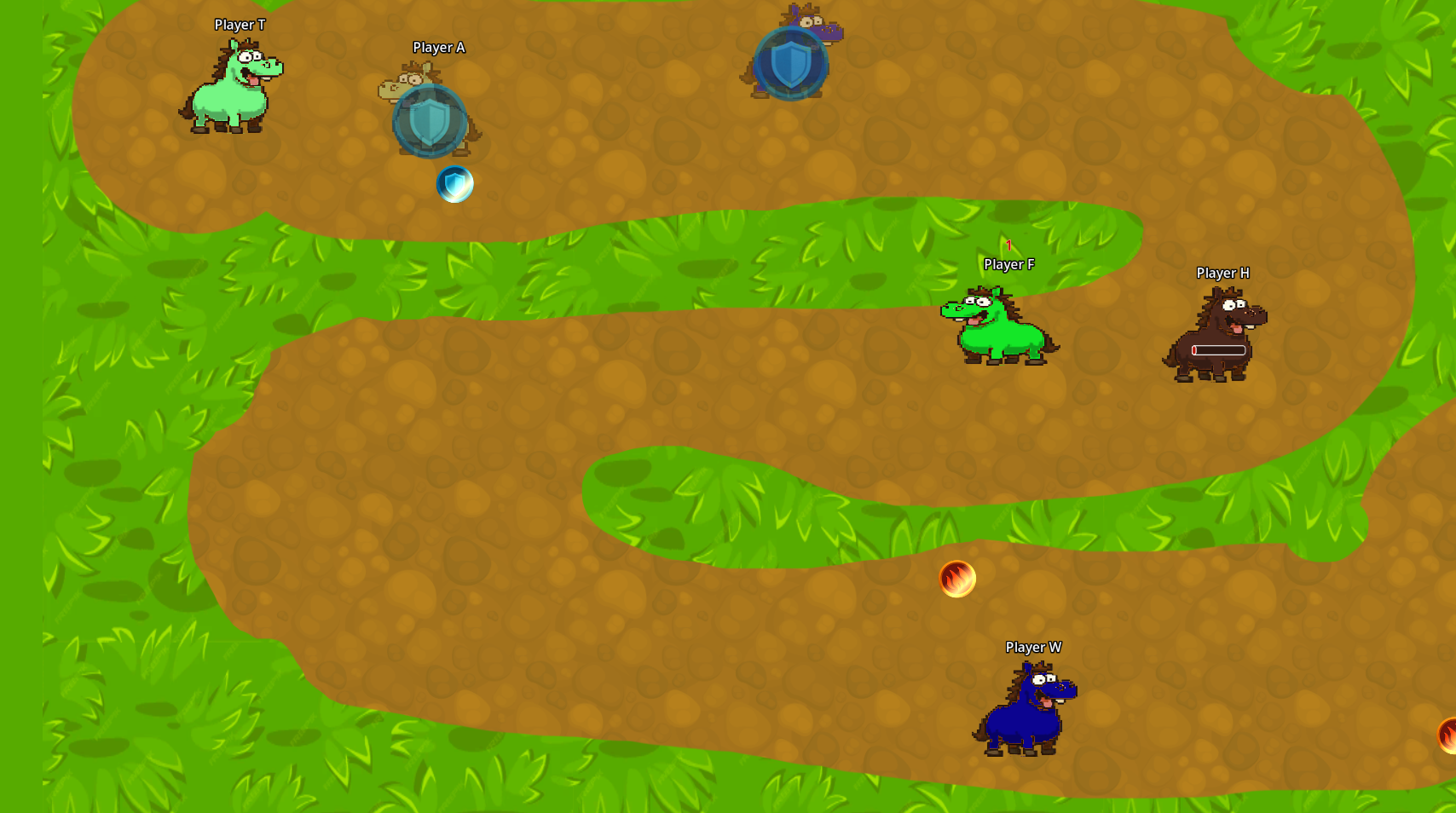
A few days ago, I saw a post on Reddit that inspired me to create a new local multiplayer game for me and my friends. After some late-night coding sessions, I’m excited to share Horse Race: a chaotic, fast-paced game perfect for game nights (or even solo play).

How it works:

Each horse is assigned to a specific button: the button you press to join the race. Your button is your key to controlling your horse throughout the race:

Attacking Opponents: to attack an opponent, simply press your button when you're in front of them.

Changing Direction: to adjust your horse's direction, press and release your button.

I’d love for you to try it out and share your thoughts. Any feedback or suggestions are more than welcome. Let me know what you’d like to see added or improved.

Play embedded here: https://stesproject.itch.io/horse-race

Have fun!
363


I'm going to try posting here interesting Godot dev updates I find on Mastodon. I am in no way associated with this game.

364
365
366
367
Here from reddit (programming.dev)


Hey y'all, I'm here from reddit after getting falsely permanent banned and I'm wondering if the community is good?

368


Some objects sticks with each other when those use CharacterBody2D, and moves like those are sticking together.

So, what do I need to do to solve this issue?

369


Hi, folks! So, I have the problem with making materials as unique.

Image

I need effects, such as painting of ships in red color, will applies only where particles will spawns. But... As you can see those effects can applies also into other ships.

I've already set these materials as "Local to Scene" into inspector tab.

And have create script for making those materials as unique:

func _make_ship_materials_unique() -> void:
	for i in ship.get_children():
		if i is MeshInstance3D:
			for n in range(i.get_surface_override_material_count()):
				i.mesh.surface_set_material(n, i.mesh.surface_get_material(n).duplicate(true))

But it given me few results 😕

If it can help, here's the script of applying of ships painting:

func damaged_spec_effect() -> void:
	for i in ship.get_children():
		if i is MeshInstance3D:
			for n in range(i.get_surface_override_material_count()):
				_create_fade_in_then_out_effect(i.mesh.surface_get_material(n), Color.RED)
func _create_fade_in_then_out_effect(material: Material, final_color: Color) -> void:
	if material is StandardMaterial3D:
		material.albedo_color = Color.WHITE
		var tween = get_tree().create_tween()
		tween.tween_property(material, "albedo_color", final_color, EFFECTS_DURATION / 2)
		tween.tween_property(material, "albedo_color", Color.WHITE, EFFECTS_DURATION / 2)

So, what do I need to do for solving my problem? 🤔

370


Hey everybody! Recently, we created a shader that simulated an analog clock using polar coordinates, and we'll stick with this type of display a little longer. This time, I'll demonstrate how to program a fully customizable spinner based on similar principles. So, let's start coding!

371


I'm new to Godot and game dev and I've decided to make my first project (having already finished some tutorials) to implement the Diplomacy board game in Godot.

Creating the logic of the game will be the easier part for me as I've been a professional systems programmer (C++/Python) for several years now.

What I'm struggling with right now is how to create the map and the tiles that represent that game board (online example: https://imgur.com/bfnEMup). Since I will want the game to react to a click anywhere in a particular region, I assume I need to have some Area2D that matches the region's shape. The problem is that it's irregularly shaped and I don't know what the best way to accomplish my goal would be.

The options I've thought of so far:

  1. Import the entire map. Then in Godot, create the areas to approximate the regions.
  2. Import the map into some graphics program. Split the map into a sprite for each region. Somehow save the offsets. And import the regions into Godot, each as its own asset. I assume generating a shape from an imported asset is pretty easy.

Any advice or recommendations?

372


Hi everybody! I hope the previous episodes have piqued your interest and that you're motivated to learn more tricks for rendering a 3D scene in 2D shaders. As you may have noticed, so far we've been able to change the camera's position, but not the direction it's facing, meaning it was fixed straight ahead, which has been somewhat limiting. In this video, we'll solve this problem, so that by the end, we'll be able to aim the camera anywhere or even set it up as an orbiting camera. So, let’s do it.

373


How is it? I'm eager to hear any and all feedback.

If any of you are on macOS, I could use your help testing out the add-macos branch. What's currently there is just me guessing at what might work.

374
375


Hi everybody! And welcome back to our miniseries dedicated to rendering 3D scenes in shaders using the ray marching method. In the third episode, we will bring the previously static scene to life – adding combinations of objects, rotations along different axes and pivots, multiple lighting sources, and morphing using the so-called smooth minimum.

view more: ‹ prev next ›